<?xml version="1.0" encoding="utf-8"?><feed xmlns="http://www.w3.org/2005/Atom" xml:lang="ko-KR"><generator uri="https://jekyllrb.com/" version="4.4.1">Jekyll</generator><link href="https://dev.junho85.pe.kr/feed.xml" rel="self" type="application/atom+xml" /><link href="https://dev.junho85.pe.kr/" rel="alternate" type="text/html" hreflang="ko-KR" /><updated>2026-11-02T01:23:31+09:00</updated><id>https://dev.junho85.pe.kr/feed.xml</id><title type="html">기술노트</title><subtitle>개발자 김준호가 직접 만들고 측정해 본 기록. AI 모델 실험, 개발 도구, 홈서버, 아두이노와 라즈베리파이.</subtitle><author><name>김준호</name><email>junho85@gmail.com</email></author><entry><title type="html">얼굴이 안 나오는 모임 후기 영상 만들기 - 검출기가 놓친 얼굴은 화면 위 끝에 있었다</title><link href="https://dev.junho85.pe.kr/2026/11/01/mogakco-bbq-video-no-faces.html" rel="alternate" type="text/html" title="얼굴이 안 나오는 모임 후기 영상 만들기 - 검출기가 놓친 얼굴은 화면 위 끝에 있었다" /><published>2026-11-01T00:00:00+09:00</published><updated>2026-11-01T00:00:00+09:00</updated><id>https://dev.junho85.pe.kr/2026/11/01/mogakco-bbq-video-no-faces</id><content type="html" xml:base="https://dev.junho85.pe.kr/2026/11/01/mogakco-bbq-video-no-faces.html"><![CDATA[<p>10월 31일 모각코 모임이 끝나고 다 같이 바베큐를 먹으러 갔습니다. 그날 찍은 영상과 사진 59개로 2분 16초짜리 후기 영상을 만들었습니다. 조건은 하나였습니다. <strong>같이 간 사람들 얼굴이 나오면 안 됩니다.</strong></p>

<div style="position:relative;padding-bottom:56.25%;height:0;overflow:hidden;max-width:720px;border-radius:8px;margin:1.2rem 0;">
  <iframe src="https://www.youtube.com/embed/2gO0yJ3ljV4" title="모각코 바베큐 모임 🔥 고기 굽고, 우쿨렐레 듣고, 불멍하며 마시멜로까지" loading="lazy" allowfullscreen="" style="position:absolute;top:0;left:0;width:100%;height:100%;border:0;" allow="accelerometer; autoplay; clipboard-write; encrypted-media; gyroscope; picture-in-picture"></iframe>
</div>

<p><em>완성본. 37컷, 2분 16초, 4K 30fps. 모임 이야기는 <a href="https://life.junho85.pe.kr/2026/11/01/mogakco-bbq-meetup.html">생활노트 후기</a>에 따로 썼습니다.</em></p>

<p>편집은 Claude Code에 맡겼습니다. 제가 만든 편집 파이프라인(avedit)은 컷 목록을 <code class="language-plaintext highlighter-rouge">edl.json</code>이라는 텍스트로 만들고 Remotion으로 렌더합니다. 저는 결과를 보고 「쫀득이가 더 잘 보이는 장면으로 바꿔 주세요」처럼 말로 고쳤습니다.</p>

<p>얼굴 검출기를 돌려서 사람이 나오는 컷을 걸러 냈는데, <strong>검출기를 통과한 완성본에 얼굴이 여섯 군데 남아 있었습니다.</strong> 전부 완성본을 눈으로 훑어서 찾았고, 그중 하나는 네 번의 렌더 검사를 통과했습니다. 놓친 얼굴은 대부분 화면 위 끝에 턱이나 입만 걸린 모양이었습니다.</p>

<h2 id="tldr">이것만 기억하면 됩니다</h2>

<ol>
  <li><strong>얼굴을 가리지 말고 얼굴이 없는 구간을 고른다.</strong> 사람이 들어오는 클립은 얼굴이 없는 몇 초만 잘라 쓰고, 위 끝에 걸리면 화면 위쪽을 잘라 낸다</li>
  <li><strong>얼굴 검출은 후보를 좁히는 데만 쓴다.</strong> 불꽃, 마시멜로, 펩시 로고는 얼굴로 잡고, 화면 위 끝에 반만 걸린 얼굴은 놓친다</li>
  <li><strong>완성본을 0.5초 간격으로 전부 훑고, 위 끝 띠는 따로 크게 본다.</strong> 작은 시트에서는 턱이 흰 셔츠처럼 보였다</li>
  <li><strong>BGM 정보는 측정한 것과 AI가 들은 것을 나눠 적는다.</strong> Gemini 두 모델이 같은 곡의 장르와 보컬 유무부터 다르게 들었다</li>
  <li><strong>수정하는 동안은 1080p로 렌더하고 4K는 마지막에 한 번만</strong> 한다</li>
</ol>

<h2 id="parts">준비물</h2>

<table>
  <thead>
    <tr>
      <th>준비물</th>
      <th>내용</th>
    </tr>
  </thead>
  <tbody>
    <tr>
      <td>소재</td>
      <td>iPhone 17 Pro Max로 찍은 영상과 사진, 메신저로 받은 사진. 59개 1.8GB</td>
    </tr>
    <tr>
      <td>편집</td>
      <td>avedit. Python으로 EDL(컷 목록)을 만들고 Remotion으로 렌더한다</td>
    </tr>
    <tr>
      <td>사람과 얼굴 검출</td>
      <td>YOLOX-s(사람), YuNet(얼굴). 둘 다 OpenCV DNN으로 돌렸다</td>
    </tr>
    <tr>
      <td>BGM</td>
      <td>Pixabay 무료 음원 9곡 중 <a href="https://pixabay.com/music/funk-heavy-funk-groove-586249/">Heavy Funk Groove</a>(ElectroAnimals)</td>
    </tr>
    <tr>
      <td>음악 측정</td>
      <td>librosa, ffmpeg <code class="language-plaintext highlighter-rouge">volumedetect</code></td>
    </tr>
    <tr>
      <td>음악 청취</td>
      <td>Gemini <code class="language-plaintext highlighter-rouge">gemini-3.8-flash</code>, <code class="language-plaintext highlighter-rouge">gemini-3.7-flash</code></td>
    </tr>
    <tr>
      <td>작업</td>
      <td>Claude Code. 소재 정리, 컷 선정, 검사, 렌더를 맡겼다</td>
    </tr>
  </tbody>
</table>

<h2 id="bgm">1단계. BGM 고르기 - 측정한 것과 AI가 들은 것을 나눴다</h2>

<p>Pixabay에서 받은 무료 음원 9곡을 저장소의 <code class="language-plaintext highlighter-rouge">bgm/</code> 폴더에 모으고, 곡마다 출처와 성격을 문서로 남겼습니다. 정보의 근거가 세 가지라 섞지 않고 적었습니다.</p>

<table>
  <thead>
    <tr>
      <th>근거</th>
      <th>무엇</th>
      <th>믿어도 되는 정도</th>
    </tr>
  </thead>
  <tbody>
    <tr>
      <td>측정</td>
      <td>길이, 음량, 템포, 조용한 구간(librosa, ffmpeg)</td>
      <td>사실. 단 BPM은 2배나 절반으로 잡힐 수 있다</td>
    </tr>
    <tr>
      <td>Pixabay</td>
      <td>곡 페이지의 장르, 무드, 태그, Content ID 표시</td>
      <td>업로더가 붙인 꼬리표</td>
    </tr>
    <tr>
      <td>AI 청취</td>
      <td>Gemini 두 모델이 곡을 듣고 쓴 설명</td>
      <td><strong>두 모델이 일치한 것만</strong> 적었다</td>
    </tr>
  </tbody>
</table>

<p>AI 청취를 나눈 이유는 두 모델이 생각보다 많이 갈렸기 때문입니다. 한 곡은 한 모델이 삼바, 다른 모델이 만화풍 행진곡으로 들었고 Pixabay 표기는 레게였습니다. 보컬 유무도 곡마다 엇갈렸습니다. 그래서 일치하지 않은 항목은 ❓로 남기고 「직접 들어 보고 확정할 것」 목록으로 따로 모았습니다.</p>

<p><strong>Content ID</strong>도 같이 확인했습니다. Pixabay 음원도 곡 페이지에 Content ID 등록 표시가 있는 곡은 유튜브에 올리면 저작권 클레임이 걸립니다. 9곡 중 2곡이 등록곡이었습니다. 라이선스 위반은 아니지만 클레임 없이 올리려면 피해야 합니다.</p>

<p>고른 곡은 Heavy Funk Groove입니다. 업로더 태그에 Barbecue, Grill, Fire가 붙어 있을 만큼 바베큐 영상에 딱 맞았고, 4비트가 뚜렷해서 컷을 박자에 맞추기 좋았습니다. 템포는 librosa 기본 추정이 112.3 BPM으로 나왔는데, 박 추적 결과를 직선으로 피팅하니 <strong>110.0 BPM</strong>(잔차 최대 18ms)이었습니다. 컷을 박자에 맞추려면 이 정도 차이도 중요합니다. 2분이면 5박 가까이 어긋납니다.</p>

<h2 id="footage">2단계. 소재를 시간순으로 놓기</h2>

<p>소재마다 촬영 시각의 근거가 달랐습니다.</p>

<table>
  <thead>
    <tr>
      <th>소재</th>
      <th>시각 근거</th>
    </tr>
  </thead>
  <tbody>
    <tr>
      <td>아이폰 영상(MOV)</td>
      <td><code class="language-plaintext highlighter-rouge">CreateDate</code>. <strong>UTC</strong>라서 코드로 9시간을 더했다</td>
    </tr>
    <tr>
      <td>아이폰 사진(HEIC)</td>
      <td><code class="language-plaintext highlighter-rouge">DateTimeOriginal</code>. +09:00이 붙어 있다</td>
    </tr>
    <tr>
      <td>메신저로 받은 사진</td>
      <td>시각 정보가 없다. 사진 내용을 보고 놓았다</td>
    </tr>
  </tbody>
</table>

<p>파일 번호가 <code class="language-plaintext highlighter-rouge">IMG_9999</code> 다음에 <code class="language-plaintext highlighter-rouge">IMG_0001</code>로 넘어가서 이름순 정렬도 믿을 수 없었습니다. 라이브포토(HEIC와 MOV 한 쌍)는 영상 쪽이 흔들려서 사진만 썼습니다.</p>

<p>원본 소리는 전부 껐습니다. 대화가 섞여 있었기 때문입니다. 쓸 구간만 발췌하면서 <code class="language-plaintext highlighter-rouge">-an -map_metadata -1</code>을 붙여 소리와 메타데이터를 같이 지웠습니다. 아이폰 원본에는 촬영 위치(GPS)가 들어 있습니다.</p>

<h2 id="faces">3단계. 얼굴이 안 나오게 고르기</h2>

<h3 id="detect">검출기로 후보를 좁힌다</h3>

<p>전체 소재에 YOLOX-s(사람)와 YuNet(얼굴)을 돌려 「큰 사람이나 얼굴이 없는 구간」을 후보로 뽑았습니다. 하지만 이 결과를 그대로 믿을 수는 없었습니다.</p>

<ul>
  <li><strong>오탐이 많다.</strong> 불꽃, 노릇하게 구운 마시멜로, 펩시 캔의 로고를 얼굴로 잡았습니다</li>
  <li><strong>옆얼굴을 놓친다.</strong> 얼굴 검출기는 정면에 가까운 얼굴에 맞춰져 있습니다</li>
  <li><strong>화면 끝에 잘린 얼굴을 놓친다.</strong> 이게 가장 문제였습니다(아래)</li>
</ul>

<p>그래서 검출은 후보를 좁히는 데만 쓰고, 실제로 쓸 구간은 원본에서 0.5초 간격으로 프레임을 뽑아 눈으로 봤습니다. 사람이 들어오는 클립은 얼굴이 없는 몇 초만 잘라 썼습니다. 예를 들어 고기를 굽는 한 클립은 앞뒤로 머리가 걸려서 1.6초부터 4.9초까지만 썼습니다.</p>

<h3 id="missed">완성본에 얼굴 여섯 군데가 남았다</h3>

<p>첫 렌더를 0.5초 간격으로 훑어보니 얼굴이 다섯 군데 남아 있었습니다.</p>

<ul>
  <li>가게 외관 사진에서 건물 앞에 선 사람. 옆 사람은 미리 지웠는데 이 사람은 놓쳤다</li>
  <li>쟁반을 들고 나가는 장면의 화면 위 끝에 걸린 입</li>
  <li>우쿨렐레 연주 장면 두 컷의 위 끝에 걸린 입과 코</li>
  <li>소시지 장면의 위 끝에 걸린 턱</li>
</ul>

<p>전부 <strong>화면 가장자리에 얼굴이 반쯤 잘려 걸린</strong> 모양이었습니다. 얼굴 검출기는 눈, 코, 입이 다 있는 얼굴을 찾도록 학습되어 있어서, 눈이 화면 밖에 있고 턱만 남으면 얼굴로 보지 않습니다.</p>

<p>고친 방법은 세 가지였습니다.</p>

<ol>
  <li><strong>그 컷을 뺀다.</strong> 쟁반 장면과 우쿨렐레 두 컷은 뺐습니다</li>
  <li><strong>화면 위쪽을 잘라 낸다.</strong> 소시지 장면은 위 15%를 잘라 냈습니다. 16:9 비율이 유지되도록 좌우도 7.5%씩 같이 잘라 내고 4K로 다시 키웠습니다</li>
  <li><strong>사진은 흐리게 지운다.</strong> 외관 사진은 첫 장면에 쓸 만한 다른 사진이 없어서 두 사람의 머리를 흐리게 지웠습니다</li>
</ol>

<p>사진을 흐리게 지울 때 처음에는 사각형으로 지웠는데, 밤 풍경 위에 네모난 얼룩이 떠서 오히려 눈에 띄었습니다. <strong>타원 모양에 가장자리를 부드럽게 섞는</strong> 방식으로 바꾸니 자연스러워졌습니다.</p>

<p><img src="/assets/images/2026-11-01-mogakco-bbq-title-blur.jpg" alt="해 질 녘 가게 외관 사진 위에 영상 제목이 올라간 첫 장면" w="1600" h="900" />
<em>첫 장면. 건물 앞에 선 두 사람의 머리를 타원으로 흐리게 지웠다</em></p>

<h3 id="fifth">다섯 번째 렌더에서 하나 더</h3>

<p>그 뒤로 자막을 고치며 네 번 더 렌더했고, 그때마다 0.5초 간격 시트를 다시 훑었습니다. 그런데 다섯 번째 렌더에서 <strong>남겨 둔 우쿨렐레 장면의 위 끝에 또 입과 턱이 걸려 있는</strong> 것을 찾았습니다. 앞의 네 번은 전부 통과한 장면이었습니다.</p>

<p>원인은 시트 크기였습니다. 4K 프레임을 960px 폭으로 줄인 시트에서는 위 끝에 걸린 턱이 흰 셔츠처럼 보였습니다. 그래서 이 장면도 위 25%를 잘라 내고, 검사 방법도 바꿨습니다.</p>

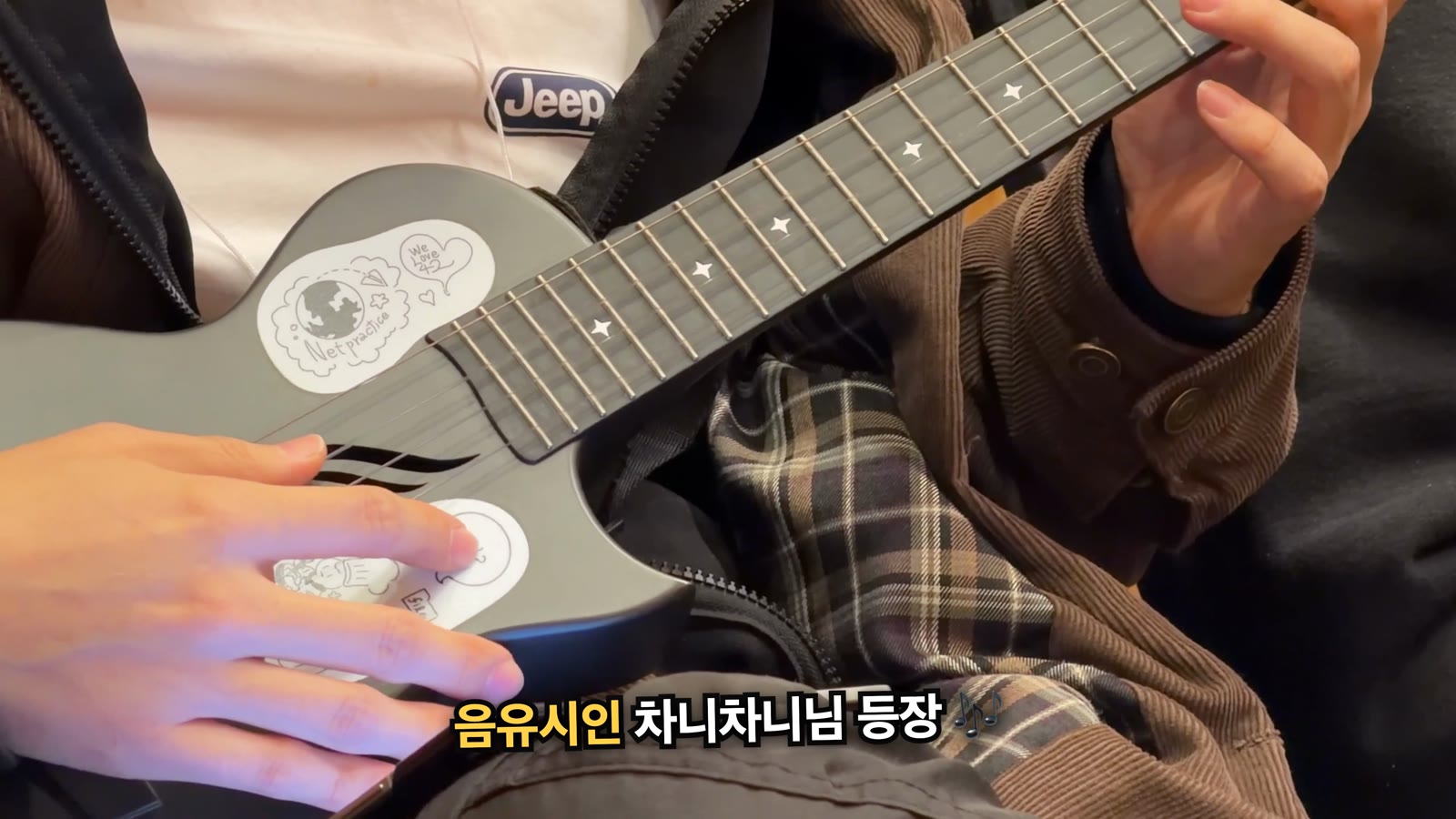
<p><img src="/assets/images/2026-11-01-mogakco-bbq-ukulele-crop.jpg" alt="우쿨렐레를 치는 손과 몸통만 보이는 장면. 위쪽을 잘라 내 얼굴이 없다" w="1600" h="900" />
<em>위 25%를 잘라 낸 우쿨렐레 장면. 원본은 화면 위 끝에 연주자의 입과 턱이 계속 걸려 있었다</em></p>

<ul>
  <li>완성본 전체를 0.5초 간격으로 훑는다 (전과 같다)</li>
  <li><strong>화면 위 25% 띠만 1초마다 1280px 폭으로 따로 뽑아서 본다</strong> (새로 추가)</li>
</ul>

<p>이번에 놓친 얼굴 여섯 군데 중 다섯 군데가 화면 위 끝이었습니다. 음식을 내려다보며 찍으면 맞은편 사람이 화면 위 끝에 걸리기 쉬운 것으로 보입니다.</p>

<h2 id="beat">4단계. 컷을 박자에 맞추기</h2>

<p>컷 경계는 BGM의 마디에 맞췄습니다. 110 BPM에서 한 박은 0.5455초인데, 30fps로 바꾸면 <strong>16.36프레임</strong>이라 프레임 경계와 맞지 않습니다. 컷 시작과 길이를 각각 반올림하면 군데군데 1프레임씩 빈 화면이 생깁니다. 그래서 마디의 시작 시각을 먼저 프레임 번호로 바꾸고, 컷 길이는 프레임 번호의 차이로 정했습니다.</p>

<div class="language-python highlighter-rouge"><div class="highlight"><pre class="highlight"><code><table class="rouge-table"><tbody><tr><td class="rouge-gutter gl"><pre class="lineno">1
2
3
4
5
6
7
8
</pre></td><td class="rouge-code"><pre><span class="n">FPS</span> <span class="o">=</span> <span class="mi">30</span>
<span class="n">BEAT</span> <span class="o">=</span> <span class="mf">0.5454738</span>          <span class="c1"># 110.0 BPM
</span><span class="n">BAR</span> <span class="o">=</span> <span class="mi">4</span> <span class="o">*</span> <span class="n">BEAT</span>
<span class="n">D0</span> <span class="o">=</span> <span class="mf">0.0609</span>               <span class="c1"># 첫 다운비트(초)
</span>
<span class="k">def</span> <span class="nf">bar_f</span><span class="p">(</span><span class="n">k</span><span class="p">):</span>
    <span class="sh">"""</span><span class="s">마디 k의 시작 프레임(정수).</span><span class="sh">"""</span>
    <span class="k">return</span> <span class="nf">round</span><span class="p">((</span><span class="n">D0</span> <span class="o">+</span> <span class="n">BAR</span> <span class="o">*</span> <span class="n">k</span><span class="p">)</span> <span class="o">*</span> <span class="n">FPS</span><span class="p">)</span>
</pre></td></tr></tbody></table></code></pre></div></div>

<p>빌드가 끝나면 모든 컷이 앞 컷이 끝난 프레임에서 시작하는지 검사하고, 어긋나면 빌드를 멈춥니다. 조용한 도입부 0~5마디에는 사진과 제목을, 곡이 잠깐 가라앉는 46~50마디에는 마시멜로를 천천히 굽는 장면을 놓았습니다.</p>

<h2 id="captions">5단계. 자막은 들은 사실만 쓴다</h2>

<p>나레이션 없이 예능 스타일 자막과 음악만 썼습니다. 처음 자막은 화면만 보고 짐작한 부분이 많았고, 이름을 모르는 것은 비워 두었습니다. 사용자(저)가 하나씩 바로잡고 채웠습니다.</p>

<table>
  <thead>
    <tr>
      <th>처음 자막</th>
      <th>문제</th>
      <th>고친 자막</th>
    </tr>
  </thead>
  <tbody>
    <tr>
      <td>(이름을 몰라 간식 이름을 쓰지 않았다)</td>
      <td>화면만으로는 무엇인지 알 수 없었다</td>
      <td>추억의 쫀득이</td>
    </tr>
    <tr>
      <td>마시멜로 교수님 등판</td>
      <td>화면은 촬영자 시점이라 촬영자가 교수님처럼 읽힌다. 교수님은 촬영자 왼쪽에 앉아 있었다</td>
      <td>교수님의 가르침을 받고 마시멜로 굽기 실력 레벨업!</td>
    </tr>
    <tr>
      <td>옆집이 불멍 카페</td>
      <td>두 곳은 한 가게였다</td>
      <td>1차 끝! 2차는 불멍 카페로</td>
    </tr>
    <tr>
      <td>조명 켜고 분위기 ON</td>
      <td>테이블 위 물건은 스피커였다</td>
      <td>조명 켜고 뮤직 ON</td>
    </tr>
    <tr>
      <td>고기 담당 우니님</td>
      <td>사용자가 원한 표현이 따로 있었다</td>
      <td>바베큐 전문가 우니님</td>
    </tr>
  </tbody>
</table>

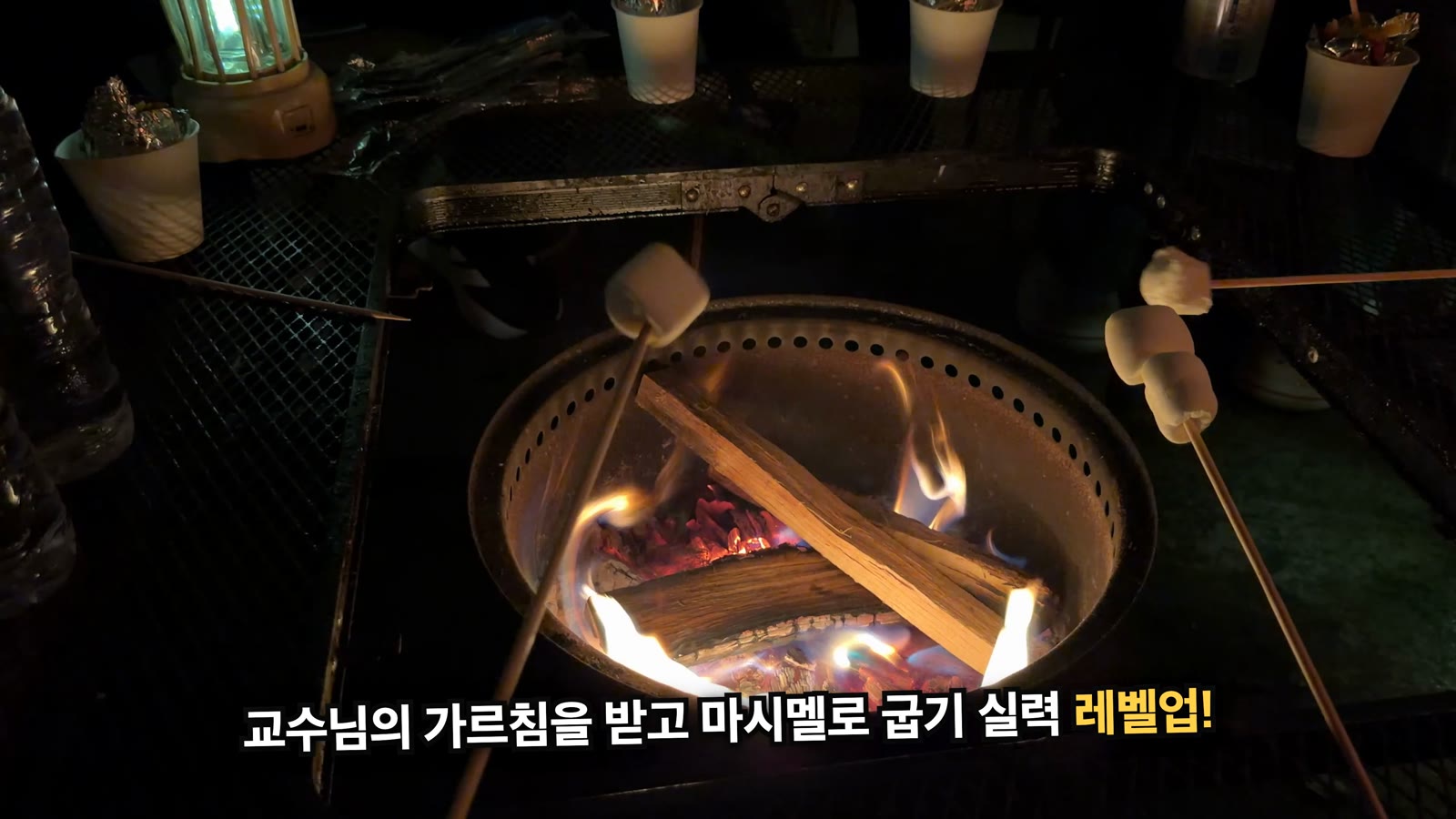
<p><img src="/assets/images/2026-11-01-mogakco-bbq-caption-fix.jpg" alt="화로 둘레에서 마시멜로를 굽는 장면에 고친 자막이 올라간 모습" w="1600" h="900" />
<em>고친 자막. 「등판」은 화면 속 손의 주인이 교수님이라는 뜻으로 읽혔다</em></p>

<p>장면 순서도 고쳤습니다. 「불멍 cafe MOONLIGHT」 간판 영상은 1차 바베큐 중간에 찍혔는데, 시간순으로 놓으니 2차를 시작하기도 전에 「2차는 불멍 카페」 자막이 나왔습니다. 이 간판을 1차와 2차 사이로 옮겨 장면이 바뀌는 신호로 썼습니다. 고기 종류처럼 화면만으로 확인할 수 없는 것은 자막에 쓰지 않았습니다.</p>

<h2 id="render">6단계. 렌더는 1080p로 고치고 4K는 한 번만</h2>

<p>이번에는 처음부터 4K로 렌더했습니다. 4K 렌더는 영상 발췌와 별도로 한 번에 약 5분 30초가 걸리는데, 자막을 고칠 때마다 렌더하다 보니 4K를 <strong>8번</strong> 돌렸습니다. 고치는 동안에는 1080p로 확인하고 마무리할 때만 4K로 한 번 렌더하는 것이 맞습니다. 다음 작업부터는 그렇게 하기로 했습니다.</p>

<p>4K는 Remotion 컴포지션을 1920×1080으로 둔 채 <code class="language-plaintext highlighter-rouge">--scale=2</code>로 렌더합니다. 자막과 카드가 CSS 픽셀 기준이라 1080p 판과 배치가 똑같고, 영상 소재만 3840×2160으로 준비하면 됩니다. 최종본은 790MB였습니다.</p>

<p>렌더가 끝날 때마다 아래를 검사했습니다.</p>

<ul>
  <li>어두운 프레임 전수 검사. 마지막 페이드아웃 10프레임 말고는 없어야 한다</li>
  <li>같은 화면이 이어지는 정지 구간 검사</li>
  <li>음량. 평균 −16.1dB, 최대 −4.9dB</li>
  <li>0.5초 간격 시트와 위 25% 띠 (3단계)</li>
</ul>

<h2 id="troubleshooting">잘 안 될 때</h2>

<h3 id="face-miss">검출기를 통과했는데 얼굴이 보인다</h3>

<p>화면 가장자리, 특히 위 끝을 보세요. 반쯤 잘린 얼굴은 검출기가 놓칩니다. 위 끝 띠를 따로 크게 뽑아서 보고, 걸리면 그 컷을 빼거나 위쪽을 잘라 냅니다.</p>

<h3 id="blur">사각형 블러가 오히려 눈에 띈다</h3>

<p>타원 마스크를 만들고 가장자리를 흐리게 해서 흐린 이미지와 섞으세요. 어두운 배경에서는 사각형의 모서리가 금방 드러납니다.</p>

<h3 id="freeze">컷 끝에서 화면이 멈춘다</h3>

<p>발췌본(프록시)의 길이가 컷보다 짧을 때 생겼습니다. 프록시 파일 이름에 시작 시각만 넣어서, 컷 길이를 늘려도 예전에 만든 짧은 파일을 그대로 다시 썼습니다. 지금은 빌드할 때 <code class="language-plaintext highlighter-rouge">ffprobe</code>로 기존 프록시의 길이를 다시 측정하고, 짧으면 새로 만듭니다.</p>

<h3 id="first-frame">첫 컷 앞에 검은 프레임이 생긴다</h3>

<p>첫 다운비트가 0.061초라서 첫 마디의 시작 프레임이 0이 아니라 2가 됩니다. 첫 컷은 다운비트와 상관없이 0프레임에서 시작하게 했습니다.</p>

<h3 id="black-frame">컷마다 1프레임씩 검은 화면이 생긴다</h3>

<p>박 길이가 프레임의 정수배가 아니면 생깁니다. 컷 경계를 프레임 번호로 먼저 바꾸고 길이는 그 차이로 정하세요(4단계).</p>

<h3 id="ai-listen">AI가 들은 곡 설명이 서로 다르다</h3>

<p>모델을 바꿔 두 번 듣게 하고, 일치한 것만 믿으세요. 장르와 보컬 유무는 결국 직접 들어 봐야 합니다. 구간 시각도 측정값과 몇 초에서 십수 초씩 어긋나서, 구성은 librosa로 RMS를 측정해 잡았습니다.</p>

<h2 id="references">참고 자료</h2>

<ul>
  <li><a href="https://life.junho85.pe.kr/2026/11/01/mogakco-bbq-meetup.html">모각코 바베큐 모임 후기 (생활노트)</a></li>
  <li><a href="https://pixabay.com/music/funk-heavy-funk-groove-586249/">Heavy Funk Groove - ElectroAnimals (Pixabay)</a></li>
  <li><a href="https://pixabay.com/service/license-summary/">Pixabay Content License</a></li>
  <li><a href="https://github.com/opencv/opencv_zoo/tree/main/models/face_detection_yunet">YuNet 얼굴 검출 모델 (OpenCV Zoo)</a></li>
  <li><a href="https://github.com/Megvii-BaseDetection/YOLOX">YOLOX</a></li>
  <li><a href="https://www.remotion.dev/">Remotion</a></li>
  <li><a href="/2026/10/27/gukmin-chejo-3x-video-making.html">국민체조 따라하기 영상 직접 만들기</a> - 같은 방식으로 Claude Code에 영상을 맡긴 이전 글</li>
</ul>]]></content><author><name>김준호</name><email>junho85@gmail.com</email></author><category term="Claude Code" /><category term="Remotion" /><category term="영상 편집" /><category term="얼굴 검출" /><category term="YuNet" /><category term="YOLOX" /><category term="BGM" /><category term="비트 싱크" /><summary type="html"><![CDATA[10월 31일 모각코 모임이 끝나고 다 같이 바베큐를 먹으러 갔습니다. 그날 찍은 영상과 사진 59개로 2분 16초짜리 후기 영상을 만들었습니다. 조건은 하나였습니다. 같이 간 사람들 얼굴이 나오면 안 됩니다.]]></summary><media:thumbnail xmlns:media="http://search.yahoo.com/mrss/" url="https://dev.junho85.pe.kr/assets/images/2026-11-01-mogakco-bbq-thumbnail.jpg" /><media:content medium="image" url="https://dev.junho85.pe.kr/assets/images/2026-11-01-mogakco-bbq-thumbnail.jpg" xmlns:media="http://search.yahoo.com/mrss/" /></entry><entry><title type="html">국민체조 따라하기 영상 직접 만들기 - 참고 영상의 자세를 3D 캐릭터로 옮기기</title><link href="https://dev.junho85.pe.kr/2026/10/27/gukmin-chejo-3x-video-making.html" rel="alternate" type="text/html" title="국민체조 따라하기 영상 직접 만들기 - 참고 영상의 자세를 3D 캐릭터로 옮기기" /><published>2026-10-27T00:00:00+09:00</published><updated>2026-10-27T00:00:00+09:00</updated><id>https://dev.junho85.pe.kr/2026/10/27/gukmin-chejo-3x-video-making</id><content type="html" xml:base="https://dev.junho85.pe.kr/2026/10/27/gukmin-chejo-3x-video-making.html"><![CDATA[<p>밤에 자기 전에 유튜브에서 국민체조 영상을 틀어 놓고 세 번 연속으로 따라 하는 편입니다. 그 영상을 <strong>직접 만든 영상으로 바꿨습니다.</strong> 3D 캐릭터 세 사람이 운동장, 잔디밭, 해변에서 한 회씩 체조를 하고, 화면 오른쪽에는 지금 하는 동작의 이름과 설명, 다음 동작이 나옵니다. 길이는 14분 44.6초이고 4K 60fps입니다.</p>

<div style="position:relative;padding-bottom:56.25%;height:0;overflow:hidden;max-width:720px;border-radius:8px;margin:1.2rem 0;">
  <iframe src="https://www.youtube.com/embed/lokzQ_UGkvU" title="국민체조 연속 3회 따라하기" loading="lazy" allowfullscreen="" style="position:absolute;top:0;left:0;width:100%;height:100%;border:0;" allow="accelerometer; autoplay; clipboard-write; encrypted-media; gyroscope; picture-in-picture"></iframe>
</div>

<p><em>완성본. 1회는 학교 운동장, 2회는 잔디밭(손과 발의 자취), 3회는 해변(뼈대 모습)에서 합니다.</em></p>

<p>캐릭터 동작은 키프레임을 손으로 하나하나 찍어 만들지 않았습니다. <strong>참고 영상에서 사람의 관절 위치를 뽑아 캐릭터에 옮기고</strong>, 데이터가 틀린 곳만 구령에 맞춰 직접 짰습니다. 코드는 Claude Code가 쓰고, 저는 확인 페이지에서 동작을 보며 「뜀뛰기 할 때 무릎이 쫙 펴질 정도로 차야 한다」처럼 말로 지적했습니다.</p>

<blockquote class="prompt-info">
  <p>영상은 HyperFrames(HTML을 영상으로 렌더하는 도구)로 만들고, 3D는 Three.js로 그렸습니다. 음악과 참고 영상은 다른 사람의 저작물이라 저장소에 넣지 않았습니다.</p>
</blockquote>

<h2 id="tldr">이것만 기억하면 됩니다</h2>

<ol>
  <li><strong>음원은 측정해서 고른다.</strong> 가지고 있던 WMA는 유튜브 음원보다 대역폭이 넓었지만 <strong>1.78% 빨랐다.</strong> 음정까지 같이 올라가 있어서 리샘플로 되돌렸다</li>
  <li><strong>참고 영상의 자세 데이터는 「방향」만 쓴다.</strong> 사람마다 체형이 달라서, 좌표를 그대로 쓰면 장면이 바뀔 때마다 캐릭터 비율이 달라진다</li>
  <li><strong>데이터가 틀린 동작은 구령에 맞춰 직접 짠다.</strong> 손이 바닥에 닿는 순간, 다리를 드는 박, 팔을 엇거는 모양은 정면 카메라 한 대로 뽑은 데이터로는 끝내 맞지 않았다</li>
  <li><strong>참고 영상과 나란히 보는 확인 페이지를 먼저 만든다.</strong> 렌더 한 번에 15~30분이 걸려서, 렌더된 영상을 보고 고치면 하루에 몇 번 못 고친다</li>
  <li><strong>「됐다」는 숫자로 확인한다.</strong> 무릎 각도, 손 높이, 관절 가속도(동작이 튀는 정도)를 측정한 뒤에 렌더했다</li>
</ol>

<h2 id="parts">준비물</h2>

<table>
  <thead>
    <tr>
      <th>준비물</th>
      <th>내용</th>
    </tr>
  </thead>
  <tbody>
    <tr>
      <td>참고 영상</td>
      <td>평소 따라 하던 유튜브 영상(대한체육회 국민체조 교육용 영상을 3회 이어 붙인 것) 720p</td>
    </tr>
    <tr>
      <td>음원</td>
      <td>예전에 받아 둔 「국민체조 고음질」 WMA(192kbps, 44.1kHz)</td>
    </tr>
    <tr>
      <td>자세 추정</td>
      <td>2D는 ultralytics <code class="language-plaintext highlighter-rouge">yolo11m-pose</code>, 3D는 MediaPipe Pose Landmarker heavy</td>
    </tr>
    <tr>
      <td>3D 그리기</td>
      <td>Three.js 0.181.2. 캐릭터는 원통과 구를 이어 붙여 만들었다</td>
    </tr>
    <tr>
      <td>영상 렌더</td>
      <td>HyperFrames 0.8.181. HTML 화면을 프레임마다 찍어 MP4로 만든다</td>
    </tr>
    <tr>
      <td>음성 처리</td>
      <td>librosa, scipy, ffmpeg 8.1.2</td>
    </tr>
    <tr>
      <td>작업</td>
      <td>Claude Code. 코드 작성, 측정, 렌더를 맡겼다</td>
    </tr>
  </tbody>
</table>

<h2 id="audio">1단계. 음원 고르기 - 고음질 WMA가 1.78% 빨랐다</h2>

<p>후보는 오래전에 받아 둔 WMA와 유튜브 영상의 음원, 두 가지였습니다. 귀로 듣기 전에 측정부터 했습니다.</p>

<table>
  <thead>
    <tr>
      <th>지표</th>
      <th>WMA</th>
      <th>유튜브(opus)</th>
    </tr>
  </thead>
  <tbody>
    <tr>
      <td>음악 대역폭</td>
      <td>약 17kHz까지</td>
      <td>15.6kHz에서 잘림</td>
    </tr>
    <tr>
      <td>비트레이트</td>
      <td>192kbps</td>
      <td>138kbps</td>
    </tr>
    <tr>
      <td>섞인 소리</td>
      <td>없음</td>
      <td>자막이 뜰 때 나는 효과음(회차마다 77초, 161초)</td>
    </tr>
    <tr>
      <td>음정(튜닝 추정)</td>
      <td>+0.29반음</td>
      <td>−0.056반음</td>
    </tr>
  </tbody>
</table>

<p>WMA 쪽이 깨끗했지만 <strong>음정이 0.3반음 높았습니다.</strong> 두 음원의 크로마(음높이 분포)를 DTW로 맞춰 보니 WMA가 약 1.019배 빠르게 재생되고 있었습니다. 음정 0.3반음을 속도로 바꾸면 정확히 1.0178배입니다. 테이프를 빨리 돌린 것처럼 템포와 음정이 함께 올라가 있었던 겁니다. 유튜브 쪽은 표준음(A440)과 4센트 안쪽으로 맞아서 이쪽을 원래 속도로 봤습니다.</p>

<p>WMA를 5089/5000배로 리샘플해서 속도와 음정을 함께 되돌렸습니다. 고친 뒤 두 음원의 튜닝 차이는 1.2센트로 줄었고, 길이는 293.24초에서 298.46초로 늘었습니다.</p>

<h2 id="timeline">2단계. 동작 구간과 박자 맞추기</h2>

<p>국민체조 1회는 22구간입니다. 숨쉬기부터 뜀뛰기까지 열 가지 동작을 두 번 하고, 이어서 팔다리운동과 숨고르기를 합니다. 구간 경계는 참고 영상 왼쪽 아래의 초록 자막(「#10 뜀뛰기」 같은 것)이 바뀌는 시각으로 정했습니다. 영상을 초당 5프레임으로 훑어서 찾았고, 66구간이 나와 22구간 × 3회와 정확히 맞았습니다.</p>

<p>처음에는 음악에 섞인 구령(「하나, 둘…」)을 whisper로 통째로 받아써서 박을 잡으려 했습니다. 목소리를 분리(demucs)한 뒤에도 「한글자막 by …」 같은 환각만 나왔습니다. 게다가 이 녹음은 동작마다 템포가 70~84bpm으로 바뀌고 뜀뛰기는 약 115bpm이라, 곡 전체의 박자를 한 번에 정할 수도 없었습니다.</p>

<p>그래서 순서를 바꿨습니다. 분리한 목소리에서 소리가 시작되는 순간(온셋)을 찾아 동작마다 구령 16박의 자리를 먼저 잡고, <strong>구령 소리를 하나씩</strong> 잘라 받아써서 어느 박이 「하나」인지만 확인했습니다. 짧게 자르니 whisper도 「하나」는 잘 알아들었습니다.</p>

<h2 id="pose">3단계. 참고 영상에서 자세 뽑기</h2>

<p>참고 영상 1회분에서 맨 앞 사람의 관절을 뽑았습니다. 먼저 YOLO 2D 자세 추정으로 사람을 찾고(26,916프레임), 그 주변을 잘라 MediaPipe로 3D 관절 33개를 뽑았습니다(8,400프레임, 검출률 99.7%).</p>

<p>그런데 데이터를 그대로 쓸 수 없는 곳이 많았습니다.</p>

<ul>
  <li><strong>장면마다 사람이 바뀐다.</strong> 참고 영상은 독무와 단체 장면이 약 6초마다 바뀝니다. 체형이 다르니 <strong>뼈의 방향만</strong> 옮기고 캐릭터의 뼈 길이는 고정했습니다(키 약 1.72m)</li>
  <li><strong>좌우가 뒤집힌 프레임이 6.3%</strong> 있었습니다. 사람을 뒷모습으로 착각한 경우입니다. 바로잡는 방법을 두 가지 시험했는데 오히려 동작이 더 튀어서 쓰지 않았습니다</li>
  <li><strong>1~10번 동작은 한 회에 두 번</strong> 나옵니다. 두 구간의 시간을 맞춰 놓고, 한쪽 품질이 나쁜 곳은 다른 쪽에서 가져왔습니다</li>
  <li><strong>거의 펴진 무릎은 아주 민감합니다.</strong> 엉덩이에서 발목까지 거리가 다리 길이의 99%만 돼도 무릎이 약 16도 굽어 보입니다. 서 있는 동작의 무릎 굽힘 중앙값이 14~29도였는데, 거의 펴진 다리를 끝까지 펴 주자 1.6도가 됐습니다</li>
</ul>

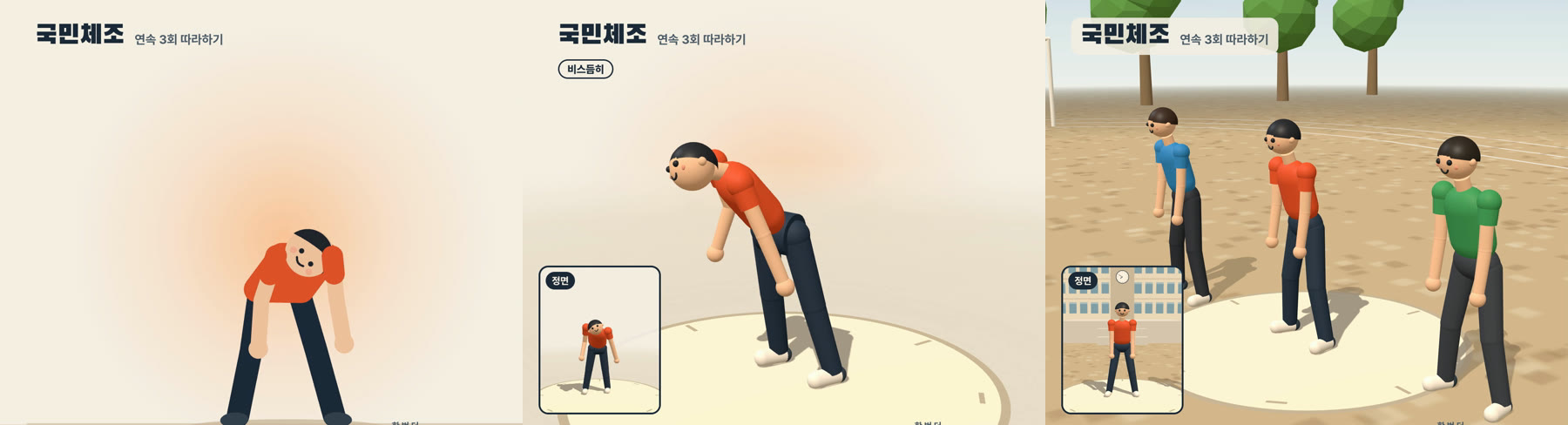
<p><img src="/assets/images/2026-10-27-gukmin-chejo-evolution.jpg" alt="첫 판 2D, 3D로 바꾼 판, 최종본의 등배운동 같은 순간" />
<em>같은 음악 시점(등배운동)의 첫 판(2D), 3D로 바꾼 판, 최종본. 첫 판은 정면 2D 좌표만 써서 숙이면 머리가 뒤집혔다</em></p>
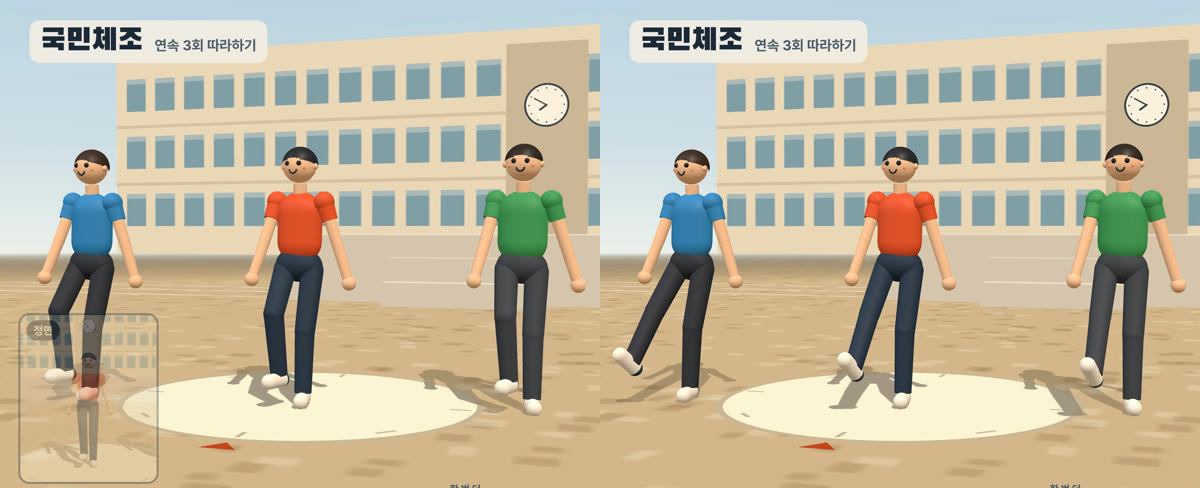
<p>첫 판은 2D 캐릭터였습니다. 정면 좌표만 쓰니 허리를 숙이면 머리가 180도 돌아가고, 앞으로 뻗은 팔이 짧아 보였습니다. 다음 판에서 3D로 바꾸면서 동작마다 카메라 각도를 바꿀 수 있게 됐고, 카메라가 정면이 아닐 때는 정면 모습을 왼쪽 아래 작은 화면에 띄웠습니다.</p>

<h2 id="viewer">4단계. 확인 페이지를 먼저 만든다</h2>

<p>영상 렌더는 FHD도 15분, 4K는 32분 걸립니다. 렌더된 영상을 보고 고치면 하루에 몇 번 못 고칩니다. 그래서 <strong>브라우저 확인 페이지</strong>를 먼저 만들었습니다.</p>

<ul>
  <li>캐릭터와 참고 영상을 <strong>같은 음악 시점으로</strong> 나란히 재생한다</li>
  <li>동작 구간 반복, 0.25~1배속, 한 프레임씩 넘기기, 카메라 각도 바꾸기</li>
  <li>보던 시각에 메모를 남기면 파일에 쌓인다(Claude Code가 다음 작업 때 읽는다)</li>
  <li>관절 가속도 그래프. 동작이 튀는 순간이 봉우리로 보인다</li>
</ul>

<p>영상과 확인 페이지는 <strong>같은 자세 계산 모듈</strong>을 씁니다. 확인 페이지에서 맞으면 영상에서도 맞습니다.</p>

<h2 id="procedural">5단계. 데이터가 틀린 동작은 구령에 맞춰 직접 짠다</h2>

<p>확인 페이지를 보며 지적한 것은 대부분 데이터의 작은 오차가 눈에 띈 경우였습니다. 정면 카메라 한 대로 뽑은 3D는 앞뒤 깊이가 흔들립니다. 그래서 아래 동작들은 데이터를 버리고 1977년 국민체조 해설과 구령에 맞춰 직접 짰습니다.</p>

<table>
  <thead>
    <tr>
      <th>지적</th>
      <th>데이터에서 측정한 것</th>
      <th>바꾼 것</th>
    </tr>
  </thead>
  <tbody>
    <tr>
      <td>등배운동 손이 바닥을 뚫거나 안 닿는다</td>
      <td>숙일 때마다 몸통 각도가 99~148도로 들쭉날쭉. 손 높이 −11.7~+19.8cm</td>
      <td>「하나」에 손바닥이 바닥에 닿고(몸통 125도) 「둘」까지 천천히 선다</td>
    </tr>
    <tr>
      <td>팔다리운동 「둘」에 두 팔이 겹친다</td>
      <td>엇걸 때 두 아래팔 사이 0.4~4cm(팔 굵기 7.5cm)</td>
      <td>팔은 1977 도해대로. 홀수 박에 옆으로 곧게, 짝수 박에 오른팔이 앞으로 엇건다</td>
    </tr>
    <tr>
      <td>팔다리운동 다리는 「다섯」에 들고 「여섯」에 내려야 한다</td>
      <td>다리를 0.3~0.5박 일찍 들고 빨리 내림</td>
      <td>「다섯」에 가장 높이(발목 40cm), 「여섯」에 바닥</td>
    </tr>
    <tr>
      <td>뜀뛰기 차기가 차다가 만다</td>
      <td>차는 순간 무릎이 47~67도 굽음</td>
      <td>다리를 곧게 펴서(무릎 6도) 앞으로 42도까지 차고 0.3박 머문다</td>
    </tr>
    <tr>
      <td>가슴운동 젖히기가 빠르다</td>
      <td>참고 영상은 「하나」보다 한 박 앞서 0.55박 만에 다 젖힘</td>
      <td>1977 도해대로 「하나, 둘」 동안 젖히고 「셋, 넷」 동안 내린다</td>
    </tr>
  </tbody>
</table>

<p><img src="/assets/images/2026-10-27-gukmin-chejo-kick.jpg" alt="뜀뛰기 앞차기 전후" />
<em>뜀뛰기 「여섯」. 왼쪽은 고치기 전(무릎이 굽은 채 찬다), 오른쪽은 최종본(다리를 곧게 펴서 찬다)</em></p>
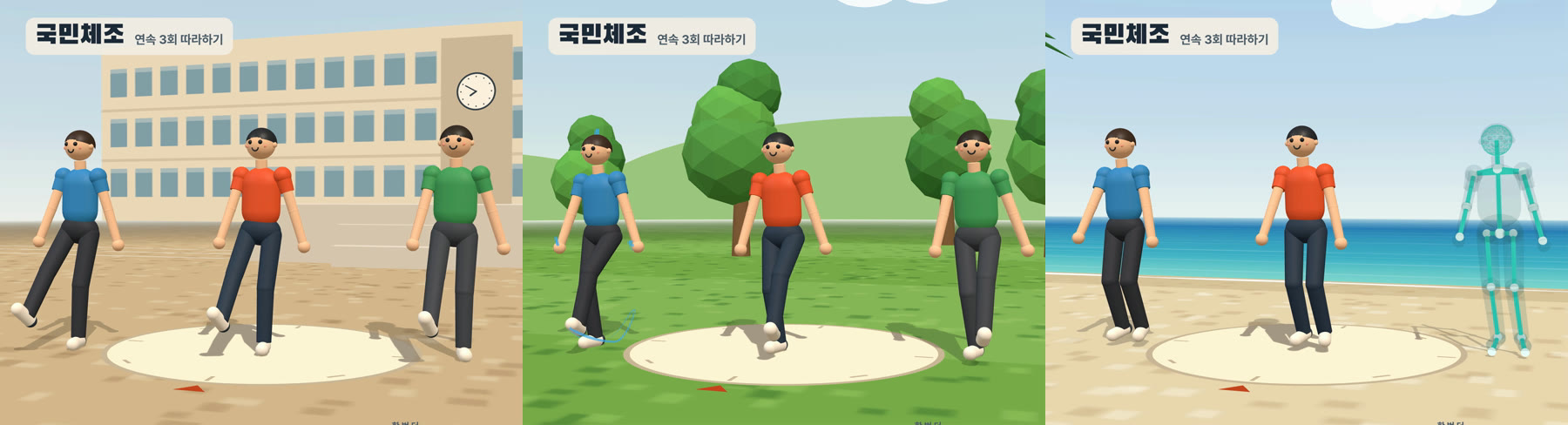
<p>고칠 때마다 숫자로 확인했습니다. 「무릎이 펴졌다」는 무릎 각도로, 「손이 바닥에 닿는다」는 손 아랫면 높이로 측정했습니다. 한 동작을 고치면 다른 곳이 튀기 쉬워서, 동작마다 관절 가속도 최댓값을 고치기 전과 비교했습니다. 뜀뛰기 차기를 고쳤을 때는 이 값이 오히려 128에서 76으로 줄었습니다.</p>

<p>말로 지적하다 보면 동작 이름을 헷갈리기도 합니다. 「몸통운동」을 고쳐 달라고 했는데 알고 보니 「온몸운동」 이야기여서, 이미 고친 몸통운동을 되돌린 적이 있습니다. 확인 페이지 메모처럼 시각이 함께 남아 있으면 이런 혼동이 줄어듭니다.</p>

<h2 id="stages">6단계. 세 사람, 세 무대</h2>

<p>혼자보다 여럿이 함께 하는 느낌이 나도록, 처음부터 <strong>세 사람이</strong> 같이 걸어 들어옵니다. 회차마다 무대와 효과가 바뀝니다.</p>

<p><img src="/assets/images/2026-10-27-gukmin-chejo-stages.jpg" alt="운동장, 잔디밭, 해변" />
<em>1회 학교 운동장, 2회 잔디밭(손, 발, 정수리 자취), 3회 해변(오른쪽 사람이 뼈대 모습)</em></p>
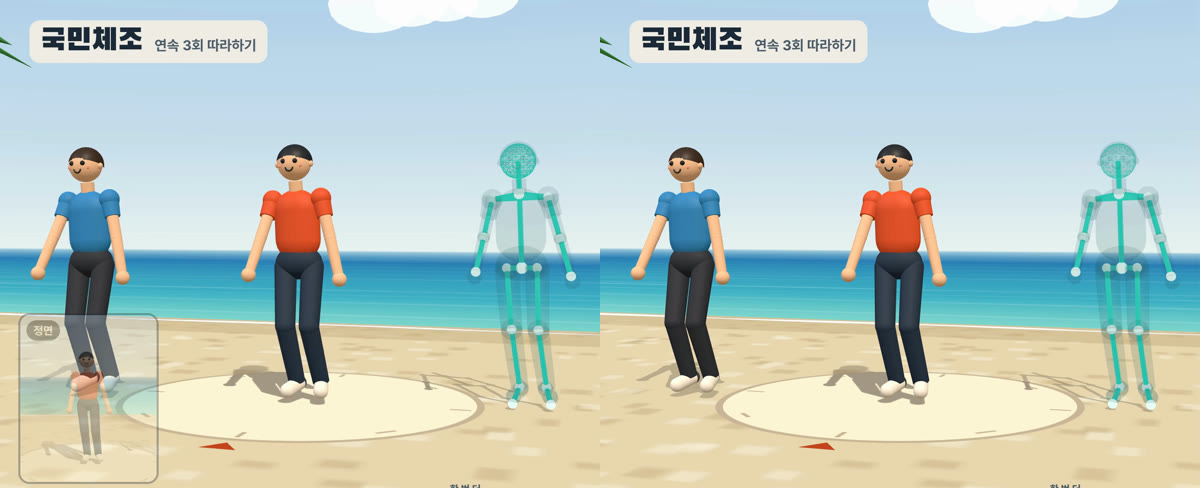
<ul>
  <li><strong>1회 학교 운동장</strong>: 흙 운동장, 트랙, 구령대, 3층 학교 건물, 게양대의 태극기가 있습니다. 태극기는 대한민국국기법 시행령 제6조의 비율(태극 지름, 4괘의 위치와 크기)대로 코드로 그렸습니다</li>
  <li><strong>2회 잔디밭</strong>: 왼쪽 사람의 손끝, 발끝, 정수리가 지나간 자리를 선으로 남깁니다. 처음에는 몸 전체의 잔상을 남겼는데 화면이 부담스러워서 선으로 줄였습니다</li>
  <li><strong>3회 해변</strong>: 오른쪽 사람이 뼈대 모습으로 바뀝니다. 관절이 어떻게 움직이는지 잘 보입니다</li>
</ul>

<p>옆 사람들은 주인공의 자세를 그대로 가져다 씁니다. 오른쪽 사람은 걸어 들어올 때 걸음을 좌우로 뒤집었는데, 체조하는 동안에도 뒤집힌 채라 혼자 반대로 움직인 적이 있습니다. 지금은 걸어 들어오는 동안만 뒤집습니다.</p>

<h2 id="render">7단계. 렌더</h2>

<p>HyperFrames로 렌더하면 음원이 AAC 192k로 들어갑니다. 이것을 24비트 마스터에서 다시 인코딩한 AAC 384k로 바꿨습니다.</p>

<div class="language-bash highlighter-rouge"><div class="highlight"><pre class="highlight"><code><table class="rouge-table"><tbody><tr><td class="rouge-gutter gl"><pre class="lineno">1
2
3
4
5
6
7
</pre></td><td class="rouge-code"><pre><span class="nb">cd </span>video
<span class="nv">HF_CAPTURE_PARALLEL_STREAM</span><span class="o">=</span><span class="nb">true </span>npx <span class="nt">--yes</span> hyperframes@0.8.181 render <span class="se">\</span>
  <span class="nt">--quality</span> delivery <span class="nt">--fps</span> 60 <span class="nt">--resolution</span> 4k <span class="nt">--output</span> renders/gukmin_chejo_3x_4k.mp4

ffmpeg <span class="nt">-i</span> renders/gukmin_chejo_3x_4k.mp4 <span class="nt">-i</span> ../audio/gukmin_chejo_3x_master_24bit.wav <span class="se">\</span>
  <span class="nt">-map</span> 0:v <span class="nt">-map</span> 1:a <span class="nt">-c</span>:v copy <span class="nt">-c</span>:a aac <span class="nt">-b</span>:a 384k <span class="nt">-movflags</span> +faststart <span class="nt">-shortest</span> <span class="se">\</span>
  renders/gukmin_chejo_3x_4k_final.mp4
</pre></td></tr></tbody></table></code></pre></div></div>

<table>
  <thead>
    <tr>
      <th>판</th>
      <th>해상도</th>
      <th>렌더 시간</th>
      <th>파일</th>
    </tr>
  </thead>
  <tbody>
    <tr>
      <td>수정 확인용</td>
      <td>1920x1080 60fps</td>
      <td>약 15분</td>
      <td>552MB</td>
    </tr>
    <tr>
      <td>최종본</td>
      <td>3840x2160 60fps, 53,076프레임</td>
      <td>32분</td>
      <td>1.24GB</td>
    </tr>
  </tbody>
</table>

<p>수정하는 동안에는 FHD로 렌더하고, 4K는 더 고칠 곳이 없을 때 한 번만 렌더했습니다.</p>

<h2 id="troubleshooting">잘 안 될 때</h2>

<h3 id="disk">4K 렌더에 디스크 440GB가 필요하다고 나온다</h3>

<p>HyperFrames는 기본 설정에서 프레임을 이미지 파일로 디스크에 저장한 뒤 합칩니다. 4K 60fps 15분 영상이면 약 440GB가 필요하다고 나왔습니다. <code class="language-plaintext highlighter-rouge">HF_CAPTURE_PARALLEL_STREAM=true</code>를 설정하면 프레임을 찍는 대로 바로 인코딩해서 디스크를 거의 쓰지 않습니다.</p>

<h3 id="pip">작은 화면이 반쯤 비친 채로 나온다</h3>

<p><img src="/assets/images/2026-10-27-gukmin-chejo-pip.jpg" alt="정면 작은 화면 전후" />
<em>3회차 뜀뛰기. 왼쪽은 고치기 전(작은 화면이 반쯤 비친다), 오른쪽은 최종본(정면에 가까운 각도라 띄우지 않는다)</em></p>
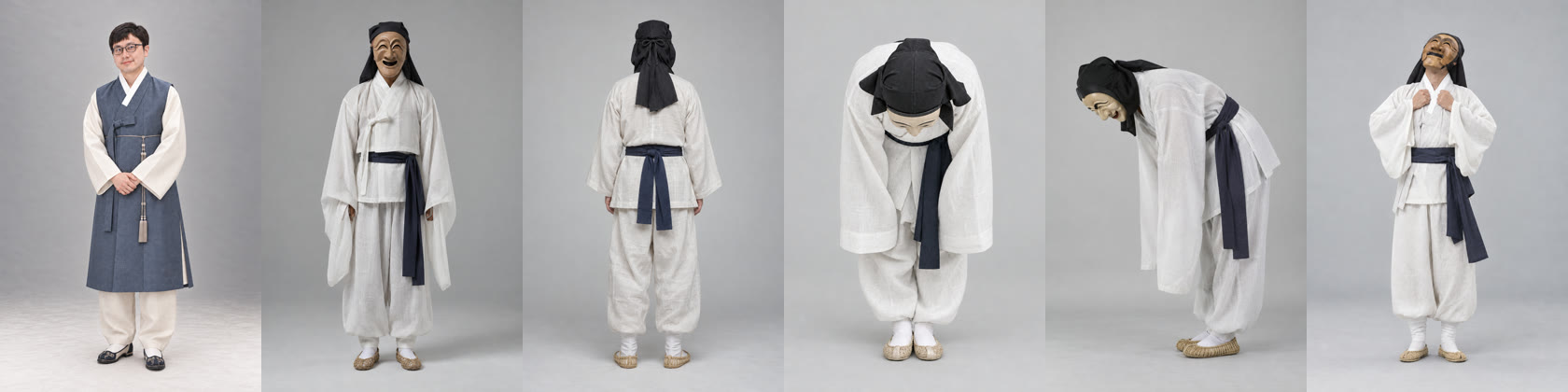
<p>「정면」 작은 화면은 큰 화면 카메라가 정면에서 벗어난 각도에 따라, 14도에서 26도 사이에서 서서히 나타나게 했습니다. 그런데 뜀뛰기 카메라 각도가 18도와 20도여서, 작은 화면이 불투명도 0.33과 0.5의 반투명 상태로 4초씩 머물렀습니다. 서서히 바뀌는 구간은 <strong>카메라가 멈춰 있는 각도와 겹치지 않게</strong> 둬야 합니다. 이 구간을 21~25도로 좁혀서, 뜀뛰기에서는 작은 화면이 아예 뜨지 않게 했습니다.</p>

<p>목운동에서도 비슷한 일이 있었습니다. 세 사람이 모두 화면에 들어오도록 카메라를 1.3배 뒤로 뺐는데, 작은 화면의 불투명도를 뒤로 뺀 뒤의 거리(2.4m → 3.12m)로 계산하고 있었습니다. 그래서 얼굴을 가까이 잡는 장면을 가까운 장면으로 알아보지 못했고, 작은 화면이 불투명도 0.13으로 흐리게만 비쳤습니다. 지금은 뒤로 빼기 전의 카메라 거리로 불투명도를 계산합니다.</p>

<h3 id="knee">다 펴진 다리가 떨린다</h3>

<p>다 펴진 다리(85cm)는 엉덩이와 발목 사이가 1mm만 바뀌어도 무릎이 3~5도씩 왔다 갔다 합니다. 다 펴지기 직전 4.3mm 구간을 부드럽게 줄여서, 무릎이 7도쯤 굽은 채로 머물게 했습니다. 뜀뛰기 차기도 다리 길이보다 1mm 짧게 뻗어서 무릎이 6도 굽은 채로 둡니다.</p>

<h3 id="same-module">확인 페이지와 영상의 자세가 서로 달라진다</h3>

<p>처음에는 영상(<code class="language-plaintext highlighter-rouge">index.html</code>)과 확인 페이지가 자세 계산 코드를 따로 가지고 있었습니다. 이렇게 두면 확인 페이지에서 고친 것을 영상 쪽에 다시 옮겨야 합니다. 공용 모듈 하나(<code class="language-plaintext highlighter-rouge">gukmin3d.js</code>)로 합쳐서, 확인 페이지에서 고치면 영상에도 그대로 반영되게 했습니다.</p>

<h3 id="beat">박이 반 박씩 어긋난다</h3>

<p>참고 영상의 자막 경계는 편집자가 손으로 넣은 시각이라 동작 첫 박과 ±0.5초쯤 어긋날 수 있습니다. 참고 영상 속 사람도 구령보다 일찍 움직이는 곳이 있습니다. 「하나에 90도, 둘에 180도」처럼 구령에 맞추려면 동작마다 데이터의 시간을 늘이고 줄여야 했습니다.</p>

<h2 id="copyright">음악 저작권</h2>

<p>음악 「국민체조」(작곡 김희조, 1977)는 KOMCA(한국음악저작권협회) 관리곡입니다. 유튜브는 이 녹음을 아세아레코드 음원으로 인식합니다(대한체육회 원본 영상의 음악 정보에 그렇게 나옵니다). 그래서 이 음악을 쓴 영상을 올리면 Content ID 소유권 주장이 걸릴 수 있습니다. 법률 판단이 아니라 제가 확인한 자료를 정리한 것입니다.</p>

<h2 id="references">참고 자료</h2>

<ul>
  <li><a href="https://youtu.be/lokzQ_UGkvU">완성본 - 국민체조 연속 3회 따라하기</a></li>
  <li><a href="https://www.youtube.com/watch?v=h66Ua2mYbRk">대한체육회 국민체조 교육용 영상</a></li>
  <li><a href="https://hyperframes.heygen.com/">HyperFrames</a></li>
  <li><a href="https://ai.google.dev/edge/mediapipe/solutions/vision/pose_landmarker">MediaPipe Pose Landmarker</a></li>
  <li><a href="https://threejs.org/">Three.js</a></li>
  <li><a href="https://www.law.go.kr/법령/대한민국국기법시행령">대한민국국기법 시행령</a></li>
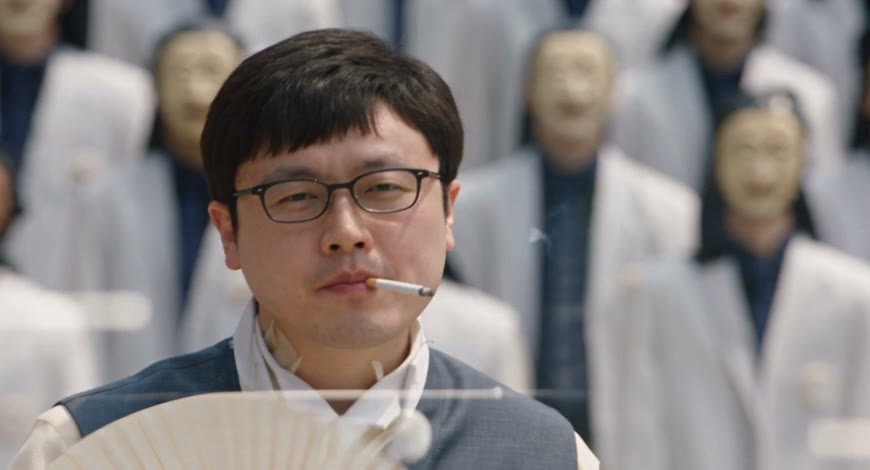
</ul>]]></content><author><name>김준호</name><email>junho85@gmail.com</email></author><category term="국민체조" /><category term="Claude Code" /><category term="HyperFrames" /><category term="Three.js" /><category term="MediaPipe" /><category term="포즈 추정" /><category term="영상 제작" /><summary type="html"><![CDATA[밤에 자기 전에 유튜브에서 국민체조 영상을 틀어 놓고 세 번 연속으로 따라 하는 편입니다. 그 영상을 직접 만든 영상으로 바꿨습니다. 3D 캐릭터 세 사람이 운동장, 잔디밭, 해변에서 한 회씩 체조를 하고, 화면 오른쪽에는 지금 하는 동작의 이름과 설명, 다음 동작이 나옵니다. 길이는 14분 44.6초이고 4K 60fps입니다.]]></summary><media:thumbnail xmlns:media="http://search.yahoo.com/mrss/" url="https://dev.junho85.pe.kr/assets/images/2026-10-27-gukmin-chejo-thumbnail.jpg" /><media:content medium="image" url="https://dev.junho85.pe.kr/assets/images/2026-10-27-gukmin-chejo-thumbnail.jpg" xmlns:media="http://search.yahoo.com/mrss/" /></entry><entry><title type="html">뮤직비디오 주인공을 나로 바꾸기 - Genjutsu로 하회탈 군무 영상 만들며 아홉 번 다시 돌린 기록</title><link href="https://dev.junho85.pe.kr/2026/10/09/genjutsu-storm-hahoe-banana.html" rel="alternate" type="text/html" title="뮤직비디오 주인공을 나로 바꾸기 - Genjutsu로 하회탈 군무 영상 만들며 아홉 번 다시 돌린 기록" /><published>2026-10-09T00:00:00+09:00</published><updated>2026-10-09T00:00:00+09:00</updated><id>https://dev.junho85.pe.kr/2026/10/09/genjutsu-storm-hahoe-banana</id><content type="html" xml:base="https://dev.junho85.pe.kr/2026/10/09/genjutsu-storm-hahoe-banana.html"><![CDATA[<p>뮤직비디오 한 장면(28초)의 주인공을 <strong>한복 입은 저</strong>로, 뒤에 선 학생 수백 명을 <strong>하회탈을 쓴 탈춤꾼</strong>으로 바꿨습니다. 원본은 GENER8ION과 Yung Lean의 「STORM」 뮤직비디오로, 주인공이 담배를 피우다 고개를 숙이면 교복 입은 군중이 일제히 절하고 하늘을 올려다보는 장면입니다. Higgsfield의 영상 변환 모델 <strong>Genjutsu motion-transfer</strong>를 API로 돌렸습니다.</p>

<div style="position:relative;padding-bottom:56.25%;height:0;overflow:hidden;max-width:720px;border-radius:8px;margin:1.2rem 0;">
  <iframe src="https://www.youtube.com/embed/2A2oTpTU4Ok" title="담배 대신 바나나 - 하회탈 군무 속 주인공" loading="lazy" allowfullscreen="" style="position:absolute;top:0;left:0;width:100%;height:100%;border:0;" allow="accelerometer; autoplay; clipboard-write; encrypted-media; gyroscope; picture-in-picture"></iframe>
</div>

<p><em>최종본(9회차). 담배는 바나나로, 교복 군중은 앞이 열린 흰 겉옷의 탈춤꾼으로 바뀌었습니다.</em></p>

<p>한 번에 되지는 않았습니다. 최종본까지 <strong>motion-transfer 9번, 원본 정리용 object-swap 2번</strong>을 돌렸습니다. 회차마다 하나가 고쳐지면 다른 하나가 틀어졌고, 그 과정에서 이 모델이 어떻게 움직이는지 감이 왔습니다. 한 줄로 줄이면 이렇습니다.</p>

<blockquote class="prompt-tip">
  <p><strong>원본에 있는 「모양」은 남고, 레퍼런스는 그 위에 색과 질감만 입힌다.</strong></p>
</blockquote>

<p>원본과 모양이 부딪히는 걸 요구하면 매번 원본이 이겼습니다. 거꾸로 레퍼런스를 원본 모양에 맞춰 주니 풀렸습니다. 이 글은 회차별로 무엇을 넣었고 무엇이 틀어졌는지, 그리고 무엇이 실제로 도움이 됐는지를 정리한 기록입니다.</p>

<blockquote class="prompt-info">
  <p>2026-10 기준, Apple M5 Max 맥북에서 API로 실행했습니다. 모든 판단은 회차당 <strong>한 번 돌린 결과</strong>입니다. Genjutsu는 seed를 지정할 수 없어서 같은 설정으로 다시 돌려도 결과가 달라집니다.</p>
</blockquote>

<h2 id="tldr">이것만 기억하면 됩니다</h2>

<ol>
  <li><strong>군중 옷은 원본 옷 모양에 맞춘다.</strong> 원본이 앞이 열린 블레이저면 레퍼런스도 앞이 열린 옷이어야 한다. 여민 한복에 허리띠를 그리면 흰 블레이저로 돌아간다</li>
  <li><strong>소품은 원본 동작과 어울리는 것으로 고른다.</strong> 담배 자리에 가는 막대(빼빼로)를 넣으면 모양은 맞아도 담배처럼 물고 내뿜는다. 「베어 물고 씹는」 바나나가 동작을 바꿔 놓았다</li>
  <li><strong>원본부터 확인한다.</strong> 첫 0.3초에 YouTube 앱 화면이 찍혀 있었고, 주인공 목에는 문신이 있었다. 둘 다 결과물에 흔적을 남겼다</li>
  <li><strong>금지어를 나열하지 않는다.</strong> 「NO smoke」 대신 「입 앞에 뒤의 탈춤꾼들이 또렷하게 보인다」처럼 보여야 할 것을 쓴다</li>
  <li><strong>첫 1초는 한 프레임씩 본다.</strong> 1초 간격으로 보면 첫 5프레임의 담배를 놓친다</li>
</ol>

<h2 id="parts">준비물</h2>

<table>
  <thead>
    <tr>
      <th>준비물</th>
      <th>내용</th>
    </tr>
  </thead>
  <tbody>
    <tr>
      <td>Higgsfield API 키와 크레딧</td>
      <td><a href="https://open.higgsfield.ai/explore">open.higgsfield.ai</a>에서 발급. 잔액 조회 API는 없다</td>
    </tr>
    <tr>
      <td>원본 영상</td>
      <td>28초, 2340×1080. 휴대폰 화면 녹화본이었다</td>
    </tr>
    <tr>
      <td>주인공 사진</td>
      <td>한복 입은 제 전신 사진 1장 (<code class="language-plaintext highlighter-rouge">june.png</code>)</td>
    </tr>
    <tr>
      <td>탈춤꾼 레퍼런스</td>
      <td>Codex CLI의 이미지 생성으로 자세별 5장을 만들었다</td>
    </tr>
    <tr>
      <td>스크립트</td>
      <td>업로드, 제출, 상태 확인, 다운로드를 묶은 파이썬 스크립트 (<code class="language-plaintext highlighter-rouge">higgsfield-client</code> 0.2.0)</td>
    </tr>
  </tbody>
</table>

<p><strong>비용(1회 기준):</strong> motion-transfer 480p는 입력 영상 1초당 $0.318이고, 28초 영상 한 번에 <strong>$8.90</strong>입니다. 모델 페이지에 50% 할인이 표시되어 있어 실제로는 그 절반일 수 있습니다. 원본 정리에 쓴 object-swap 720p는 1초당 $0.681로, 한 번에 <strong>$19~20</strong>입니다. 생성에는 회당 8~14분 걸렸습니다.</p>

<p>API 호출 자체는 단순합니다. 영상과 레퍼런스 이미지를 업로드하고, URL을 넣어 제출한 뒤 끝날 때까지 상태를 확인합니다.</p>

<div class="language-json highlighter-rouge"><div class="highlight"><pre class="highlight"><code><table class="rouge-table"><tbody><tr><td class="rouge-gutter gl"><pre class="lineno">1
2
3
4
5
6
</pre></td><td class="rouge-code"><pre><span class="p">{</span><span class="w">
  </span><span class="nl">"video_url"</span><span class="p">:</span><span class="w"> </span><span class="s2">"https://.../original-clean-trim.mp4"</span><span class="p">,</span><span class="w">
  </span><span class="nl">"image_urls"</span><span class="p">:</span><span class="w"> </span><span class="p">[</span><span class="s2">"주인공.png"</span><span class="p">,</span><span class="w"> </span><span class="s2">"탈춤꾼_정면.png"</span><span class="p">,</span><span class="w"> </span><span class="s2">"...최대 8장"</span><span class="p">],</span><span class="w">
  </span><span class="nl">"prompt"</span><span class="p">:</span><span class="w"> </span><span class="s2">"Use the uploaded reference video as the exact motion ..."</span><span class="p">,</span><span class="w">
  </span><span class="nl">"resolution"</span><span class="p">:</span><span class="w"> </span><span class="s2">"480p"</span><span class="w">
</span><span class="p">}</span><span class="w">
</span></pre></td></tr></tbody></table></code></pre></div></div>

<p>프롬프트에서는 업로드 순서대로 <code class="language-plaintext highlighter-rouge">@Image 1</code>, <code class="language-plaintext highlighter-rouge">@Image 2</code>처럼 이미지를 가리킵니다.</p>

<h2 id="first-refs">처음 쓴 레퍼런스</h2>

<p><img src="/assets/images/2026-10-09-genjutsu-refs-hahoe-a.jpg" alt="주인공 사진 1장과 탈춤꾼 자세별 레퍼런스 5장" />
<em>왼쪽부터 주인공(<code class="language-plaintext highlighter-rouge">@Image 1</code>), 탈춤꾼 정면, 뒤, 카메라 쪽 인사, 옆 인사, 하늘 보기. 탈춤꾼은 고름으로 여민 흰 저고리에 남색 허리띠를 맸다. 이 옷이 나중에 문제가 된다</em></p>

<p>탈춤꾼 이미지는 원본 장면에 나오는 동작(정면으로 서기, 돌아서기, 절하기, 하늘 보기)에 맞춰 자세별로 만들었습니다. 앞서 같은 영상의 군중을 라이언으로 바꿨을 때 절하는 장면에서 몸통에 얼굴이 그려졌는데, 그때는 자세별 레퍼런스만으로는 안 됐고 <strong>라이언에게 원본 교복을 입힌 레퍼런스</strong>로 풀었습니다. 이번에는 그 교훈을 옷이 아니라 자세에만 적용한 셈이었고, 이게 뒤에서 발목을 잡습니다.</p>

<p>프롬프트는 역할별 문단으로 나눴습니다. 뼈대는 끝까지 같습니다.</p>

<div class="language-text highlighter-rouge"><div class="highlight"><pre class="highlight"><code><table class="rouge-table"><tbody><tr><td class="rouge-gutter gl"><pre class="lineno">1
2
3
4
5
6
7
8
</pre></td><td class="rouge-code"><pre>REFERENCE IMAGES (in upload order):
@Image 1: the main character, a real Korean man ... navy-gray hanbok vest ...
@Image 2: the surrounding dancer: a Korean mask dancer wearing a pale wooden Hahoe Yangban mask ...
...
MAIN CHARACTER:      주인공 한 명만 @Image 1로 바꾼다
PROP REPLACEMENT:    손에 든 것을 무엇으로 바꿀지
SURROUNDING CHARACTERS: 군중 전원을 탈춤꾼으로, 동작별로 어느 이미지를 따를지
ACTION / CAMERA / TEMPORAL CONSISTENCY: 원본 동작과 카메라를 그대로
</pre></td></tr></tbody></table></code></pre></div></div>

<h2 id="runs">회차별 기록</h2>

<h3 id="run1">1회차. 담배 대신 부채</h3>

<ul>
  <li><strong>이미지:</strong> 주인공 1장 + 탈춤꾼 5장</li>
  <li><strong>프롬프트:</strong> 담배를 합죽선(접부채)으로 바꾼다</li>
</ul>

<p><img src="/assets/images/2026-10-09-genjutsu-v1-first-frame.jpg" alt="1회차 첫 프레임. 주인공이 담배를 물고 있고 부채가 아래에 있다" />
<em>0.0초. 부채는 올라오는 중이고 입에는 아직 담배가 있다. 0.2초부터 부채로 바뀐다</em></p>

<p>얼굴과 한복은 사진과 똑같이 나왔고, 군중도 전원 하회탈을 썼습니다. 문제는 두 가지였습니다.</p>

<ul>
  <li><strong>첫 5프레임(0.0~0.2초)에 담배가 남았다.</strong> 1초 간격으로 훑어봐서 저는 놓쳤고, 재생해 본 뒤에야 알았습니다</li>
  <li><strong>군중 옷이 한복이 아니라 흰 블레이저로 나왔다.</strong> 원본 교복 재킷의 깃과 엠블럼 자리는 그대로이고, 레퍼런스의 흰색과 남색만 입혀졌습니다</li>
</ul>

<h3 id="run2">2회차. 초코바 + 궁궐 배경</h3>

<ul>
  <li><strong>이미지:</strong> 1회차 6장 + 궁궐 배경 2장(근정전풍 정전, 박석과 단청)</li>
  <li><strong>프롬프트:</strong> 소품을 초코바로, 「첫 프레임부터 초코바를 물고 있다」 명시, 배경을 궁궐로</li>
</ul>

<p><img src="/assets/images/2026-10-09-genjutsu-v2-cigarette-neck.jpg" alt="2회차. 왼쪽은 첫 프레임의 담배, 오른쪽은 목 앞의 솟은 자국" />
<em>왼쪽 0.0초, 오른쪽 2.0초. 목 앞쪽에 솟은 자국은 원본 인물의 목 문신 자리와 겹친다</em></p>
<ul>
  <li><strong>「첫 프레임부터」라고 써도 첫 0.5초는 담배였다.</strong> 앞 0.6초를 잘라내 봤지만, 잘라낸 영상에서도 초코바 옆에 흰 담배가 함께 들려 있었습니다</li>
  <li><strong>목에 문신 모양대로 요철이 생겼다.</strong> 색은 빠지고 윤곽만 피부 위에 남은 모양입니다</li>
  <li><strong>궁궐은 색만 바뀌었다.</strong> 벽돌 건물이 붉은 벽과 단청 무늬로 바뀌었지만, 아치 문과 창문 배치는 원본 그대로였습니다</li>
</ul>

<p>춘식이로 바꿀 때는 담배가 고구마로 깔끔하게 바뀌었는데 이번에는 왜 안 되는지가 궁금했습니다. 제 추정은 이렇습니다. 춘식이는 사람과 생김새가 전혀 달라서 모델이 손과 몸을 처음부터 다시 그립니다. 사람을 사람으로 바꾸면 얼굴 교체에 가까워져서 <strong>손가락 사이의 담배나 목 문신 윤곽 같은 원본 세부가 그대로 남습니다.</strong></p>

<h3 id="run3">3회차. 담배와 같은 모양의 빼빼로</h3>

<ul>
  <li><strong>이미지:</strong> 주인공 1장 + 탈춤꾼 5장 + 궁궐 1장 + 빼빼로를 손가락에 끼운 손 1장</li>
  <li><strong>프롬프트:</strong> 소품을 빼빼로로, 「담배, 연기 없음」 한 줄</li>
</ul>

<p>원본 모양을 이길 수 없다면 원본 모양에 맞추자는 생각으로, 담배와 같은 가는 막대인 빼빼로를 골랐습니다.</p>

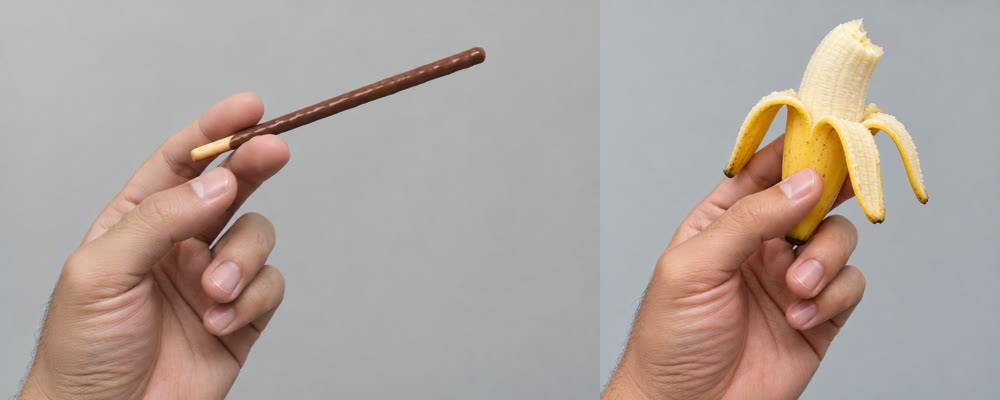
<p><img src="/assets/images/2026-10-09-genjutsu-refs-props.jpg" alt="빼빼로 레퍼런스와 바나나 레퍼런스" />
<em>왼쪽이 3~5회차에 쓴 빼빼로, 오른쪽이 6회차부터 쓴 바나나. 둘 다 Codex로 만들었다</em></p>
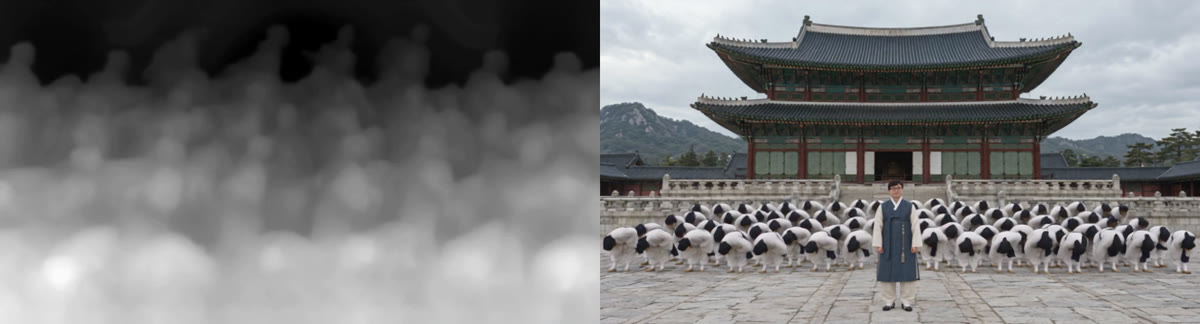
<p><img src="/assets/images/2026-10-09-genjutsu-v3-fade-establishing.jpg" alt="3회차. 왼쪽은 흰 화면으로 시작하는 첫 프레임, 오른쪽은 근정전 앞 원경으로 바뀐 와이드 장면" />
<em>왼쪽 0.0초, 오른쪽 22.5초. 원본은 군중을 가까이서 잡은 장면인데, 궁궐 사진의 구도를 그대로 가져와 군중이 작게 일렬로 섰다</em></p>
<ul>
  <li>첫 프레임의 담배는 사라졌습니다. 대신 <strong>흰 화면에서 서서히 밝아지는 0.2초</strong>가 새로 생겼습니다</li>
  <li>군중이 <strong>처음으로 한복</strong>으로 나왔습니다. 바꾼 건 소품뿐이라 이유는 모릅니다</li>
  <li><strong>와이드 장면이 궁궐 사진의 구도를 따라갔습니다.</strong> 배경 이미지가 배경뿐 아니라 카메라 위치까지 바꿔 버렸습니다</li>
</ul>

<h3 id="source-check">원본을 다시 보다 - 화면 녹화의 함정</h3>

<p>흰 화면과 첫 몇 프레임의 담배가 계속 나와서 원본을 한 프레임씩 열어 봤습니다. <strong>원본 첫 0.3초(12프레임)에 YouTube 앱 화면이 덮여 있었습니다.</strong> 원본이 휴대폰 화면 녹화본이라 영상 제목, 일시정지 버튼, 재생 막대가 찍혀 있었던 겁니다. 모델은 이 프레임들을 제대로 바꾸지 못했고, 1~3회차 첫 프레임 문제는 이 구간 때문인 것으로 보입니다.</p>

<p>그래서 순서를 바꿨습니다. <strong>object-swap으로 원본부터 정리</strong>한 뒤 motion-transfer를 돌리기로 했습니다.</p>

<ul>
  <li>object-swap(720p) 프롬프트: 담배를 빼빼로로 바꾸고, 목과 손의 문신을 지우고, 나머지는 그대로</li>
  <li>결과: <strong>문신은 깨끗하게 지워졌습니다.</strong> 담배는 입에 물고 있는 0~0.7초만 바뀌고, 손을 내린 0.8~1.0초에는 흰 담배가 그대로 남았습니다. 연기도 남았습니다</li>
  <li>정리본의 앞 0.5초를 잘라 YouTube 화면 구간을 없앴습니다. 이후 회차는 모두 이 영상(27.22초)을 입력으로 씁니다</li>
</ul>

<h3 id="run4">4회차. 정리한 원본 + 카메라 고정 문장</h3>

<ul>
  <li><strong>입력:</strong> 정리한 원본</li>
  <li><strong>이미지:</strong> 3회차와 같은 8장</li>
  <li><strong>프롬프트:</strong> 「궁궐 사진의 구도는 쓰지 않는다. 모든 장면은 원본의 카메라 위치와 크기를 유지하고, 궁궐은 군중 뒤와 위에만 보인다」</li>
</ul>

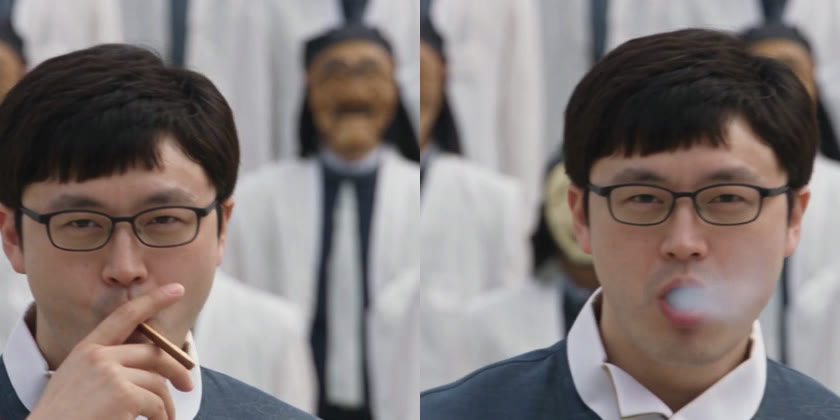
<p><img src="/assets/images/2026-10-09-genjutsu-v4-pepero-smoke.jpg" alt="4회차. 빼빼로를 물고 있는 장면과 입에서 연기가 나오는 장면" />
<em>왼쪽 0.4초, 오른쪽 1.3초. 빼빼로를 담배처럼 물었다 떼고, 입에서 흰 연기를 내뿜는다</em></p>
<ul>
  <li>첫 프레임 담배, 목, 와이드 장면 구도는 모두 해결됐습니다</li>
  <li><strong>빼빼로를 담배처럼 피웠습니다.</strong> 물고, 떼고, 입을 오므려 내뿜는 원본 동작을 그대로 따릅니다</li>
  <li>정리본에 남아 있던 연기가 그대로 옮겨졌습니다</li>
</ul>

<h3 id="run5">5회차. 배경은 원본 그대로</h3>

<ul>
  <li><strong>이미지:</strong> 궁궐을 빼고 7장</li>
  <li><strong>프롬프트:</strong> 궁궐 문단을 지우고 「원본 배경, 건물, 바닥을 그대로 둔다」 한 줄</li>
</ul>

<p>배경까지 바꾸라고 하니 다른 게 흐트러지는 것 같아서 배경 지시를 뺐습니다.</p>

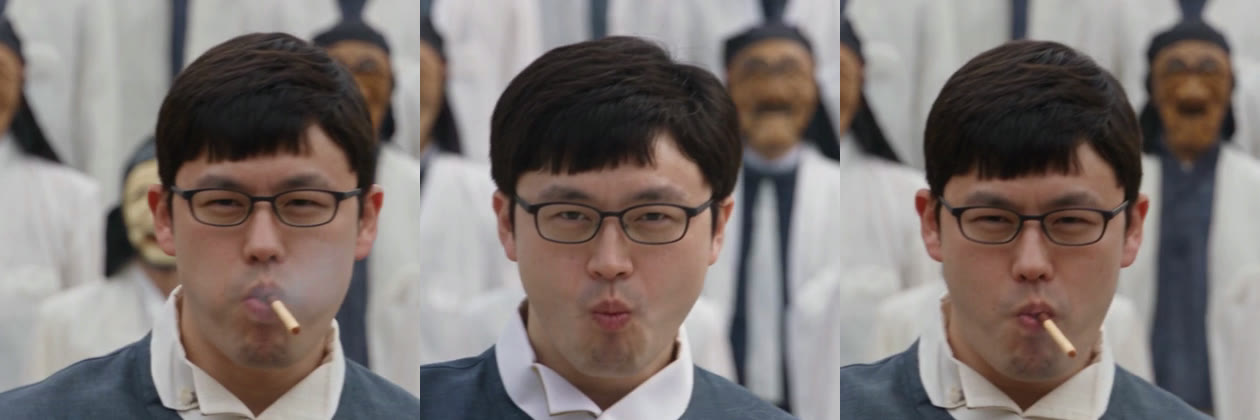
<p><img src="/assets/images/2026-10-09-genjutsu-v5-pepero-face.jpg" alt="5회차. 빼빼로를 입에 문 채 연기가 나는 장면, 4회차 얼굴, 5회차 얼굴" />
<em>왼쪽 5회차 1.3초, 가운데 4회차 1.0초, 오른쪽 5회차 1.0초. 5회차는 막대를 계속 입에 물고 있고 얼굴도 달라졌다</em></p>
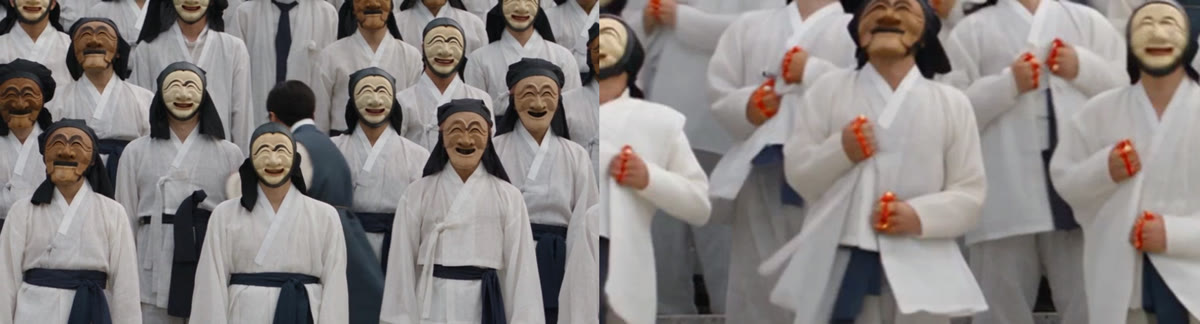
<ul>
  <li>군중이 처음부터 끝까지 한복으로 맞춰졌습니다</li>
  <li><strong>빼빼로를 아예 입에 문 채로</strong> 다녔습니다. 초콜릿 색도 안 보여서 빼빼로로 읽히지 않습니다</li>
  <li>주인공 얼굴이 눈이 가늘고 둥글게 바뀌었습니다</li>
</ul>

<h3 id="nocig">object-swap으로 담배만 지우기</h3>

<p>빼빼로를 포기하고, 정리본에서 담배만 지워 빈손으로 만들어 보기로 했습니다. 빈손 레퍼런스는 원본 0.85초 프레임을 Codex에 주고 손가락 사이만 비워서 만들었습니다.</p>

<ul>
  <li>첫 클로즈업의 담배와 머리 옆 연기 덩어리는 지워졌습니다</li>
  <li><strong>두 번째 흡연 장면(14.5~16.3초)은 그대로였습니다.</strong> 군중 사이에서 주인공이 작게 잡히는 장면인데, 인물이 작으면 object-swap이 손을 대지 않는 것으로 보입니다</li>
  <li>구간을 잘라 다시 돌리고 이어 붙이는 방법도 있었지만, 이음매가 거슬려서 쓰지 않았습니다</li>
</ul>

<h3 id="run6">6회차. 담배 대신 바나나</h3>

<ul>
  <li><strong>입력:</strong> 문신만 지운 정리본</li>
  <li><strong>이미지:</strong> 주인공 1장 + 탈춤꾼 5장 + 반쯤 깐 바나나를 든 손 1장</li>
  <li><strong>프롬프트:</strong> 「손에 들고 입에 가져가는 것은 반쯤 깐 바나나다. 입에 가져갈 때마다 한 입 베어 물고 씹어서 조금씩 짧아진다」. 담배, 연기, 빼빼로라는 단어는 넣지 않았다</li>
</ul>

<p>모양이 전혀 다른 소품이라 원본 모양에 밀릴까 걱정했는데, 반대였습니다.</p>

<ul>
  <li><strong>첫 프레임부터 바나나를 먹었습니다.</strong> 떼고 나면 볼이 부풀어 씹는 모양이 되고, 연기 장면이 씹는 입 모양으로 바뀌었습니다</li>
  <li>object-swap이 못 지운 두 번째 흡연 장면도 바나나를 먹는 장면이 됐습니다</li>
</ul>

<p><img src="/assets/images/2026-10-09-genjutsu-v6-hands.jpg" alt="6회차. 10초의 한복 군중과 21초 군무 장면의 손" />
<em>왼쪽 10초, 오른쪽 21초 확대. 군무 구간에서 옷 모양이 달라지고, 옷깃을 쥔 주먹마다 주황색과 빨간색 덩어리가 붙었다</em></p>
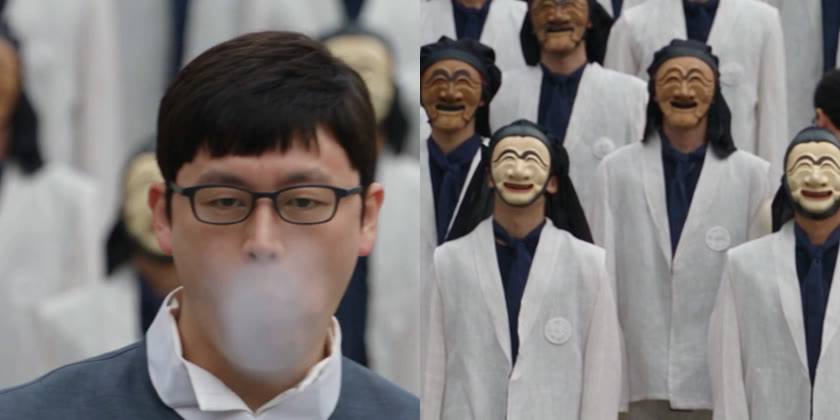
<ul>
  <li><strong>군무 구간에서 옷이 갑자기 바뀌고, 군중의 손에 주황색 덩어리가 생겼습니다.</strong> 바나나 지시가 군중에게 번진 것으로 보입니다</li>
</ul>

<h3 id="run7">7회차. 군중은 맨손</h3>

<ul>
  <li><strong>프롬프트:</strong> 6회차 + 「바나나는 주인공만 든다」, 「탈춤꾼들은 아무것도 들지 않은 맨손이다. 옷깃(jacket collar)을 쥘 때도」</li>
</ul>

<p><img src="/assets/images/2026-10-09-genjutsu-v7-puff-blazer.jpg" alt="7회차. 입 앞의 큰 흰 김과 흰 블레이저로 돌아간 군중" />
<em>왼쪽 1.3초, 오른쪽 10초. 손은 고쳐졌지만 입김과 블레이저가 돌아왔다</em></p>
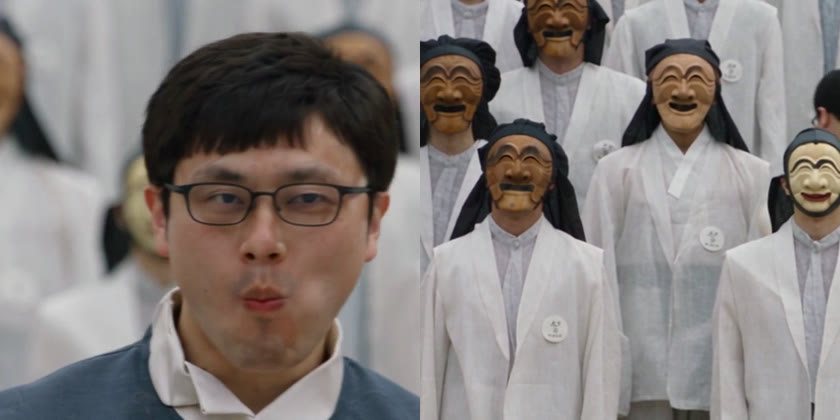
<p>두 줄을 더했을 뿐인데 손 말고 다른 것까지 달라졌습니다. 손은 맨손이 됐지만, <strong>군중은 다시 흰 블레이저가 됐고 입 앞에 큰 흰 김이 나왔습니다.</strong> 주인공 얼굴도 갸름해졌습니다. 추가한 문장의 「jacket」이 블레이저를 끌어왔을 수도 있지만 확인하지 못했습니다.</p>

<h3 id="run8">8회차. 얼굴 클로즈업 + 「보여야 할 것」을 쓰기</h3>

<ul>
  <li><strong>이미지:</strong> 7회차 7장 + 제 사진에서 얼굴만 잘라 키운 1장(<code class="language-plaintext highlighter-rouge">@Image 8</code>)</li>
  <li><strong>프롬프트:</strong>
    <ul>
      <li>「클로즈업에서는 @Image 8과 같은 얼굴」</li>
      <li>「클로즈업 동안 입을 다물고 씹는다. 숨을 내쉴 때도 입과 얼굴 바로 앞에 뒤의 탈춤꾼들이 또렷하게 보인다」</li>
      <li>뒤의 사람들을 <code class="language-plaintext highlighter-rouge">students</code> 대신 <code class="language-plaintext highlighter-rouge">masked dancers</code>로 부름. 「학생」이라는 단어가 교복을 끌어올까 봐서다</li>
    </ul>
  </li>
</ul>

<p><img src="/assets/images/2026-10-09-genjutsu-v8-blazer.jpg" alt="8회차. 입김 없이 씹는 얼굴과 여전히 블레이저인 군중" />
<em>왼쪽 1.3초, 오른쪽 10초. 입김은 사라졌지만 군중은 회청색 속옷에 가슴 배지가 달린 흰 블레이저다</em></p>
<ul>
  <li>입김이 사라졌고, 제 눈에는 얼굴도 7회차보다 원래 얼굴에 가까워졌습니다</li>
  <li>군중은 여전히 흰 블레이저였습니다</li>
</ul>

<h3 id="run9">9회차. 앞이 열린 옷 - 최종본</h3>

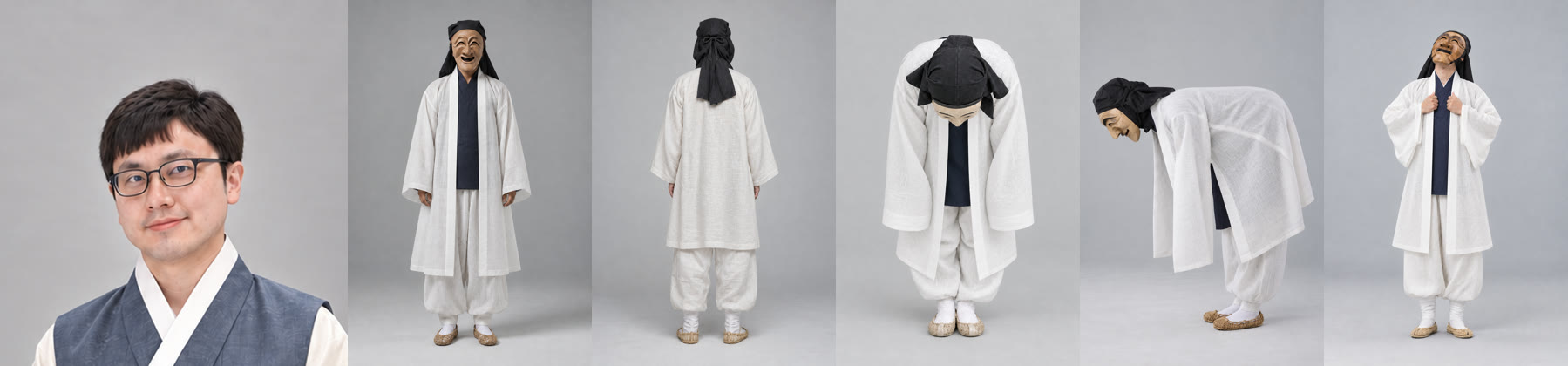
<p>여기서 결정적인 걸 알아챘습니다. <strong>원본 군중은 블레이저 앞이 열려 있고, 군무에서 그 옷깃을 움켜쥡니다.</strong> 그런데 제 탈춤꾼 레퍼런스는 고름으로 여민 저고리에 허리띠를 맨 옷이었습니다. 춘식이와 라이언 때 「라이언에게 원본 교복을 입혀서」 몸통 얼굴 문제를 풀었던 것과 같은 상황이었습니다.</p>

<p><img src="/assets/images/2026-10-09-genjutsu-refs-open.jpg" alt="앞이 열린 흰 겉옷을 입은 탈춤꾼 레퍼런스 5장과 얼굴 클로즈업" />
<em>왼쪽부터 얼굴 클로즈업(<code class="language-plaintext highlighter-rouge">@Image 8</code>), 탈춤꾼 정면, 뒤, 카메라 쪽 인사, 옆 인사, 하늘 보기. 고름과 허리띠를 없애고 앞을 열었다. 양쪽 깃이 라펠처럼 내려오고, 안의 남색 속옷이 원본의 셔츠와 넥타이 자리에 온다</em></p>

<ul>
  <li><strong>이미지:</strong> 주인공 1장 + 앞이 열린 탈춤꾼 5장 + 바나나 1장 + 얼굴 1장</li>
  <li><strong>프롬프트:</strong> 탈춤꾼 옷 설명을 「무릎 길이 흰 모시 겉옷을 앞을 열어 입고, 고름과 허리띠는 없다. 깃이 라펠처럼 내려오고 안에 남색 속옷이 보인다」로, 옷깃 쥐는 동작은 「겉옷의 열린 앞자락을 잡는다」로 바꿨다</li>
</ul>

<div class="language-text highlighter-rouge"><div class="highlight"><pre class="highlight"><code><table class="rouge-table"><tbody><tr><td class="rouge-gutter gl"><pre class="lineno">1
2
3
4
5
6
</pre></td><td class="rouge-code"><pre>@Image 2: the surrounding dancer: ... a knee-length white ramie hanbok outer coat
worn open at the front with no ties and no sash, its two white collar bands running
down the open front edges like lapels, a plain dark navy inner shirt showing as a
vertical strip down the chest ...
@Image 6: ... head tilted back looking up at the sky,
both hands grabbing the two open front edges of the coat.
</pre></td></tr></tbody></table></code></pre></div></div>

<p><strong>군중 옷이 처음부터 끝까지 레퍼런스대로 나왔고, 군무 구간에서도 바뀌지 않았습니다.</strong> 큰 입김이 없는 것, 바나나, 맨손도 그대로 유지됐습니다. 이 회차를 최종본으로 정했습니다.</p>

<h2 id="remaining">최종본에 남은 문제</h2>

<p><img src="/assets/images/2026-10-09-genjutsu-v9-remaining.jpg" alt="9회차 남은 문제. 군중 가슴의 흰 동그라미, 24초에 손이 보이지 않는 주인공" />
<em>왼쪽 10초, 오른쪽 24.2초 확대. 가슴의 흰 동그라미는 원본 교복의 학교 배지 자리다</em></p>
<ul>
  <li><strong>가슴 장식:</strong> 군중 겉옷 가슴에 흰 동그라미가 남았습니다. 원본 블레이저의 배지 자리입니다. 이것도 「원본 모양이 남는다」의 한 예입니다</li>
  <li><strong>24초 손:</strong> 주인공이 손을 옷 속으로 집어넣은 것처럼 손이 보이지 않습니다</li>
  <li><strong>2초 입김:</strong> 숨을 내쉬는 순간 짧게 김이 나갑니다. 8회차의 「입 앞이 또렷하게 보인다」 문장으로도 완전히 막지는 못했습니다</li>
</ul>

<p>다시 돌리면 고칠 수도 있지만, 7회차처럼 다른 곳이 틀어질 수 있어서 여기서 멈췄습니다.</p>

<h2 id="what-helped">무엇이 도움이 됐나</h2>

<table>
  <thead>
    <tr>
      <th>시도</th>
      <th>결과</th>
      <th>효과</th>
    </tr>
  </thead>
  <tbody>
    <tr>
      <td>군중 레퍼런스를 원본 옷 모양(앞이 열린 옷)에 맞춤</td>
      <td>9회차에서 옷이 처음부터 끝까지 일관됨</td>
      <td>✅ 가장 컸다</td>
    </tr>
    <tr>
      <td>소품을 「먹는 것」(바나나)으로 바꾸고 베어 무는 동작을 씀</td>
      <td>흡연 동작이 먹는 동작으로 바뀜, 연기 장면도 씹는 입으로</td>
      <td>✅</td>
    </tr>
    <tr>
      <td>object-swap으로 원본 문신 지우기</td>
      <td>목 요철 사라짐</td>
      <td>✅</td>
    </tr>
    <tr>
      <td>원본 앞 0.5초(YouTube 화면) 잘라내기</td>
      <td>4회차부터 첫 프레임 담배와 흰 화면이 사라짐 (원본 정리와 함께 적용)</td>
      <td>✅</td>
    </tr>
    <tr>
      <td>「원본 카메라 위치와 크기를 유지한다」 문장</td>
      <td>4회차에 와이드 장면 구도가 원본으로 돌아옴</td>
      <td>✅</td>
    </tr>
    <tr>
      <td>배경 지시를 빼고 원본 배경 유지</td>
      <td>5회차에 처음으로 군중이 처음부터 끝까지 한복</td>
      <td>△ 한 번 관찰</td>
    </tr>
    <tr>
      <td>얼굴 클로즈업 레퍼런스 추가</td>
      <td>얼굴이 원래 얼굴에 가까워짐</td>
      <td>△ 한 번 관찰</td>
    </tr>
    <tr>
      <td>「보여야 할 것」을 쓴 입김 문장</td>
      <td>8, 9회차에 큰 김은 사라짐, 짧은 김은 남음</td>
      <td>△</td>
    </tr>
    <tr>
      <td>담배와 같은 모양의 소품(빼빼로)</td>
      <td>모양은 맞지만 담배처럼 피움</td>
      <td>❌</td>
    </tr>
    <tr>
      <td>「NO smoke」, 「첫 프레임부터」 같은 지시</td>
      <td>바뀌지 않음</td>
      <td>❌</td>
    </tr>
    <tr>
      <td>궁궐 배경 이미지</td>
      <td>색만 바뀌거나, 구도까지 사진을 따라감</td>
      <td>❌</td>
    </tr>
    <tr>
      <td>object-swap으로 담배 지우기</td>
      <td>클로즈업만 일부 지워지고 작게 잡힌 장면은 그대로</td>
      <td>❌</td>
    </tr>
  </tbody>
</table>

<p>정리하면 프롬프트 문장을 다듬는 것보다 <strong>레퍼런스 이미지를 원본에 맞추는 것</strong>과 <strong>원본을 미리 정리하는 것</strong>이 효과가 컸습니다. 문장 한두 줄을 바꾸면 의도하지 않은 곳까지 달라졌습니다.</p>

<h2 id="troubleshooting">잘 안 될 때</h2>

<h3 id="outfit">군중 옷이 레퍼런스대로 안 나온다</h3>

<p>원본 옷의 실루엣(앞이 열렸는지, 깃이 어디 있는지, 배지가 어디 있는지)을 먼저 봅니다. 레퍼런스를 그 실루엣에 맞춰 다시 만듭니다. 특히 군무에서 손으로 잡는 부분(옷깃)이 레퍼런스에도 있어야 합니다.</p>

<h3 id="first-frames">첫 몇 프레임에 원본이 남는다</h3>

<p>원본 첫 프레임에 앱 화면, 자막, 페이드가 있는지 한 프레임씩 확인합니다. 화면 녹화본이면 UI가 찍힌 구간을 잘라내고 넣습니다.</p>

<h3 id="human-to-human">사람을 사람으로 바꾸면 원본 세부가 남는다</h3>

<p>담배, 문신 같은 원본 세부가 새 얼굴과 옷 아래에 남습니다. 문신처럼 지워야 할 것은 object-swap으로 원본에서 먼저 지우는 편이 나았습니다. 다만 화면에서 작게 잡힌 인물에는 object-swap이 잘 듣지 않았습니다.</p>

<h3 id="side-effects">한 줄 고쳤는데 다른 곳이 틀어진다</h3>

<p>seed가 없어서 생기는 무작위성과, 새 문장의 단어가 다른 곳으로 번지는 것이 섞여 있습니다. <code class="language-plaintext highlighter-rouge">jacket</code>, <code class="language-plaintext highlighter-rouge">students</code>처럼 원본 옷을 떠올리게 하는 단어는 피했습니다. 고친 뒤에는 이전 회차에서 잘 나온 항목도 다시 확인합니다.</p>

<h3 id="check-frames">결과를 1초 간격으로만 보면 놓친다</h3>

<p>첫 1초는 프레임 단위로, 담배나 연기처럼 짧게 나오는 건 확대해서 봅니다. 저는 1초 간격으로 보고 「담배 없음」이라고 했다가 첫 5프레임을 놓쳤습니다.</p>

<h2 id="references">참고 자료</h2>

<ul>
  <li><a href="https://open.higgsfield.ai/models/higgsfield/genjutsu/motion-transfer/v1.0/playground">Genjutsu Motion Transfer Playground</a></li>
  <li><a href="https://docs.higgsfield.ai/docs/models/genjutsu/motion-transfer">Genjutsu motion-transfer API 문서</a></li>
  <li>원본: GENER8ION, Yung Lean 「STORM」 뮤직비디오 <a href="https://youtu.be/x6_mbnsh6VU?t=257">YouTube</a> 4:17부터 28초. 영상과 음원의 권리는 원저작자에게 있습니다</li>
</ul>]]></content><author><name>김준호</name><email>junho85@gmail.com</email></author><category term="Higgsfield" /><category term="Genjutsu" /><category term="motion-transfer" /><category term="AI 영상" /><category term="video-to-video" /><category term="하회탈" /><category term="프롬프트" /><category term="Claude Code" /><summary type="html"><![CDATA[뮤직비디오 한 장면(28초)의 주인공을 한복 입은 저로, 뒤에 선 학생 수백 명을 하회탈을 쓴 탈춤꾼으로 바꿨습니다. 원본은 GENER8ION과 Yung Lean의 「STORM」 뮤직비디오로, 주인공이 담배를 피우다 고개를 숙이면 교복 입은 군중이 일제히 절하고 하늘을 올려다보는 장면입니다. Higgsfield의 영상 변환 모델 Genjutsu motion-transfer를 API로 돌렸습니다.]]></summary><media:thumbnail xmlns:media="http://search.yahoo.com/mrss/" url="https://dev.junho85.pe.kr/assets/images/2026-10-09-genjutsu-thumbnail.jpg" /><media:content medium="image" url="https://dev.junho85.pe.kr/assets/images/2026-10-09-genjutsu-thumbnail.jpg" xmlns:media="http://search.yahoo.com/mrss/" /></entry><entry><title type="html">Gemini 3.8 TTS가 내세운 기능을 시험해 봤습니다 - 한국어 목소리, Voice design, 태그, style, 긴 글</title><link href="https://dev.junho85.pe.kr/2026/09/27/gemini-3-8-tts-features-tested.html" rel="alternate" type="text/html" title="Gemini 3.8 TTS가 내세운 기능을 시험해 봤습니다 - 한국어 목소리, Voice design, 태그, style, 긴 글" /><published>2026-09-27T13:00:00+09:00</published><updated>2026-09-27T13:00:00+09:00</updated><id>https://dev.junho85.pe.kr/2026/09/27/gemini-3-8-tts-features-tested</id><content type="html" xml:base="https://dev.junho85.pe.kr/2026/09/27/gemini-3-8-tts-features-tested.html"><![CDATA[<blockquote class="prompt-info">
  <p>Gemini TTS 3.8 시험기 3편 중 3편입니다. <a href="/2026/09/27/gemini-tts-podcast-four-models-compared.html">1편 네 모델 비교</a> · <a href="/2026/09/27/gemini-tts-voice-replication.html">2편 내 목소리 복제</a> · <strong>3편 3.8 기능 시험</strong></p>
</blockquote>

<p><a href="/2026/09/27/gemini-tts-podcast-four-models-compared.html">1편</a>에서 Gemini TTS 네 모델을 비교하면서 3.8의 가격과 API 변경, 품질을 봤습니다. 이번에는 문서가 3.8의 장점으로 내세운 기능을 하나씩 돌려 봤습니다. 판정 모델의 청취가 걸린 시험에는 <strong>태그나 지시를 뺀 같은 문장을 대조군으로</strong> 함께 만들어, 대조군에서도 같은 자리에서 같은 소리가 들렸다고 하면 그 판정은 쓰지 않았습니다.</p>

<h2 id="tldr">결론부터</h2>

<table class="compact">
  <thead>
    <tr>
      <th>기능</th>
      <th>결과</th>
    </tr>
  </thead>
  <tbody>
    <tr>
      <td>한국어 목소리</td>
      <td><strong>117개 있습니다.</strong> 기본 목소리 Leda·Charon은 미국 영어 목소리였습니다. 한국어 목소리 두 개로 바꾸자 청크 간 게스트 흔들림이 줄고, 다시 만들 때 차이는 커졌습니다. 3.1에서는 쓸 수 없습니다</td>
    </tr>
    <tr>
      <td>Voice design</td>
      <td>글로 설명하면 30초 만에 목소리를 만듭니다. <strong>문서와 달리 2인 한 번 호출에 들어갑니다.</strong> 흔들림은 줄지 않았습니다</td>
    </tr>
    <tr>
      <td>영어 고유명사</td>
      <td>목소리를 바꿔도 다른 단어로 읽었습니다</td>
    </tr>
    <tr>
      <td>인라인 태그</td>
      <td>웃음과 기침은 들어갔고, 한숨은 모델마다 달랐습니다</td>
    </tr>
    <tr>
      <td>style 지시</td>
      <td>속삭임, 외침, 느리게가 수치로 분명히 드러났습니다</td>
    </tr>
    <tr>
      <td>긴 글 한 번에</td>
      <td>5분 분량도 뒷부분이 뭉개지지 않았습니다. 3.8이 3.1보다 3배 빨랐습니다</td>
    </tr>
    <tr>
      <td>스트리밍</td>
      <td>첫 소리가 1.7초에 나옵니다</td>
    </tr>
  </tbody>
</table>

<h2 id="korean-voices">한국어 목소리가 117개 있습니다</h2>

<p>목소리 목록(<code class="language-plaintext highlighter-rouge">GET /v1beta/voices</code>)을 끝까지 넘겨 보니 기본 제공 목소리가 <strong>2,089개</strong>였고, 그중 <strong>한국어(ko-KR)가 117개</strong>였습니다. 팟캐스트 진행자, 내레이터, 상담원 같은 유형과 나이, 음 높이 설명이 붙어 있고, 103개가 서울말, <strong>14개가 부산 사투리</strong>로 분류돼 있습니다.</p>

<p>그런데 제 팟캐스트 스킬이 쓰던 <strong>Leda와 Charon은 미국 영어(en-US) 목소리</strong>였습니다. 한국어 대본을 미국 영어 목소리로 읽혀 온 셈입니다. 한국어 팟캐스트 진행자 목소리 두 개(<code class="language-plaintext highlighter-rouge">ko-kr-podcaster-4</code> 여성, <code class="language-plaintext highlighter-rouge">ko-kr-podcaster-8</code> 남성)로 바꿔 같은 시험을 돌렸습니다.</p>

<ul>
  <li>2인 대화를 한 번에 만드는 방식에 그대로 들어갑니다.</li>
  <li>3.8 Flash로 <a href="/2026/09/27/gemini-tts-podcast-four-models-compared.html#consistency">1편</a>과 똑같은 일관성 시험(같은 대본, 청크 4개, 3회)을 했습니다. 청크 간 게스트 흔들림이 15.6% → <strong>8.4%</strong>로 줄었고, 다시 만들 때의 차이는 1.2% → 6.6%로 커졌습니다. 언어만이 아니라 목소리 자체가 바뀐 비교이고, 두 목소리만 측정했습니다.</li>
  <li><a href="#proper-nouns-voices">영어 고유명사</a> 문제는 남았습니다. 3회 중 1회는 PostgreSQL을 알파벳 한 글자씩 읽었습니다.</li>
</ul>

<link rel="stylesheet" href="/assets/css/gemini-tts-charts.css?v=2" />

<script src="/assets/js/gemini-tts-charts.js?v=4" defer=""></script>

<div class="gviz" data-viz="voices"></div>

<details style="margin-bottom:1.25rem">
  <summary>표로 보기: 최악값과 다시 만들 때 차이 포함</summary>

  <table class="compact">
    <thead>
      <tr>
        <th>3.8 Flash 목소리</th>
        <th>청크끼리 평균</th>
        <th>청크끼리 최악</th>
        <th>다시 만들 때</th>
      </tr>
    </thead>
    <tbody>
      <tr>
        <td><strong>한국어 목소리</strong></td>
        <td>8.0% / <strong>8.4%</strong></td>
        <td>10.5% / 17.3%</td>
        <td>1.0% / 6.6%</td>
      </tr>
      <tr>
        <td>Voice design 목소리</td>
        <td>12.0% / 16.1%</td>
        <td>14.7% / 17.8%</td>
        <td>2.0% / 6.9%</td>
      </tr>
      <tr>
        <td>Leda / Charon(1편)</td>
        <td>8.2% / 15.6%</td>
        <td>11.5% / 22.6%</td>
        <td>2.4% / 1.2%</td>
      </tr>
    </tbody>
  </table>

  <p><em>각 칸은 진행자 / 게스트다. 한 편 안에서 청크별 화자 음 높이 중앙값이 벌어진 정도(3회 평균과 최악)와, 세 회차의 편 평균이 서로 벌어진 정도다. 방법은 <a href="/2026/09/27/gemini-tts-podcast-four-models-compared.html#consistency">1편</a>과 같다</em></p>

</details>
<ul>
  <li><strong>3.1에서는 쓸 수 없습니다.</strong> “No matching speaker voice found”로 거절됩니다.</li>
</ul>

<p><b>3.8 Flash + 한국어 목소리</b> (<a href="/2026/09/27/gemini-tts-podcast-four-models-compared.html#listen">1편</a>의 네 모델과 같은 대본, 1회차)</p>
<audio controls="" preload="none" src="/assets/audio/2026-09-27-podcast-38-ko-voices.mp3" style="width:100%"></audio>

<p>부산 사투리 목소리(<code class="language-plaintext highlighter-rouge">ko-kr-assistant-2</code>)는 확인하지 못했습니다. 표준어 문장을 읽히면 판정 모델 두 개가 모두 서울말 억양이라고 했고, 사투리 문장(“억수로 좋네예”)을 읽히면 판정이 갈렸습니다. 서울말 목소리에 같은 사투리 문장을 읽혀도 똑같이 갈려서, 판정 모델이 억양을 가리지 못한다고 봤습니다. 두 음성을 나란히 둡니다.</p>

<p><b>부산 사투리 목소리</b> - 사투리 문장</p>
<audio controls="" preload="none" src="/assets/audio/2026-09-27-busan-voice-dialect-text.mp3" style="width:100%"></audio>

<p><b>서울말 목소리</b> - 같은 사투리 문장</p>
<audio controls="" preload="none" src="/assets/audio/2026-09-27-seoul-voice-dialect-text.mp3" style="width:100%"></audio>

<h2 id="voice-design">Voice design: 만들기는 쉬웠지만 더 흔들렸습니다</h2>

<p>Voice design은 목소리를 글로 설명하면 새 목소리를 만들어 주는 기능입니다. 진행자와 게스트를 이렇게 설명해 만들었습니다.</p>

<ul>
  <li>진행자: 「30대 중반의 한국 여성 팟캐스트 진행자. 밝고 또렷한 목소리로, 호기심 많고 친근하게 질문을 던진다. 표준 서울말.」</li>
  <li>게스트: 「40대 초반의 한국 남성 IT 분석가. 차분하고 낮은 목소리로, 설명을 조리 있게 풀어낸다. 표준 서울말.」</li>
</ul>

<p>하나 만드는 데 30초 안팎이 걸렸고, 만들면서 37초짜리 미리 듣기 음성을 함께 돌려줍니다. 문서상 <strong>프로젝트에 저장하는 방식만</strong> 되고(1년 보관), 복제 목소리와 달리 동의 녹음은 필요 없습니다.</p>

<p><b>설계한 진행자 목소리</b> - 미리 듣기</p>
<audio controls="" preload="none" src="/assets/audio/2026-09-27-designed-host-sample.mp3" style="width:100%"></audio>

<p><b>설계한 게스트 목소리</b> - 미리 듣기</p>
<audio controls="" preload="none" src="/assets/audio/2026-09-27-designed-guest-sample.mp3" style="width:100%"></audio>

<p><strong>문서와 달리 2인 대화를 한 번에 만드는 방식에도 들어갔습니다.</strong> 문서는 설계한 목소리도 대사별로 따로 만들라고 합니다. 들어가긴 하는데 다른 목소리로 바뀌는 건 아닌지 확인하려고, 진행자 대사만 넣어 한 번에 만든 결과를 미리 듣기 음성과 비교했습니다. 유사도가 0.965로, 같은 목소리를 단독으로 합성한 결과(0.960)와 같았고 다른 목소리(0.845)와는 달랐습니다. 복제 목소리는 같은 방식에서 400 오류가 났으니 둘의 처리가 다릅니다.</p>

<p>다만 이 대본에서는 나아진 점이 없었습니다. <a href="#korean-voices">위 표</a>에서 진행자는 기본 목소리보다 더 흔들렸고 게스트는 비슷했으며, <a href="#proper-nouns-voices">영어 고유명사</a>는 3회 모두 다른 단어로 읽었습니다. 문서가 흔들림 원인으로 든 긴 연기 지시문은 제 스킬이 원래 쓰지 않으므로, 문서의 주장을 반박하는 결과는 아닙니다.</p>

<p><b>3.8 Flash + Voice design 목소리</b> (<a href="/2026/09/27/gemini-tts-podcast-four-models-compared.html#listen">1편</a>의 네 모델과 같은 대본, 1회차)</p>
<audio controls="" preload="none" src="/assets/audio/2026-09-27-podcast-38-designed-voices.mp3" style="width:100%"></audio>

<h2 id="proper-nouns-voices">목소리를 바꿔도 영어 고유명사는 틀렸습니다</h2>

<p><a href="/2026/09/27/gemini-tts-podcast-four-models-compared.html#proper-nouns">1편</a>에서 3.8 Flash가 대본의 두 번째 “PostgreSQL은”을 다른 단어로 읽었습니다. 목소리 탓인지 보려고 같은 15줄 대본을 목소리만 바꿔 3회씩 만들었습니다.</p>

<table class="compact">
  <thead>
    <tr>
      <th>3.8 Flash 목소리(각 3회)</th>
      <th>두 번째 PostgreSQL을 판정 모델 두 개가 들은 것</th>
    </tr>
  </thead>
  <tbody>
    <tr>
      <td>Leda / Charon(1편)</td>
      <td><strong>포스트지피티</strong>, <strong>포스트클라우드</strong>, 포스트그레스</td>
    </tr>
    <tr>
      <td>한국어 목소리</td>
      <td>포스트그레스 에스큐엘, <strong>피오에스지알이</strong>(알파벳을 한 글자씩), 포스트그레스</td>
    </tr>
    <tr>
      <td>Voice design 목소리</td>
      <td><strong>패스터지피티</strong>, <strong>포스트위스퍼</strong>, <strong>포스트지알아이</strong></td>
    </tr>
  </tbody>
</table>

<p>목소리를 바꿔도 사라지지 않았고, 설계한 목소리는 3회 모두 틀렸습니다. 「위스퍼」는 대본 뒤쪽의 whisper가 섞여 든 것으로 보입니다. 대본에 영어 대신 한글 발음(<code class="language-plaintext highlighter-rouge">포스트그레스큐엘</code>)으로 적는 것이 여전히 가장 확실합니다.</p>

<h2 id="inline-tags">인라인 태그: 웃음과 기침은 들어갔습니다</h2>

<p>대본 중간에 <code class="language-plaintext highlighter-rouge">&lt;laugh&gt;</code>, <code class="language-plaintext highlighter-rouge">&lt;sigh&gt;</code>, <code class="language-plaintext highlighter-rouge">&lt;cough&gt;</code>, <code class="language-plaintext highlighter-rouge">&lt;short pause&gt;</code>, <code class="language-plaintext highlighter-rouge">&lt;breath&gt;</code>를 넣고, 판정 모델에게 어떤 소리를 넣었는지 알려 주지 않은 채 “말이 아닌 소리가 들리면 위치에 표시하라”고 물었습니다. 판정 모델 두 개가 <strong>같은 자리에서 같은 소리를 들은 경우만</strong> 셌습니다.</p>

<table class="compact">
  <thead>
    <tr>
      <th>모델(각 2회)</th>
      <th>웃음</th>
      <th>한숨</th>
      <th>기침</th>
      <th>태그를 글자로 읽음</th>
    </tr>
  </thead>
  <tbody>
    <tr>
      <td>3.8 Flash</td>
      <td>2/2</td>
      <td>0/2</td>
      <td>2/2</td>
      <td>없음</td>
    </tr>
    <tr>
      <td>3.8 Flash-Lite</td>
      <td>2/2</td>
      <td>2/2</td>
      <td>2/2</td>
      <td>없음</td>
    </tr>
    <tr>
      <td>3.1 Flash</td>
      <td>1/2</td>
      <td>1/2</td>
      <td>2/2</td>
      <td>없음</td>
    </tr>
  </tbody>
</table>

<p><em>3.8 두 모델은 한국어 목소리(<code class="language-plaintext highlighter-rouge">ko-kr-podcaster-8</code>), 3.1은 한국어 목소리를 쓸 수 없어 Charon으로 만들었다</em></p>

<ul>
  <li><code class="language-plaintext highlighter-rouge">&lt;short pause&gt;</code>와 <code class="language-plaintext highlighter-rouge">&lt;breath&gt;</code>는 판정할 수 없었습니다. 태그가 없는 대조군에서도 판정 모델이 숨소리를 들었다고 했습니다.</li>
  <li>3.8 Flash 대조군 하나는 태그가 없는데도 두 판정 모델이 웃음을 들었습니다. 태그를 넣은 자리와는 다른 곳이라 위 표의 판정은 그대로 두었습니다. 모델이 스스로 웃음을 넣었을 수 있습니다.</li>
  <li>3.1도 꺾쇠 태그를 글자로 읽지 않고 소리로 냈습니다.</li>
</ul>

<blockquote>
  <p>와, 정말요? <code class="language-plaintext highlighter-rouge">&lt;laugh&gt;</code> 그건 전혀 몰랐네요. <code class="language-plaintext highlighter-rouge">&lt;sigh&gt;</code> 사실 저도 어젯밤을 꼬박 새웠거든요. <code class="language-plaintext highlighter-rouge">&lt;cough&gt;</code> 아, 실례했습니다. <code class="language-plaintext highlighter-rouge">&lt;short pause&gt;</code> 그럼 다시 시작해 볼까요? <code class="language-plaintext highlighter-rouge">&lt;breath&gt;</code> 좋습니다.</p>
</blockquote>

<p><b>3.8 Flash</b> - 태그 있음</p>
<audio controls="" preload="none" src="/assets/audio/2026-09-27-tags-38-flash.mp3" style="width:100%"></audio>

<p><b>3.8 Flash</b> - 태그 없음(대조군)</p>
<audio controls="" preload="none" src="/assets/audio/2026-09-27-tags-38-flash-control.mp3" style="width:100%"></audio>

<p><b>3.8 Flash-Lite</b> - 태그 있음</p>
<audio controls="" preload="none" src="/assets/audio/2026-09-27-tags-38-lite.mp3" style="width:100%"></audio>

<h2 id="style">style 지시: 수치로 분명히 드러났습니다</h2>

<p>같은 문장(“오늘 회의는 여기까지 하겠습니다. 다음 주에는 새로운 기능을 발표할 예정이니 많이 기대해 주세요.”)을 <code class="language-plaintext highlighter-rouge">style</code> 필드만 바꿔 만들었습니다. 속삭이면 성대가 울리지 않으니 유성음 비율이 떨어지고, 느리게 말하면 길이가 늘어야 합니다.</p>

<div class="gviz" data-viz="style"></div>

<details style="margin-bottom:1.25rem">
  <summary>표로 보기: 음량과 판정 모델 결과 포함</summary>

  <table class="compact">
    <thead>
      <tr>
        <th>3.8 Flash(각 2회)</th>
        <th>길이</th>
        <th>음량</th>
        <th>유성음 비율</th>
        <th>음 높이</th>
        <th>판정 모델</th>
      </tr>
    </thead>
    <tbody>
      <tr>
        <td>지시 없음</td>
        <td>5.8~6.1초</td>
        <td>-17dB</td>
        <td>0.67~0.79</td>
        <td>127~138Hz</td>
        <td>보통 2/2</td>
      </tr>
      <tr>
        <td><code class="language-plaintext highlighter-rouge">whispering softly</code></td>
        <td>8.2초</td>
        <td>-31~-36dB</td>
        <td><strong>0.00~0.04</strong></td>
        <td>-</td>
        <td>속삭임 2/2</td>
      </tr>
      <tr>
        <td><code class="language-plaintext highlighter-rouge">shouting with excitement</code></td>
        <td>6.9~7.0초</td>
        <td>-16~-17dB</td>
        <td>0.62</td>
        <td><strong>207~284Hz</strong></td>
        <td>신나게 외침 2/2</td>
      </tr>
      <tr>
        <td><code class="language-plaintext highlighter-rouge">speaking very slowly and calmly</code></td>
        <td><strong>13.7~13.9초</strong></td>
        <td>-17~-20dB</td>
        <td>0.62~0.68</td>
        <td>114~118Hz</td>
        <td>느리고 차분함 2/2</td>
      </tr>
    </tbody>
  </table>

  <p><em>외침은 음량이 거의 그대로인 대신 음 높이로 표현됐다</em></p>

</details>

<p>Flash-Lite도 같은 방향으로 움직였습니다(속삭임 유성음 비율 0.00~0.06, 느리게 약 2배). 다만 외침과 느리게는 판정 모델이 2회 중 1회만 그렇게 들었습니다.</p>

<p><b>지시 없음</b></p>
<audio controls="" preload="none" src="/assets/audio/2026-09-27-style-38-none.mp3" style="width:100%"></audio>

<p><b>whispering softly</b></p>
<audio controls="" preload="none" src="/assets/audio/2026-09-27-style-38-whisper.mp3" style="width:100%"></audio>

<p><b>shouting with excitement</b></p>
<audio controls="" preload="none" src="/assets/audio/2026-09-27-style-38-shout.mp3" style="width:100%"></audio>

<p><b>speaking very slowly and calmly</b></p>
<audio controls="" preload="none" src="/assets/audio/2026-09-27-style-38-slow.mp3" style="width:100%"></audio>

<h2 id="long-form">긴 글을 한 번에: 5분까지는 뭉개지지 않았습니다</h2>

<p>예전 모델은 긴 대본을 한 번에 만들면 뒤로 갈수록 발음이 뭉개져서, 제 팟캐스트 스킬은 대본을 620자씩 나눠 만듭니다. 문서는 3.8을 “긴 글에서도 흔들리지 않는” 모델로 소개합니다. 50줄, 2,309자 대본을 나누지 않고 한 번에 넣었습니다.</p>

<p>전체를 받아써 대본과 글자 단위로 맞추고, 앞·중간·뒤 세 구간의 오류율(CER, 공백과 문장부호 제외)을 구했습니다. 판정 모델 두 개로 받아쓴 결과의 범위입니다.</p>

<div class="gviz" data-viz="longcer"></div>
<div class="gviz" data-viz="longtime"></div>

<details style="margin-bottom:1.25rem">
  <summary>표로 보기: 회차별 범위</summary>

  <table class="compact">
    <thead>
      <tr>
        <th>모델(각 2회)</th>
        <th>음성 길이</th>
        <th>생성 시간</th>
        <th>앞</th>
        <th>중간</th>
        <th>뒤</th>
      </tr>
    </thead>
    <tbody>
      <tr>
        <td>3.8 Flash</td>
        <td>5분 2초, 5분 11초</td>
        <td><strong>34~37초</strong></td>
        <td>2.5~3.3%</td>
        <td>0.9~3.4%</td>
        <td>0.0~2.4%</td>
      </tr>
      <tr>
        <td>3.1 Flash</td>
        <td>4분 37초, 4분 42초</td>
        <td>106~108초</td>
        <td>0.9~2.7%</td>
        <td>0.4~2.5%</td>
        <td>0.5~2.7%</td>
      </tr>
    </tbody>
  </table>

</details>

<p><strong>두 모델 모두 뒷부분 오류율이 늘지 않았습니다.</strong> 예전에 겪은 문제는 이번 5분 분량에서는 재현되지 않았습니다. 3.8은 3배 빨랐습니다. 한 편을 네 구간으로 나눈 음 높이 편차는 3.8이 진행자 6%, 게스트 4%와 16%, 3.1이 진행자 9~12%, 게스트 6~8%로, 한 번에 만들어도 흔들림이 없어지지는 않았습니다. 3.1은 새 API(Interactions)에서 화자 지정을 받지 않아 예전 방식(<code class="language-plaintext highlighter-rouge">generateContent</code>)으로 만들었습니다.</p>

<h2 id="streaming">스트리밍: 첫 소리는 1.7초</h2>

<p><code class="language-plaintext highlighter-rouge">stream: true</code>로 요청하면 첫 음성 조각이 <strong>1.65~1.74초</strong> 만에 도착했습니다(3회). 같은 문장의 전체 완료는 스트리밍 16.5~23.5초, 일반 요청 13.5~14.8초로 스트리밍이 오히려 느렸습니다. 팟캐스트처럼 파일로 받을 때는 일반 요청이 낫고, 음성 비서처럼 바로 말을 시작해야 할 때 쓸 기능입니다.</p>

<h2 id="not-tested">측정하지 않은 것</h2>

<p>130개 언어 지원, μ-law·A-law 같은 출력 형식, Batch·Flex 요금제는 이 글에서 시험하지 않았습니다.</p>

<h2 id="caveats">읽을 때 감안할 점</h2>

<ul>
  <li><strong>표본이 작습니다.</strong> 인라인 태그와 style은 모델당 2회, 긴 글은 2회, 한국어·설계 목소리 일관성과 고유명사는 3회입니다.</li>
  <li><strong>판정을 모델에게 맡겼습니다.</strong> 받아쓰기와 청취 판정은 Gemini 음성 인식 모델 두 개로 따로 받아, 둘이 일치한 것만 결론으로 썼습니다.</li>
  <li><strong>한국어 목소리와 설계 목소리는 한 쌍씩만</strong> 시험했습니다. 다른 목소리에서는 결과가 다를 수 있습니다.</li>
</ul>

<h2 id="references">참고 자료</h2>

<ul>
  <li><a href="https://ai.google.dev/gemini-api/docs/speech-generation">Gemini API - Speech generation (text-to-speech)</a></li>
  <li><a href="https://ai.google.dev/gemini-api/docs/voice-design">Gemini API - Voice design</a></li>
  <li><a href="/2026/09/27/gemini-tts-podcast-four-models-compared.html">1편: Gemini TTS 네 가지로 같은 팟캐스트를 만들어 봤습니다</a></li>
  <li><a href="/2026/09/27/gemini-tts-voice-replication.html">2편: Gemini TTS로 내 목소리를 복제해 봤습니다</a></li>
</ul>]]></content><author><name>김준호</name><email>junho85@gmail.com</email></author><category term="TTS" /><category term="Gemini" /><category term="gemini-3.8-flash-tts" /><category term="Voice design" /><category term="음성 합성" /><category term="팟캐스트" /><summary type="html"><![CDATA[Gemini TTS 3.8 시험기 3편 중 3편입니다. 1편 네 모델 비교 · 2편 내 목소리 복제 · 3편 3.8 기능 시험]]></summary><media:thumbnail xmlns:media="http://search.yahoo.com/mrss/" url="https://dev.junho85.pe.kr/assets/images/2026-09-27-gemini-tts-consistency.png" /><media:content medium="image" url="https://dev.junho85.pe.kr/assets/images/2026-09-27-gemini-tts-consistency.png" xmlns:media="http://search.yahoo.com/mrss/" /></entry><entry><title type="html">Gemini TTS로 내 목소리를 복제해 봤습니다 - 3.8 Flash, Flash-Lite, 로컬 Qwen3-TTS 비교</title><link href="https://dev.junho85.pe.kr/2026/09/27/gemini-tts-voice-replication.html" rel="alternate" type="text/html" title="Gemini TTS로 내 목소리를 복제해 봤습니다 - 3.8 Flash, Flash-Lite, 로컬 Qwen3-TTS 비교" /><published>2026-09-27T12:00:00+09:00</published><updated>2026-09-27T12:00:00+09:00</updated><id>https://dev.junho85.pe.kr/2026/09/27/gemini-tts-voice-replication</id><content type="html" xml:base="https://dev.junho85.pe.kr/2026/09/27/gemini-tts-voice-replication.html"><![CDATA[<blockquote class="prompt-info">
  <p>Gemini TTS 3.8 시험기 3편 중 2편입니다. <a href="/2026/09/27/gemini-tts-podcast-four-models-compared.html">1편 네 모델 비교</a> · <strong>2편 내 목소리 복제</strong> · <a href="/2026/09/27/gemini-3-8-tts-features-tested.html">3편 3.8 기능 시험</a></p>
</blockquote>

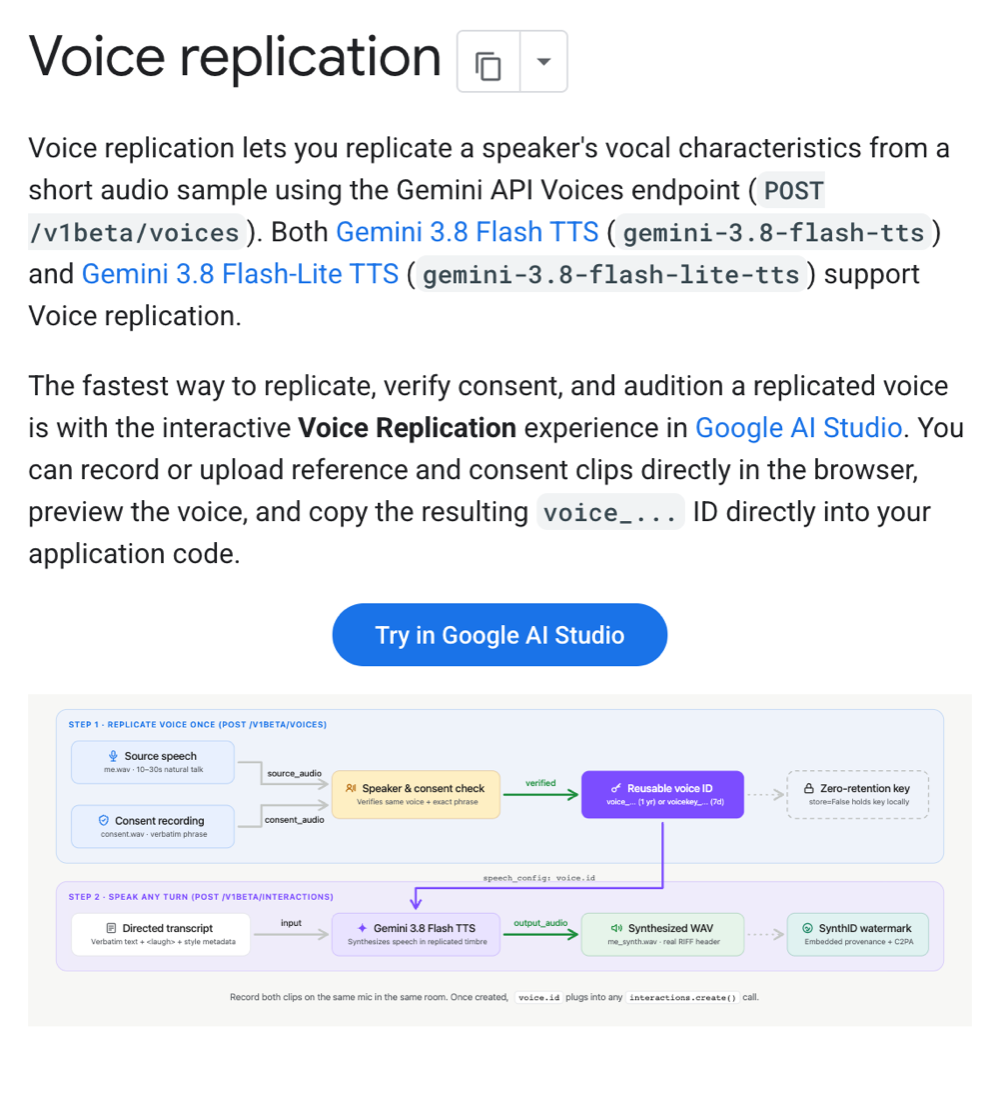
<p><a href="/2026/09/27/gemini-tts-podcast-four-models-compared.html">1편</a>에서 Gemini TTS 네 모델로 같은 팟캐스트를 만들어 비교했습니다. 이번에는 3.8에 새로 생긴 Voice replication(음성 복제)으로 제 목소리를 복제해 봤습니다. 짧은 녹음을 올려 목소리 ID를 받고, 이후 합성에서 Leda 같은 기본 목소리 대신 그 ID를 넣는 방식입니다.</p>

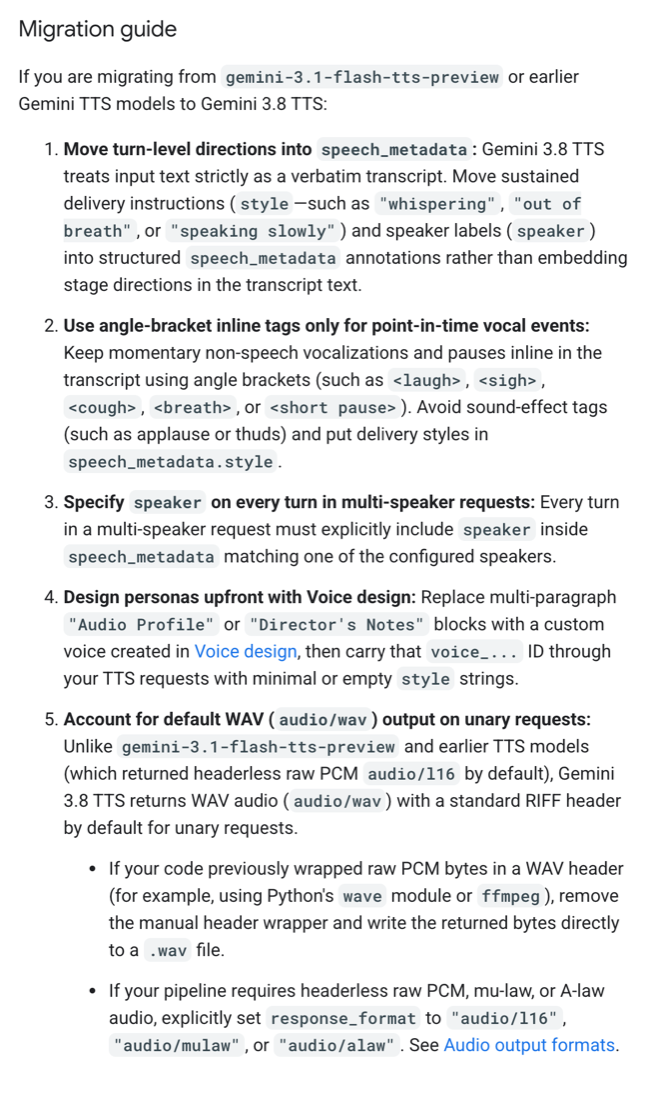
<p>문서상으로는 3.8 Flash와 3.8 Flash-Lite가 음성 복제를 지원하고 3.1과 2.5 Pro는 지원하지 않습니다. 직접 해 보니 문서와 다른 부분이 있었고, 제가 쓰던 로컬 음성 복제(Qwen3-TTS)와도 비교했습니다.</p>

<h2 id="tldr">결론부터</h2>

<ul>
  <li><strong>원본 음성과 동의 녹음은 같은 마이크, 같은 자리에서 녹음해야 합니다.</strong> 예전에 녹음해 둔 샘플에 동의 녹음만 새로 붙였더니 “다른 사람”이라며 거절됐습니다.</li>
  <li><strong>복제는 3.8 Flash로만 만들 수 있습니다.</strong> Flash-Lite를 지정하면 거절되지만, 만든 목소리는 Flash-Lite로도 읽힙니다. 문서상 미지원인 3.1도 읽었습니다.</li>
  <li><strong>복제한 목소리는 실제 녹음끼리만큼 원본과 닮았습니다</strong>(화자 유사도 0.92~0.94). 같은 녹음을 참조한 로컬 Qwen3-TTS도 비슷했습니다.</li>
  <li><strong>크게 갈린 건 쓸 수 있는 결과의 비율입니다.</strong> Gemini는 10개 모두 대본대로 읽었고, 로컬은 8개 중 4~7개만 쓸 수 있었습니다.</li>
  <li><strong>2인 대화를 한 번에 만드는 방식에는 넣을 수 없습니다.</strong> 대사마다 따로 만들어 이어 붙여야 합니다.</li>
</ul>

<p><img src="/assets/images/2026-09-27-gemini-tts-replication-intro.png" alt="Gemini API Voice replication 문서 첫 부분. POST /v1beta/voices로 짧은 음성에서 목소리를 복제하며, Gemini 3.8 Flash TTS와 3.8 Flash-Lite TTS 모두 지원한다는 문장과, 원본 음성과 동의 녹음을 검증해 voice ID를 받은 뒤 합성에 쓰는 흐름도" />
<em>voice-replication 문서 첫 부분(2026-09-27 캡처). 도식에는 합성 음성에 SynthID 워터마크가 들어간다고 적혀 있다</em></p>
<h2 id="replication-requirements">녹음 두 개가 필요합니다</h2>

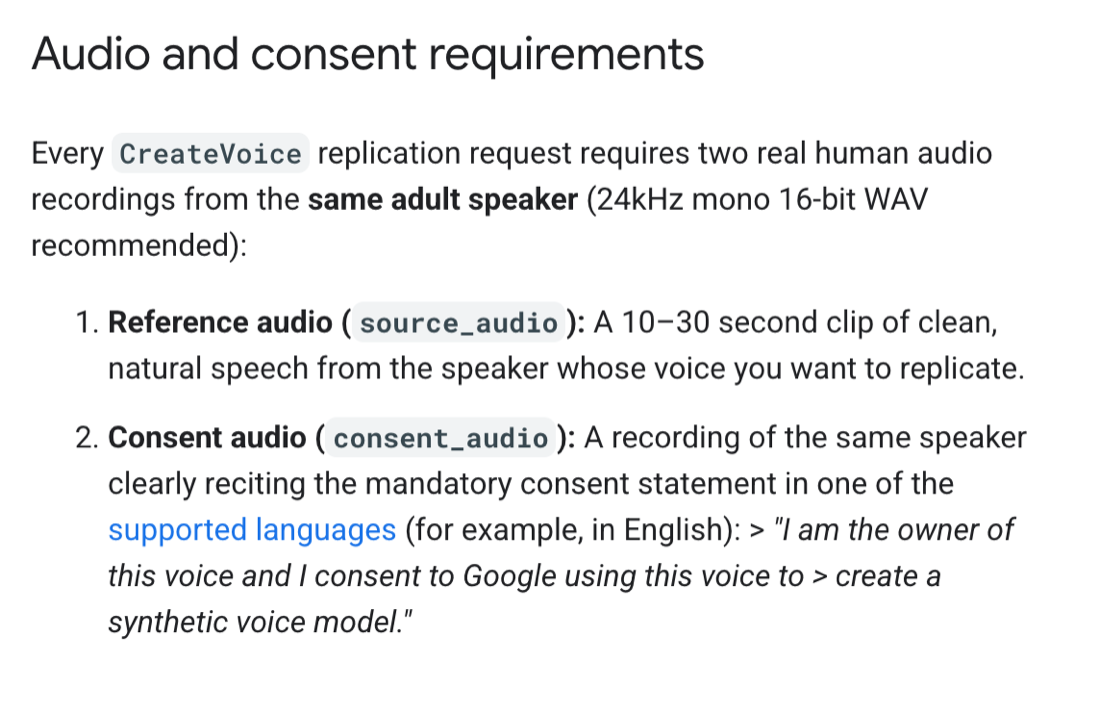
<ul>
  <li><strong>원본 음성</strong>: 복제할 사람의 자연스러운 말소리 10~30초</li>
  <li><strong>동의 녹음</strong>: 같은 사람이 정해진 동의 문장을 직접 읽은 녹음</li>
</ul>

<p>서버가 두 녹음이 같은 사람인지, 동의 문장을 정확히 읽었는지 확인한 뒤에야 목소리를 만들어 줍니다. 문서는 두 녹음을 같은 마이크, 같은 공간에서 하라고 권합니다. Google AI Studio에서 브라우저로 바로 녹음하고 들어 볼 수도 있습니다.</p>

<p><img src="/assets/images/2026-09-27-gemini-tts-replication-consent.png" alt="Voice replication 문서의 Audio and consent requirements 절. 10~30초 원본 음성과, 같은 화자가 동의 문장을 읽은 녹음이 필요하다는 내용" />
<em>voice-replication 문서의 Audio and consent requirements 절</em></p>

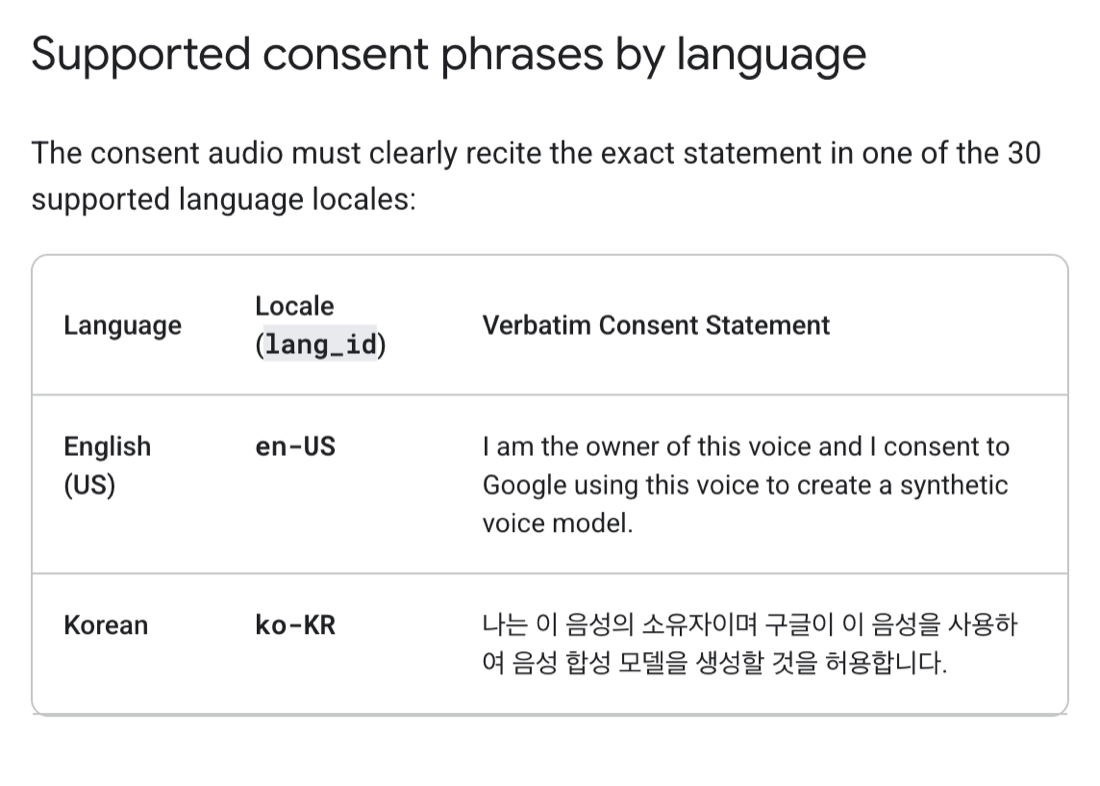
<p>동의 문장은 30개 언어를 지원하고, 한국어도 있습니다.</p>

<p><img src="/assets/images/2026-09-27-gemini-tts-replication-korean.png" alt="지원 언어별 동의 문장 표 중 영어와 한국어 행. 한국어 문장은 &quot;나는 이 음성의 소유자이며 구글이 이 음성을 사용하여 음성 합성 모델을 생성할 것을 허용합니다.&quot;" />
<em>Supported consent phrases by language 표에서 영어와 한국어 행만 남기고 나머지를 가렸다</em></p>
<p>복제한 목소리는 두 방식으로 보관합니다. 서버에 저장하면 프로젝트당 200개까지 1년간 쓸 수 있고, 저장하지 않으면 암호화된 <code class="language-plaintext highlighter-rouge">voicekey_...</code>를 받아 직접 보관하며 7일간 쓸 수 있습니다. 가격 페이지에서 복제 자체에 대한 별도 항목은 찾지 못했습니다.</p>

<h2 id="replication-mismatch">예전에 녹음한 샘플로는 거절됐습니다</h2>

<p>처음에는 로컬 음성 클론(Qwen3-TTS)용으로 예전에 녹음해 둔 23초짜리 샘플을 원본으로 쓰고, 동의 문장만 새로 녹음했습니다. 동의 문장은 판정 모델 두 개가 한 글자도 틀리지 않았다고 확인했는데도 거절됐습니다.</p>

<div class="language-text highlighter-rouge"><div class="highlight"><pre class="highlight"><code><table class="rouge-table"><tbody><tr><td class="rouge-gutter gl"><pre class="lineno">1
2
3
</pre></td><td class="rouge-code"><pre>Consent flow failed. ...
Voice mismatch detected. The speaker in the consent audio does not match
the speaker in the voice sample.
</pre></td></tr></tbody></table></code></pre></div></div>

<p>동의 녹음의 음량이 원본보다 12dB 작아서 맞춰 봤지만 결과는 같았습니다. <strong>원본 음성도 동의 녹음과 같은 마이크, 같은 자리에서 새로 녹음하자 4초 만에 통과했습니다.</strong> 같은 사람인데도 녹음 환경이 다르면 다른 사람으로 판정될 수 있습니다. 아래 화자 유사도에서도 예전 샘플과 새 녹음은 0.842로, 같은 자리에서 녹음한 두 파일(0.912)보다 낮았습니다.</p>

<p>테스트라서 서버에 저장하지 않는 방식(<code class="language-plaintext highlighter-rouge">store: false</code>)으로 만들었습니다. 이 방식은 7일 뒤 만료됩니다.</p>

<h2 id="replication-models">Flash-Lite로는 만들 수 없고, 3.1은 문서와 달리 읽었습니다</h2>

<p>복제를 만들 때 모델을 지정하는데, 모델마다 결과가 달랐습니다.</p>

<table class="compact">
  <thead>
    <tr>
      <th>모델</th>
      <th>복제 만들기</th>
      <th>만든 목소리로 읽기</th>
    </tr>
  </thead>
  <tbody>
    <tr>
      <td>3.8 Flash</td>
      <td>됨</td>
      <td>됨</td>
    </tr>
    <tr>
      <td>3.8 Flash-Lite</td>
      <td><strong>거절</strong>(“Voice Replication을 지원하지 않는다”)</td>
      <td>됨</td>
    </tr>
    <tr>
      <td>모델 지정 안 함</td>
      <td>됨(3.8 Flash로 만들어짐)</td>
      <td>-</td>
    </tr>
    <tr>
      <td>3.1 Flash</td>
      <td>-</td>
      <td><strong>됨</strong>(문서상 미지원)</td>
    </tr>
  </tbody>
</table>

<p>Flash-Lite를 지정하면 서버가 “모델을 빼면 기본 생성 모델로 만들고, 그 목소리는 어떤 TTS 모델에서도 쓸 수 있다”고 안내합니다. 실제로 그렇게 만든 목소리를 Flash-Lite로 읽으면 잘 됐습니다. 문서의 “Flash-Lite도 지원”은 <strong>읽기</strong> 쪽 이야기로 보입니다.</p>

<p>3.1도 복제 키를 받아 읽었습니다. 키를 조금이라도 바꾸면 “복제 키를 해석할 수 없다”며 거절하고, 목소리를 아예 빼도 400이 납니다. 키를 무시하고 기본 목소리로 읽은 것은 아닙니다. 다만 문서에 없는 동작이라 언제든 바뀔 수 있습니다.</p>

<h2 id="replication-listen">들어 보세요: 실제 목소리와 복제 목소리</h2>

<p>먼저 실제 녹음입니다. 복제에 쓴 원본 음성의 앞 10초만 잘랐습니다. 동의 문장 녹음은 공개하지 않습니다.</p>

<p><b>실제 녹음</b> (원본 음성 앞 10초)</p>
<audio controls="" preload="none" src="/assets/audio/2026-09-27-clone-real-excerpt.mp3" style="width:100%"></audio>

<p>아래는 모두 같은 문장을 복제한 목소리로 읽힌 것입니다. 모델마다 두 번씩 만들어 1회차를 실었습니다. 비교를 위해 파일마다 음량만 같은 수준으로 맞췄습니다.</p>

<blockquote>
  <p>오늘은 제 목소리를 복제해서 만든 음성을 비교해 보겠습니다. 같은 문장을 구글 제미나이와 로컬 모델로 각각 읽혀 봤는데요, 어느 쪽이 더 저처럼 들리는지 직접 들어 보시죠.</p>
</blockquote>

<p><b>3.8 Flash</b></p>
<audio controls="" preload="none" src="/assets/audio/2026-09-27-clone-38-flash.mp3" style="width:100%"></audio>

<p><b>3.8 Flash-Lite</b></p>
<audio controls="" preload="none" src="/assets/audio/2026-09-27-clone-38-lite.mp3" style="width:100%"></audio>

<p><b>3.1 Flash</b> (문서상 미지원)</p>
<audio controls="" preload="none" src="/assets/audio/2026-09-27-clone-31-flash.mp3" style="width:100%"></audio>

<p>로컬 Qwen3-TTS(맥북에서 생성)는 참조 녹음을 세 가지로 바꿔 만들었습니다. 예전에 녹음해 둔 두 샘플(My Voice 28.3초, My Voice 2 23.3초)과, Gemini에 쓴 것과 같은 새 원본입니다.</p>

<p><b>로컬 Qwen3-TTS ← 새 원본</b> (Gemini와 같은 참조)</p>
<audio controls="" preload="none" src="/assets/audio/2026-09-27-clone-local-qwen-new.mp3" style="width:100%"></audio>

<p><b>로컬 Qwen3-TTS ← My Voice</b> (예전 28초 샘플)</p>
<audio controls="" preload="none" src="/assets/audio/2026-09-27-clone-local-qwen-v1.mp3" style="width:100%"></audio>

<p><b>로컬 Qwen3-TTS ← My Voice 2</b> (예전 23초 샘플)</p>
<audio controls="" preload="none" src="/assets/audio/2026-09-27-clone-local-qwen.mp3" style="width:100%"></audio>

<p>화자 임베딩 모델(resemblyzer)로 실제 녹음과의 유사도를 측정했습니다. 1에 가까울수록 같은 사람이고, 다른 사람인 Charon을 대조군으로 넣었습니다. 모델마다 5개씩 만들었습니다.</p>

<link rel="stylesheet" href="/assets/css/gemini-tts-charts.css?v=2" />

<script src="/assets/js/gemini-tts-charts.js?v=4" defer=""></script>

<div class="gviz" data-viz="similarity"></div>

<details style="margin-bottom:1.25rem">
  <summary>표로 보기: 참조 녹음 세 가지와 비교한 전체 값</summary>

  <table class="compact">
    <thead>
      <tr>
        <th>음성</th>
        <th>새 원본과</th>
        <th>My Voice 2와</th>
        <th>My Voice와</th>
      </tr>
    </thead>
    <tbody>
      <tr>
        <td>실제 녹음: 동의 문장(새 원본과 같은 자리)</td>
        <td>0.912</td>
        <td>0.838</td>
        <td>0.850</td>
      </tr>
      <tr>
        <td>실제 녹음: My Voice 2 샘플</td>
        <td>0.842</td>
        <td>-</td>
        <td>0.844</td>
      </tr>
      <tr>
        <td>실제 녹음: My Voice 샘플</td>
        <td>0.865</td>
        <td>0.844</td>
        <td>-</td>
      </tr>
      <tr>
        <td><strong>Gemini 3.8 Flash ← 새 원본</strong> ×5</td>
        <td><strong>0.917~0.936</strong> (평균 0.927)</td>
        <td>0.78~0.82</td>
        <td>0.82~0.87</td>
      </tr>
      <tr>
        <td><strong>Gemini 3.8 Flash-Lite ← 새 원본</strong> ×5</td>
        <td><strong>0.892~0.936</strong> (평균 0.920)</td>
        <td>0.79~0.83</td>
        <td>0.81~0.85</td>
      </tr>
      <tr>
        <td>Gemini 3.1 Flash ← 새 원본 ×2</td>
        <td>0.843, 0.855</td>
        <td>0.77~0.82</td>
        <td>0.78~0.79</td>
      </tr>
      <tr>
        <td><strong>로컬 Qwen3-TTS ← 새 원본</strong> ×5</td>
        <td><strong>0.929~0.956</strong> (평균 0.943)</td>
        <td>0.81~0.83</td>
        <td>0.79~0.82</td>
      </tr>
      <tr>
        <td>로컬 Qwen3-TTS ← My Voice 2 ×4</td>
        <td>0.80~0.87</td>
        <td><strong>0.80~0.91</strong> (평균 0.873)</td>
        <td>0.73~0.80</td>
      </tr>
      <tr>
        <td>로컬 Qwen3-TTS ← My Voice ×7</td>
        <td>0.83~0.88</td>
        <td>0.81~0.84</td>
        <td><strong>0.85~0.92</strong> (평균 0.880)</td>
      </tr>
      <tr>
        <td>대조: Charon</td>
        <td>0.60~0.63</td>
        <td>0.65~0.66</td>
        <td>0.65</td>
      </tr>
    </tbody>
  </table>

  <p><em>코사인 유사도다. 굵게 표시한 칸이 자기 참조 녹음과의 비교다. 로컬은 쓸 수 있는 후보만 셌다(아래)</em></p>

</details>

<ul>
  <li><strong>복제한 목소리는 모두 자기 참조 녹음과 가장 닮았습니다.</strong> 로컬도 Gemini도 참조를 바꾸면 결과가 그쪽으로 따라갑니다.</li>
  <li><strong>같은 참조(새 원본)로 비교하면 셋 다 0.92~0.94 안팎</strong>입니다. 실제 녹음끼리(0.912)보다 높은 값도 나왔는데, 이 지표는 목소리뿐 아니라 마이크와 방 소리까지 닮은 것을 점수로 주는 것으로 보입니다. 그래서 0.91을 넘는 구간 안에서 순위를 매기지는 않았습니다.</li>
  <li><strong>3.1은 복제 키를 쓰지만 덜 닮았습니다</strong>(0.84~0.86). 그래도 Charon(0.6 안팎)과는 확연히 다릅니다.</li>
</ul>

<p>유사도보다 크게 갈린 건 <strong>쓸 수 있는 결과의 비율</strong>이었습니다. 모든 후보의 끝부분을 받아써 확인했습니다.</p>

<div class="gviz" data-viz="usable"></div>

<details style="margin-bottom:1.25rem">
  <summary>표로 보기: 불량 내역</summary>

  <table class="compact">
    <thead>
      <tr>
        <th> </th>
        <th>대본대로 끝까지 읽은 비율</th>
        <th>불량</th>
      </tr>
    </thead>
    <tbody>
      <tr>
        <td>Gemini 3.8 Flash</td>
        <td>5/5</td>
        <td>없음</td>
      </tr>
      <tr>
        <td>Gemini 3.8 Flash-Lite</td>
        <td>5/5</td>
        <td>없음</td>
      </tr>
      <tr>
        <td>로컬 Qwen3-TTS ← 새 원본</td>
        <td>5/8</td>
        <td>버리는 문장이 남음 3(그중 1개는 끝부분도 다르게 읽음)</td>
      </tr>
      <tr>
        <td>로컬 Qwen3-TTS ← My Voice</td>
        <td>7/8</td>
        <td>버리는 문장이 남음 1</td>
      </tr>
      <tr>
        <td>로컬 Qwen3-TTS ← My Voice 2</td>
        <td>4/8</td>
        <td>버리는 문장이 남음 2, 끝 음절 잘림 2</td>
      </tr>
    </tbody>
  </table>

  <p><em>로컬 도구는 끝 음절이 잘리는 문제를 피하려고 뒤에 버리는 문장(“감사합니다”)을 붙여 만든 뒤 잘라낸다. 그 제거가 실패하거나 끝이 잘린 것을 불량으로 셌다</em></p>

</details>

<p>로컬은 여러 개를 만들어 골라내야 하고, Gemini는 한 번에 쓸 수 있는 결과가 나왔습니다. 실린 로컬 샘플은 기본 시드 순서대로 봤을 때 첫 번째로 정상인 후보입니다.</p>

<p>음 높이(F0)도 비교해 봤는데, Charon의 음 높이 중앙값(115.9Hz)이 실제 목소리(112.6Hz)와 비슷해서 같은 사람인지 가르는 데는 쓸 수 없었습니다.</p>

<h2 id="replication-limit">팟캐스트에 넣으려면 대사별로 만들어야 합니다</h2>

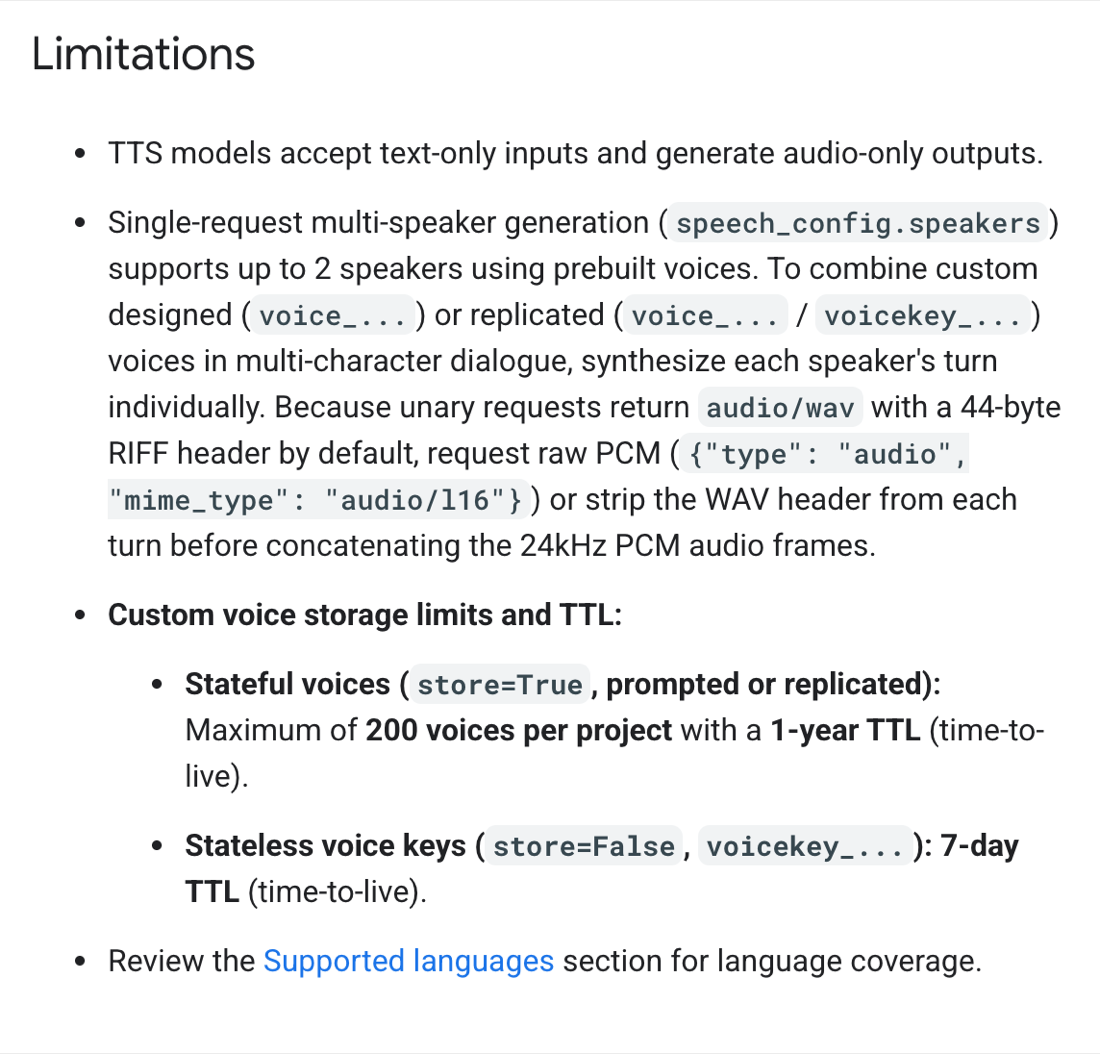
<p>문서의 Limitations 절 둘째 항목에 따르면 <strong>한 요청으로 두 사람 대화를 만드는 기능은 기본 제공 목소리 2명까지만 됩니다.</strong></p>

<p><img src="/assets/images/2026-09-27-gemini-tts-limitations.png" alt="Gemini TTS 문서 Limitations 절. 한 요청의 다화자 생성은 prebuilt 음성 2명까지이고, 설계하거나 복제한 음성을 대화에 넣으려면 대사마다 따로 합성하라는 내용" />
<em>speech-generation 문서의 Limitations 절(2026-09-27 캡처)</em></p>
<p>실제로 진행자에 복제 키, 게스트에 Charon을 넣어 한 번에 요청하자 400 오류가 났습니다.</p>

<p>그래서 진행자(내 목소리)와 게스트(Charon)를 대사마다 따로 만들고 0.35초 간격으로 이어 붙였습니다. 6줄을 동시에 요청해 6.4초 만에 34초짜리 대화가 나왔습니다.</p>

<p><b>2인 대화</b> - 진행자 내 목소리(3.8 Flash 복제), 게스트 Charon</p>
<audio controls="" preload="none" src="/assets/audio/2026-09-27-clone-dialog.mp3" style="width:100%"></audio>

<p>한 번에 만드는 방식과 달리 대사 사이 간격은 0.35초로 고정이고, 대사마다 따로 만들었으니 앞 대사의 말투를 이어받지도 않습니다. 제 팟캐스트 스킬에 넣으려면 gemini 경로에 대사별 합성 모드를 따로 만들어야 합니다.</p>

<p>한 가지 더 볼 것은 <strong>무료 등급의 데이터 사용</strong>입니다. TTS 모델 가격표에서 무료 등급은 “Used to improve our products”가 Yes로 적혀 있습니다. 복제용으로 올리는 녹음에도 같은 규정이 적용되는지는 문서에서 찾지 못했습니다. 적용된다면 내 목소리 녹음은 유료 등급 키로 올리는 편이 좋겠습니다.</p>

<h2 id="caveats">읽을 때 감안할 점</h2>

<ul>
  <li><strong>한 사람, 한 번의 녹음입니다.</strong> 녹음 환경을 바꿔 가며 몇 번까지 거절되는지는 시험하지 않았습니다.</li>
  <li><strong>닮은 정도는 화자 임베딩 모델(resemblyzer) 하나로 측정했습니다.</strong> 마이크와 방 소리까지 점수에 섞이는 것으로 보여, 0.91 이상에서는 순위를 매기지 않았습니다.</li>
  <li><strong>복제 키는 테스트용</strong>(<code class="language-plaintext highlighter-rouge">store: false</code>, 7일)으로 만들었습니다. 서버에 저장하는 방식은 시험하지 않았습니다.</li>
</ul>

<h2 id="references">참고 자료</h2>

<ul>
  <li><a href="https://ai.google.dev/gemini-api/docs/voice-replication">Gemini API - Voice replication</a></li>
  <li><a href="https://ai.google.dev/gemini-api/docs/speech-generation">Gemini API - Speech generation (text-to-speech)</a></li>
  <li><a href="https://ai.google.dev/gemini-api/docs/pricing">Gemini API - Pricing</a></li>
  <li><a href="/2026/09/27/gemini-tts-podcast-four-models-compared.html">1편: Gemini TTS 네 가지로 같은 팟캐스트를 만들어 봤습니다</a></li>
  <li><a href="/2026/09/27/gemini-3-8-tts-features-tested.html">3편: Gemini 3.8 TTS가 내세운 기능을 시험해 봤습니다</a></li>
</ul>]]></content><author><name>김준호</name><email>junho85@gmail.com</email></author><category term="TTS" /><category term="Gemini" /><category term="Voice replication" /><category term="음성 복제" /><category term="Qwen3-TTS" /><category term="음성 합성" /><summary type="html"><![CDATA[Gemini TTS 3.8 시험기 3편 중 2편입니다. 1편 네 모델 비교 · 2편 내 목소리 복제 · 3편 3.8 기능 시험]]></summary><media:thumbnail xmlns:media="http://search.yahoo.com/mrss/" url="https://dev.junho85.pe.kr/assets/images/2026-09-27-gemini-tts-replication-intro.png" /><media:content medium="image" url="https://dev.junho85.pe.kr/assets/images/2026-09-27-gemini-tts-replication-intro.png" xmlns:media="http://search.yahoo.com/mrss/" /></entry><entry><title type="html">Gemini TTS 네 가지로 같은 팟캐스트를 만들어 봤습니다 - 3.8 Flash, 3.8 Flash-Lite, 3.1 Flash, 2.5 Pro</title><link href="https://dev.junho85.pe.kr/2026/09/27/gemini-tts-podcast-four-models-compared.html" rel="alternate" type="text/html" title="Gemini TTS 네 가지로 같은 팟캐스트를 만들어 봤습니다 - 3.8 Flash, 3.8 Flash-Lite, 3.1 Flash, 2.5 Pro" /><published>2026-09-27T00:00:00+09:00</published><updated>2026-09-27T00:00:00+09:00</updated><id>https://dev.junho85.pe.kr/2026/09/27/gemini-tts-podcast-four-models-compared</id><content type="html" xml:base="https://dev.junho85.pe.kr/2026/09/27/gemini-tts-podcast-four-models-compared.html"><![CDATA[<blockquote class="prompt-info">
  <p>Gemini TTS 3.8 시험기 3편 중 1편입니다. <strong>1편 네 모델 비교</strong> · <a href="/2026/09/27/gemini-tts-voice-replication.html">2편 내 목소리 복제</a> · <a href="/2026/09/27/gemini-3-8-tts-features-tested.html">3편 3.8 기능 시험</a></p>
</blockquote>

<p>2인 대화 팟캐스트를 만드는 스킬을 쓰고 있습니다. 대본을 쓰면 Gemini 다화자 TTS가 진행자와 게스트 목소리로 읽어 주는 방식입니다. 기본 모델을 <code class="language-plaintext highlighter-rouge">gemini-3.1-flash-tts-preview</code>에서 새로 나온 <code class="language-plaintext highlighter-rouge">gemini-3.8-flash-tts</code>로 올리면서, 같은 대본을 네 모델로 만들어 비교했습니다.</p>

<p>요약하면 이렇습니다. <strong>3.8은 올해 말까지 3.1의 절반 이하 가격이고, 짧은 샘플의 품질은 구별되지 않았습니다. 다만 모델 이름만 바꾸면 요청이 전부 실패하고, 영어로 적은 고유명사를 엉뚱한 단어로 읽는 경우가 있었습니다.</strong> 청크 사이 목소리 흔들림은 진행자 쪽만 나아졌습니다. 내 목소리 복제는 <a href="/2026/09/27/gemini-tts-voice-replication.html">2편</a>, 문서가 내세운 나머지 기능은 <a href="/2026/09/27/gemini-3-8-tts-features-tested.html">3편</a>에 따로 정리했습니다.</p>

<h2 id="tldr">결론부터</h2>

<table class="compact">
  <thead>
    <tr>
      <th> </th>
      <th><strong>3.8 Flash</strong></th>
      <th>3.8 Flash-Lite</th>
      <th>3.1 Flash</th>
      <th>2.5 Pro</th>
    </tr>
  </thead>
  <tbody>
    <tr>
      <td>상태</td>
      <td>현재</td>
      <td>현재</td>
      <td>이전</td>
      <td>이전</td>
    </tr>
    <tr>
      <td>출력 단가(1M 토큰)</td>
      <td><strong>$9</strong> (2027년 $18)</td>
      <td>$6 (2027년 $12)</td>
      <td>$20</td>
      <td>$20</td>
    </tr>
    <tr>
      <td>품질(10점)</td>
      <td>8/9/10/8~9</td>
      <td>7~8/9/10/8</td>
      <td>8/9/10/8</td>
      <td>-</td>
    </tr>
    <tr>
      <td>PostgreSQL 오독</td>
      <td><strong>2/3</strong></td>
      <td>0/3</td>
      <td>0/2</td>
      <td>-</td>
    </tr>
    <tr>
      <td>청크 간 편차</td>
      <td>8% / 16%</td>
      <td>6% / 13%</td>
      <td>12% / 15%</td>
      <td><strong>6% / 7%</strong></td>
    </tr>
    <tr>
      <td>목소리 복제(<a href="/2026/09/27/gemini-tts-voice-replication.html">2편</a>)</td>
      <td>만들기·읽기</td>
      <td>읽기만</td>
      <td>읽기만(문서상 미지원)</td>
      <td>안 됨</td>
    </tr>
  </tbody>
</table>

<p><em>모델 ID는 <code class="language-plaintext highlighter-rouge">gemini-3.8-flash-tts</code>, <code class="language-plaintext highlighter-rouge">gemini-3.8-flash-lite-tts</code>, <code class="language-plaintext highlighter-rouge">gemini-3.1-flash-tts-preview</code>, <code class="language-plaintext highlighter-rouge">gemini-2.5-pro-preview-tts</code>다. 품질은 자연스러움/발음 명료도/화자 구분/대화 호흡, PostgreSQL 오독은 다른 단어로 읽은 횟수, 청크 간 편차는 진행자/게스트의 음 높이가 청크끼리 벌어진 정도(3회 평균)다</em></p>

<ul>
  <li><strong>가격이 가장 크게 달라졌습니다.</strong> 3.8 Flash는 3.1보다 출력 단가가 55% 싸고, 2026년이 끝나 두 배로 올라도 조금 쌉니다.</li>
  <li><strong>API가 호환되지 않게 바뀌었습니다.</strong> 모델 이름만 바꾸면 400 오류가 나고, 기본 출력이 WAV로 바뀌어 예전 코드로 이어 붙이면 청크마다 “딱” 소리가 납니다.</li>
  <li><strong>영어 고유명사는 한글로 적어야 합니다.</strong> 3.8 Flash가 “PostgreSQL은”을 「포스트지피티」 「포스트클라우드」로 읽었고, 대본에 <code class="language-plaintext highlighter-rouge">포스트그레스큐엘</code>로 적자 3회 모두 제대로 읽었습니다.</li>
  <li><strong>목소리 일관성은 가장 오래된 2.5 Pro가 제일 좋았습니다.</strong> 3.8 Flash는 3.1보다 진행자가 안정됐지만 남성 게스트는 비슷하게 흔들렸습니다. 기본 목소리 Leda와 Charon은 미국 영어 목소리인데, 한국어 목소리로 바꾼 결과는 <a href="/2026/09/27/gemini-3-8-tts-features-tested.html#korean-voices">3편</a>에 있습니다.</li>
</ul>

<h2 id="listen">직접 들어 보세요</h2>

<p>같은 대본(32줄, 1,387자)을 네 모델로 만들었습니다. 대본을 300자 안팎의 청크 네 개로 나눠 따로 만들고 0.25초 간격으로 이어 붙였습니다. 목소리는 모두 진행자 Leda, 게스트 Charon입니다.</p>

<p>골라서 싣지 않으려고 <strong>세 번 만든 것 중 모든 모델의 첫 번째 결과물</strong>을 그대로 올렸습니다. 3.1 Flash는 공교롭게 첫 번째가 세 번 중 청크 간 편차가 가장 컸던 회차입니다.</p>

<p><b>3.8 Flash</b> (3분 10초)</p>
<audio controls="" preload="none" src="/assets/audio/2026-09-27-podcast-38-flash.mp3" style="width:100%"></audio>

<p><b>3.8 Flash-Lite</b> (2분 58초)</p>
<audio controls="" preload="none" src="/assets/audio/2026-09-27-podcast-38-lite.mp3" style="width:100%"></audio>

<p><b>3.1 Flash</b> (3분 9초)</p>
<audio controls="" preload="none" src="/assets/audio/2026-09-27-podcast-31-flash.mp3" style="width:100%"></audio>

<p><b>2.5 Pro</b> (2분 46초)</p>
<audio controls="" preload="none" src="/assets/audio/2026-09-27-podcast-25-pro.mp3" style="width:100%"></audio>

<p>청크가 바뀌는 자리는 모델마다 몇 초씩 다르지만 대략 45초, 1분 25초, 2분 무렵입니다. 3.1 Flash는 두 번째 청크(49초~1분 31초)에서 두 사람 목소리가 모두 높아집니다. 이 청크의 음 높이 중앙값이 진행자 268Hz, 게스트 139Hz로, 다른 청크 평균보다 각각 약 40Hz, 25Hz 높았습니다.</p>

<details>
<summary><b>읽힌 대본</b> - 32줄, 지난번 실시간 전사 비교 글 내용</summary>
<p><b>진행자</b> 안녕하세요! 오늘은 실시간 음성 인식 여섯 가지를 같은 녹음으로 측정해 본 이야기를 나눠 보려고 해요.</p>
<p><b>게스트</b> 네, 반갑습니다. 한마디로 요약하면 빠른 방식일수록 고유명사를 잘못 적었다는 겁니다.</p>
<p><b>진행자</b> 오, 흥미로운데요. 어떤 녹음으로 측정하셨어요?</p>
<p><b>게스트</b> 팔십구 초짜리 한국어 면접 답변을 하나 녹음했어요. 틀리기 쉬운 고유명사와 숫자를 일부러 넣었고요.</p>
<p><b>진행자</b> 틀리기 쉬운 걸 일부러 넣었다니, 꽤 짓궂은 시험이네요.</p>
<p><b>게스트</b> 그렇죠. 말을 정정하는 대목도 있고, 추임새도 있고, 빠르게 읽는 구간도 있어요. 실제 면접처럼요.</p>
<p><b>진행자</b> 그럼 여섯 가지 방식은 어떻게 나뉘나요?</p>
<p><b>게스트</b> 스트리밍 두 가지, 오 초씩 잘라서 넣는 방식 두 가지, 그리고 녹음을 통째로 넣는 방식 두 가지예요.</p>
<p><b>진행자</b> 스트리밍부터 들어 볼까요? 제일 빠른 건 어디였어요?</p>
<p><b>게스트</b> 딥그램이 일 점 일육 초 만에 첫 글자를 띄웠어요. 다만 그건 아직 바뀔 수 있는 중간 결과였고요.</p>
<p><b>진행자</b> 중간 결과라는 게 정확히 뭔가요?</p>
<p><b>게스트</b> 확정하기 전에 지금까지 들은 만큼 추측해서 먼저 보여 주는 거예요. 말이 이어지면 계속 고쳐집니다.</p>
<p><b>진행자</b> 그럼 화면에서 글자가 바뀌는 게 보이겠네요.</p>
<p><b>게스트</b> 맞아요. 맥엔드라고 떴다가 뒷말이 들어오면서 백엔드로 바뀌는 식이에요. 오히려 확정이 더 나빠진 경우도 있었고요.</p>
<p><b>진행자</b> 재밌네요. 다른 스트리밍 서비스는요?</p>
<p><b>게스트</b> 카르테시아는 문장을 어디서 끊을지 제가 직접 정해야 했어요. 한국어 모델로는 서버가 알아서 끊어 주는 기능이 거절됐거든요.</p>
<p><b>진행자</b> 그럼 이번엔 오 초 청킹 이야기를 해 볼까요?</p>
<p><b>게스트</b> 오디오를 쌓다가 무음이 나오면 자르고, 오 초를 넘기면 가장 조용한 지점을 찾아 자르는 방식이에요. 팔십구 초가 스물세 조각으로 나뉘었습니다.</p>
<p><b>진행자</b> 조각으로 잘라도 정확도는 괜찮았나요?</p>
<p><b>게스트</b> 포스트그레스큐엘은 네 가지 모두 맞게 적었어요. 그런데 라이브킷은 통째로 넣은 큐웬 하나만 맞혔습니다.</p>
<p><b>진행자</b> 통째로 넣으면 역시 더 잘 맞히는군요. 대신 느리겠죠?</p>
<p><b>게스트</b> 네, 처리 자체는 사 초에서 팔 초면 끝나는데, 말이 다 끝나야 시작할 수 있어서 첫 글자가 구십 초가 넘어서야 나와요.</p>
<p><b>진행자</b> 아, 그럼 실시간 자막으로는 못 쓰겠네요.</p>
<p><b>게스트</b> 그렇죠. 그래서 둘을 같이 쓰는 방법을 권해요. 말하는 동안에는 스트리밍으로 보여 주고, 끝나면 전체를 한 번 더 돌려서 바꾸는 거예요.</p>
<p><b>진행자</b> 좋은 방법이네요. 혹시 모든 방식이 다 틀린 단어도 있었나요?</p>
<p><b>게스트</b> 무음이라는 단어를 여섯 중 다섯이 모음으로 적었어요. 발음이 거의 같아서 문맥으로만 구별할 수 있는 단어거든요.</p>
<p><b>진행자</b> 문맥을 넓게 보면 풀릴 줄 알았는데 아니었군요.</p>
<p><b>게스트</b> 네, 녹음 전체를 들은 모델도 틀렸어요. 문맥을 늘리는 것만으로는 해결되지 않는 부분이었습니다.</p>
<p><b>진행자</b> 마지막으로 비용 이야기도 해 주세요.</p>
<p><b>게스트</b> 카르테시아는 무료로 한 달에 다섯 시간 남짓 쓸 수 있고, 딥그램은 가입하면 이백 달러 크레딧을 줘요. 로컬 모델은 내려받기만 하면 비용이 들지 않고요.</p>
<p><b>진행자</b> 오늘 이야기 정말 유익했습니다. 들어 주셔서 감사합니다!</p>
<p><b>게스트</b> 감사합니다. 다음에 또 만나요!</p>
</details>

<p>대본 내용은 <a href="/2026/09/23/realtime-stt-six-ways-compared.html">실시간 전사 여섯 가지를 비교한 글</a>을 대화로 풀어 쓴 것입니다. 대본에는 이미 고유명사를 한글로 적어 두었습니다(<code class="language-plaintext highlighter-rouge">포스트그레스큐엘</code>, <code class="language-plaintext highlighter-rouge">라이브킷</code>). 이유는 <a href="#proper-nouns">아래</a>에 있습니다.</p>

<h2 id="setup">어떻게 비교했나</h2>

<p>모두 2026-09-27에 Gemini API로 만들었습니다. 음성은 24kHz 모노이고, 한 번 호출하면 두 사람의 대화가 한 파일로 나옵니다.</p>

<table class="compact">
  <thead>
    <tr>
      <th>비교</th>
      <th>대본</th>
      <th>횟수</th>
      <th>판정</th>
    </tr>
  </thead>
  <tbody>
    <tr>
      <td>품질</td>
      <td>6줄, 약 40초</td>
      <td>3.8 3회, Lite 3회, 3.1 2회</td>
      <td>모델을 가리고 <code class="language-plaintext highlighter-rouge">gemini-3.5-flash</code>로 채점</td>
    </tr>
    <tr>
      <td>영어 고유명사</td>
      <td>15줄, 약 1분 30초</td>
      <td>모델별 2~3회</td>
      <td><code class="language-plaintext highlighter-rouge">gemini-3.5-flash</code>·<code class="language-plaintext highlighter-rouge">gemini-3.7-flash</code> 두 모델로 받아쓰기</td>
    </tr>
    <tr>
      <td>숫자와 퍼센트</td>
      <td>5줄, 약 17초</td>
      <td>모델별 3회</td>
      <td>같은 두 모델로 받아쓰기</td>
    </tr>
    <tr>
      <td>목소리 일관성</td>
      <td>32줄, 약 3분</td>
      <td>모델별 3회</td>
      <td>청크별 음 높이 측정</td>
    </tr>
  </tbody>
</table>

<p>듣고 판정하는 일은 사람 대신 Gemini 음성 인식 모델에 맡겼습니다. 판정 모델도 잘못 들을 수 있어서 받아쓰기는 두 모델로 따로 받았습니다. 들린 음절까지 똑같지는 않은 경우가 있었지만, 결론으로 쓴 <strong>「원래 단어로 알아볼 수 있는가, 다른 단어인가」에서는 두 모델이 모두 일치</strong>했습니다. 갈린 칸은 표에 함께 적었습니다.</p>

<h2 id="api-change">3.8은 API가 바뀌었습니다</h2>

<p>스킬의 모델 이름만 <code class="language-plaintext highlighter-rouge">gemini-3.8-flash-tts</code>로 바꾸고 돌리자 바로 거절됐습니다.</p>

<div class="language-text highlighter-rouge"><div class="highlight"><pre class="highlight"><code><table class="rouge-table"><tbody><tr><td class="rouge-gutter gl"><pre class="lineno">1
2
3
</pre></td><td class="rouge-code"><pre>HTTP 400 INVALID_ARGUMENT
Multi-speaker generation requests must specify speech_metadata.speaker
for each text part in the contents.
</pre></td></tr></tbody></table></code></pre></div></div>

<p>3.8은 호출 방식이 통째로 달라졌습니다.</p>

<table class="compact">
  <thead>
    <tr>
      <th> </th>
      <th>3.8</th>
      <th>3.1 이전</th>
    </tr>
  </thead>
  <tbody>
    <tr>
      <td>엔드포인트</td>
      <td><code class="language-plaintext highlighter-rouge">/v1beta/interactions</code></td>
      <td><code class="language-plaintext highlighter-rouge">models/{model}:generateContent</code></td>
    </tr>
    <tr>
      <td>화자 지정</td>
      <td>대사마다 <code class="language-plaintext highlighter-rouge">speech_metadata.speaker</code> 필수</td>
      <td>대본 텍스트에 <code class="language-plaintext highlighter-rouge">진행자:</code>를 붙인다</td>
    </tr>
    <tr>
      <td>입력 텍스트</td>
      <td><strong>적힌 글자를 그대로 읽는다.</strong> 톤은 <code class="language-plaintext highlighter-rouge">style</code> 필드로</td>
      <td>안내문, 연기 지시를 섞어도 된다</td>
    </tr>
    <tr>
      <td>기본 출력</td>
      <td><strong>WAV(44바이트 RIFF 헤더 포함)</strong></td>
      <td>헤더 없는 raw PCM(<code class="language-plaintext highlighter-rouge">audio/l16</code>)</td>
    </tr>
  </tbody>
</table>

<details style="margin-bottom:1.25rem">
  <summary>문서 원문: Migration guide (스크린샷)</summary>

  <p><img src="/assets/images/2026-09-27-gemini-tts-migration.png" alt="Gemini 3.8 TTS 마이그레이션 가이드. speech_metadata로 지시 옮기기, 인라인 태그, 대사마다 speaker 지정, Voice design, 기본 WAV 출력 다섯 항목" />
<em>speech-generation 문서의 Migration guide 절(2026-09-27 캡처, 문서 최종 수정 2026-09-24). 5번이 기본 출력 변경이다</em></p>
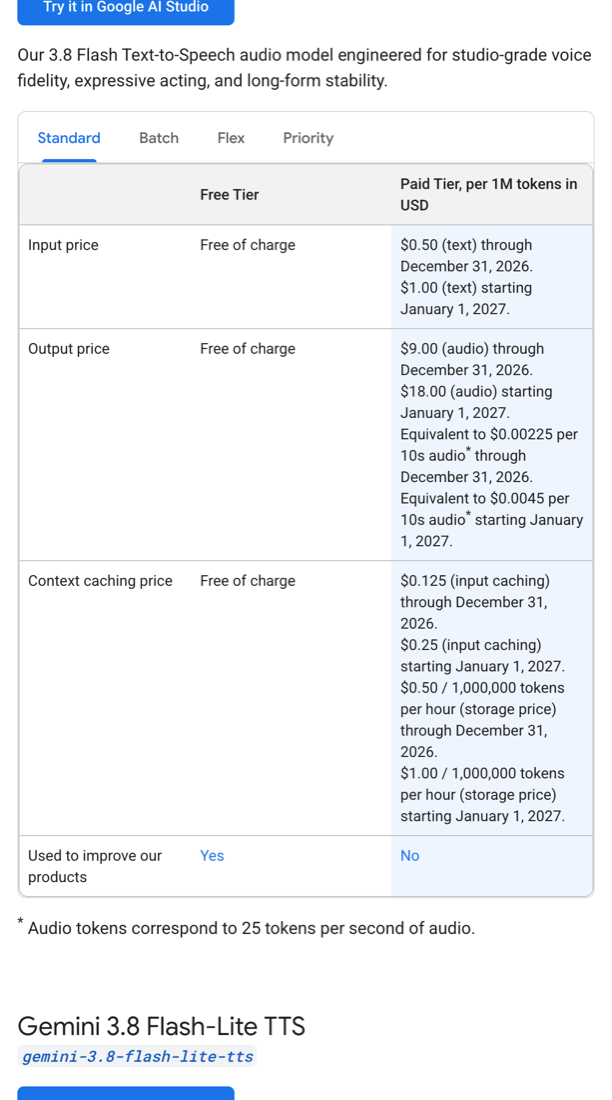
</details>

<p>3.8 요청은 이렇게 생겼습니다. 대사 하나가 <code class="language-plaintext highlighter-rouge">content</code> 항목 하나이고, 누가 말하는지를 <code class="language-plaintext highlighter-rouge">annotations</code>에 답니다.</p>

<div class="language-json highlighter-rouge"><div class="highlight"><pre class="highlight"><code><table class="rouge-table"><tbody><tr><td class="rouge-gutter gl"><pre class="lineno">1
2
3
4
5
6
7
8
9
10
11
12
13
14
</pre></td><td class="rouge-code"><pre><span class="p">{</span><span class="w">
  </span><span class="nl">"model"</span><span class="p">:</span><span class="w"> </span><span class="s2">"gemini-3.8-flash-tts"</span><span class="p">,</span><span class="w">
  </span><span class="nl">"input"</span><span class="p">:</span><span class="w"> </span><span class="p">[{</span><span class="nl">"type"</span><span class="p">:</span><span class="w"> </span><span class="s2">"user_input"</span><span class="p">,</span><span class="w"> </span><span class="nl">"content"</span><span class="p">:</span><span class="w"> </span><span class="p">[</span><span class="w">
    </span><span class="p">{</span><span class="nl">"type"</span><span class="p">:</span><span class="w"> </span><span class="s2">"text"</span><span class="p">,</span><span class="w"> </span><span class="nl">"text"</span><span class="p">:</span><span class="w"> </span><span class="s2">"안녕하세요! 오늘은 ..."</span><span class="p">,</span><span class="w">
     </span><span class="nl">"annotations"</span><span class="p">:</span><span class="w"> </span><span class="p">[{</span><span class="nl">"type"</span><span class="p">:</span><span class="w"> </span><span class="s2">"speech_metadata"</span><span class="p">,</span><span class="w"> </span><span class="nl">"speaker"</span><span class="p">:</span><span class="w"> </span><span class="s2">"진행자"</span><span class="p">}]},</span><span class="w">
    </span><span class="p">{</span><span class="nl">"type"</span><span class="p">:</span><span class="w"> </span><span class="s2">"text"</span><span class="p">,</span><span class="w"> </span><span class="nl">"text"</span><span class="p">:</span><span class="w"> </span><span class="s2">"네, 반갑습니다. ..."</span><span class="p">,</span><span class="w">
     </span><span class="nl">"annotations"</span><span class="p">:</span><span class="w"> </span><span class="p">[{</span><span class="nl">"type"</span><span class="p">:</span><span class="w"> </span><span class="s2">"speech_metadata"</span><span class="p">,</span><span class="w"> </span><span class="nl">"speaker"</span><span class="p">:</span><span class="w"> </span><span class="s2">"분석가"</span><span class="p">}]}</span><span class="w">
  </span><span class="p">]}],</span><span class="w">
  </span><span class="nl">"response_format"</span><span class="p">:</span><span class="w"> </span><span class="p">{</span><span class="nl">"type"</span><span class="p">:</span><span class="w"> </span><span class="s2">"audio"</span><span class="p">,</span><span class="w"> </span><span class="nl">"mime_type"</span><span class="p">:</span><span class="w"> </span><span class="s2">"audio/l16"</span><span class="p">,</span><span class="w"> </span><span class="nl">"sample_rate"</span><span class="p">:</span><span class="w"> </span><span class="mi">24000</span><span class="p">},</span><span class="w">
  </span><span class="nl">"generation_config"</span><span class="p">:</span><span class="w"> </span><span class="p">{</span><span class="nl">"speech_config"</span><span class="p">:</span><span class="w"> </span><span class="p">{</span><span class="nl">"mode"</span><span class="p">:</span><span class="w"> </span><span class="s2">"conversational"</span><span class="p">,</span><span class="w"> </span><span class="nl">"speakers"</span><span class="p">:</span><span class="w"> </span><span class="p">[</span><span class="w">
    </span><span class="p">{</span><span class="nl">"speaker"</span><span class="p">:</span><span class="w"> </span><span class="s2">"진행자"</span><span class="p">,</span><span class="w"> </span><span class="nl">"voice"</span><span class="p">:</span><span class="w"> </span><span class="s2">"Leda"</span><span class="p">},</span><span class="w">
    </span><span class="p">{</span><span class="nl">"speaker"</span><span class="p">:</span><span class="w"> </span><span class="s2">"분석가"</span><span class="p">,</span><span class="w"> </span><span class="nl">"voice"</span><span class="p">:</span><span class="w"> </span><span class="s2">"Charon"</span><span class="p">}</span><span class="w">
  </span><span class="p">]}}</span><span class="w">
</span><span class="p">}</span><span class="w">
</span></pre></td></tr></tbody></table></code></pre></div></div>

<h3 id="wav-header">기본 WAV를 모르고 이어 붙이면 청크마다 “딱” 소리가 납니다</h3>

<p>스킬은 받은 바이트를 raw PCM으로 보고 WAV 헤더를 씌운 뒤 mp3로 바꿉니다. 3.8의 기본 응답은 이미 WAV라서 헤더가 두 번 붙고, <strong>안쪽 헤더 44바이트가 소리로 재생됩니다.</strong> 그 상태로 파일 앞 10ms를 측정해 보니 최대 진폭이 <strong>28,006(최대치의 85%)</strong> 이었습니다. 정상 파일은 같은 구간이 3입니다. 긴 대본은 청크로 나눠 이어 붙이니 청크 수만큼 잡음이 납니다.</p>

<p>귀에 해로울 만큼 커서 음성은 싣지 않았습니다. 위 요청처럼 <code class="language-plaintext highlighter-rouge">mime_type: "audio/l16"</code>을 명시하면 예전과 같은 raw PCM이 옵니다. 문서의 제한 사항 절에도 같은 주의가 있습니다.</p>

<details style="margin-bottom:1.25rem">
  <summary>문서 원문: Limitations (스크린샷)</summary>

  <p><img src="/assets/images/2026-09-27-gemini-tts-limitations.png" alt="Gemini TTS 문서 Limitations 절. 한 요청의 다화자 생성은 prebuilt 음성 2명까지, 기본 audio/wav 응답은 44바이트 RIFF 헤더가 있으니 raw PCM을 요청하거나 헤더를 떼라는 내용, 커스텀 음성 저장 한도" />
<em>같은 문서의 Limitations 절. 둘째 항목에 44바이트 헤더 이야기와, <a href="/2026/09/27/gemini-tts-voice-replication.html#replication-limit">2편</a>에서 다룰 복제 음성 제약이 함께 있다</em></p>

</details>

<h2 id="cost">비용</h2>

<details style="margin-bottom:1.25rem">
  <summary>문서 원문: 가격표 (스크린샷 3장)</summary>

  <p><img src="/assets/images/2026-09-27-gemini-tts-pricing-flash.png" alt="Gemini 3.8 Flash TTS 가격표. 입력 텍스트 1M 토큰당 0.50달러, 출력 오디오 9.00달러(2026년 12월 31일까지), 2027년 1월 1일부터 각각 1.00달러와 18.00달러" />
<em>Gemini API 가격 페이지의 Gemini 3.8 Flash TTS 항목(2026-09-27 캡처). 할인 기간이 2026년 12월 31일까지로 적혀 있다</em></p>
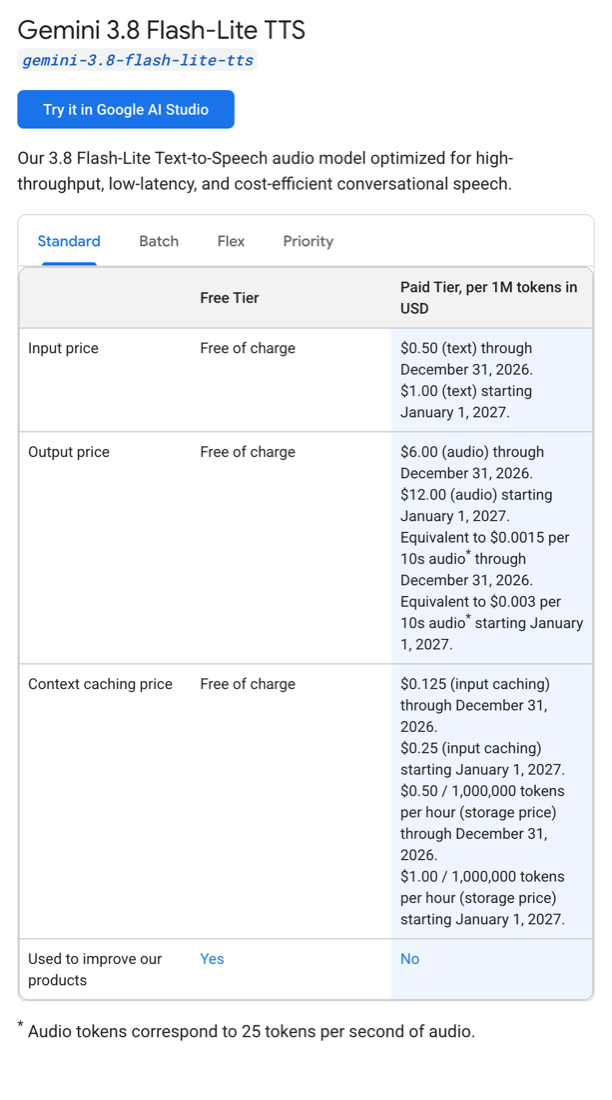
  <p><img src="/assets/images/2026-09-27-gemini-tts-pricing-lite.png" alt="Gemini 3.8 Flash-Lite TTS 가격표. 입력 0.50달러, 출력 6.00달러(2026년 12월 31일까지), 2027년부터 1.00달러와 12.00달러" />
<em>같은 페이지의 3.8 Flash-Lite TTS 항목</em></p>

  <p><img src="/assets/images/2026-09-27-gemini-tts-pricing-31.png" alt="Gemini 3.1 Flash TTS Preview 가격표. 입력 1.00달러, 출력 20.00달러" />
<em>같은 페이지의 3.1 Flash TTS Preview 항목. 무료 등급은 “Used to improve our products”가 Yes다</em></p>
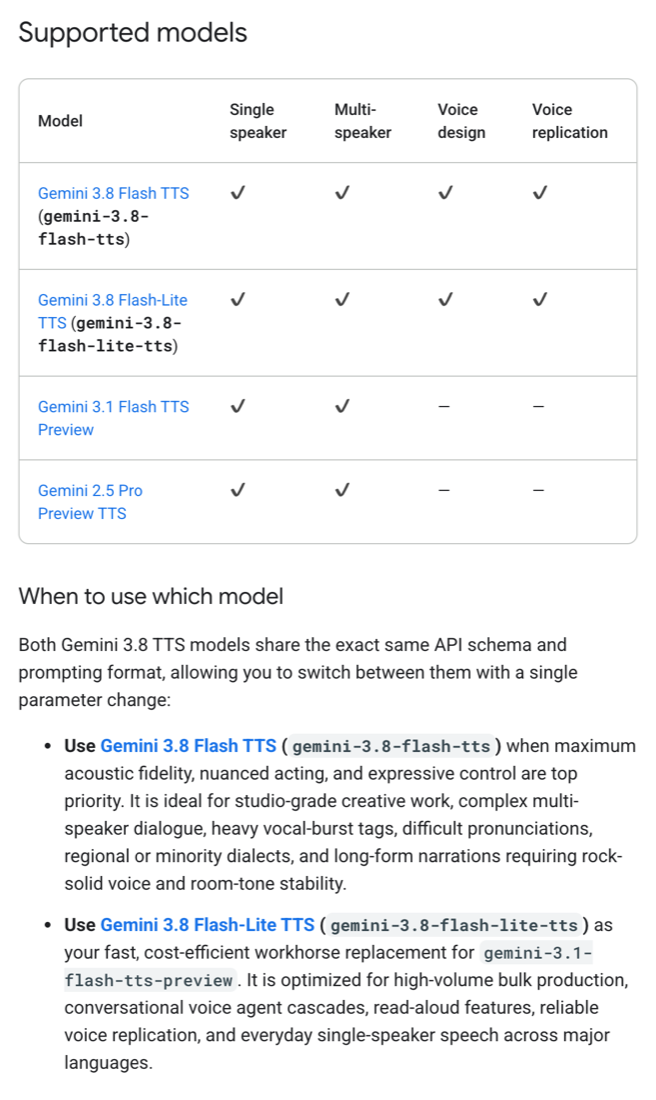
</details>

<p>Flash-Lite는 출력 $6(2027년부터 $12)이고, 2.5 Pro는 3.1과 같은 $20이지만 무료 등급이 없습니다. 대본(입력)은 수백 토큰이라 비용에서 무시할 수준이고, 사실상 <strong>출력 오디오 토큰</strong>이 비용입니다.</p>

<p>그런데 오디오 1초가 몇 토큰인지가 문서와 달랐습니다. 가격표 각주는 <strong>초당 25토큰</strong>이라고 하는데, 측정한 세 모델 모두 응답의 <code class="language-plaintext highlighter-rouge">usage</code>에 <strong>초당 32토큰</strong>이 찍혔습니다.</p>

<table class="compact">
  <thead>
    <tr>
      <th>모델</th>
      <th>음성 길이</th>
      <th>출력 토큰(usage)</th>
      <th>초당</th>
    </tr>
  </thead>
  <tbody>
    <tr>
      <td>3.8 Flash</td>
      <td>40.1초</td>
      <td>1,284</td>
      <td>32.0</td>
    </tr>
    <tr>
      <td>3.8 Flash-Lite</td>
      <td>40.6초</td>
      <td>1,298</td>
      <td>32.0</td>
    </tr>
    <tr>
      <td>3.1 Flash</td>
      <td>43.2초</td>
      <td>1,383</td>
      <td>32.0</td>
    </tr>
  </tbody>
</table>

<p>실제 청구가 어느 쪽을 따르는지는 확인하지 못했습니다. 두 기준으로 모두 환산하면 이렇습니다.</p>

<link rel="stylesheet" href="/assets/css/gemini-tts-charts.css?v=2" />

<script src="/assets/js/gemini-tts-charts.js?v=4" defer=""></script>

<div class="gviz" data-viz="cost"></div>

<details style="margin-bottom:1.25rem">
  <summary>표로 보기: 1분당 비용(문서 기준 25토큰/초 환산 포함)</summary>

  <table class="compact">
    <thead>
      <tr>
        <th>모델</th>
        <th>1분(실측 32토큰/초)</th>
        <th>1분(문서 25토큰/초)</th>
        <th>22분 팟캐스트(실측)</th>
      </tr>
    </thead>
    <tbody>
      <tr>
        <td><strong>3.8 Flash</strong></td>
        <td><strong>$0.017</strong> (2027년 $0.035)</td>
        <td>$0.014 ($0.027)</td>
        <td><strong>$0.38</strong> ($0.76)</td>
      </tr>
      <tr>
        <td>3.8 Flash-Lite</td>
        <td>$0.012 (2027년 $0.023)</td>
        <td>$0.009 ($0.018)</td>
        <td>$0.25 ($0.51)</td>
      </tr>
      <tr>
        <td>3.1 Flash, 2.5 Pro*</td>
        <td>$0.038</td>
        <td>$0.030</td>
        <td>$0.84</td>
      </tr>
    </tbody>
  </table>

  <p><em>* 2.5 Pro는 usage를 따로 측정하지 않아 단가가 같은 3.1 수치를 옮겨 적었다</em></p>

</details>

<p>이번 비교에 만든 음성은 모두 합쳐 1시간 남짓입니다. 가장 비싼 단가($20)로 계산해도 3달러가 안 됩니다.</p>

<h2 id="quality">품질: 짧은 샘플로는 구별되지 않았습니다</h2>

<p>6줄짜리 대본(약 40초)을 모델을 가린 채 평가했습니다.</p>

<table class="compact">
  <thead>
    <tr>
      <th>모델</th>
      <th>점수</th>
      <th>생성 시간</th>
    </tr>
  </thead>
  <tbody>
    <tr>
      <td>3.8 Flash ×3</td>
      <td>8/9/10/9, 8/9/10/8, 8/9/10/8</td>
      <td>17.8~19.3초</td>
    </tr>
    <tr>
      <td>3.8 Flash-Lite ×3</td>
      <td>7/9/10/8, 8/9/10/8, 8/9/10/8</td>
      <td>15.1~15.6초</td>
    </tr>
    <tr>
      <td>3.1 Flash ×2</td>
      <td>8/9/10/8, 8/9/10/8</td>
      <td>18.6~19.2초</td>
    </tr>
  </tbody>
</table>

<p>점수는 거의 같습니다. 3.8 샘플 중 하나는 대본의 톤 지시를 <code class="language-plaintext highlighter-rouge">style</code>로 넣은 것인데, 점수가 달라지지 않았습니다. Lite는 2~4초 빠르고, 한 번은 자연스러움 7점을 받았습니다.</p>

<p>문서는 3.8 Flash를 “스튜디오급 음질, 섬세한 연기, 긴 글에서 흔들리지 않는 목소리”용으로, Flash-Lite를 “3.1을 대체하는 빠르고 싼 모델”로 소개합니다. 이번 표본으로는 그 차이를 확인하지 못했습니다.</p>

<details style="margin-bottom:1.25rem">
  <summary>문서 원문: 지원 모델 표와 모델 선택 안내 (스크린샷)</summary>

  <p><img src="/assets/images/2026-09-27-gemini-tts-supported-models.png" alt="Gemini TTS 문서의 지원 모델 표와 모델 선택 안내. 3.8 Flash는 최고 음질과 표현력, 3.8 Flash-Lite는 3.1 Flash TTS Preview를 대체하는 빠르고 저렴한 모델로 소개" />
<em>speech-generation 문서의 Supported models 절과 When to use which model 절(2026-09-27 캡처)</em></p>
</details>

<h2 id="proper-nouns">영어 고유명사는 한글로 적어야 합니다</h2>

<p>15줄 대본에 “PostgreSQL”이 두 번 나옵니다. 첫 번째 “빠른 방식일수록 PostgreSQL 같은”은 모든 모델이 매번 알아들을 수 있게 읽었습니다. 두 번째 “조각으로 잘라도 PostgreSQL은”에서 갈렸습니다.</p>

<div class="gviz" data-viz="pg"></div>

<details style="margin-bottom:1.25rem">
  <summary>표로 보기: 판정 모델이 들은 음절</summary>

  <table class="compact">
    <thead>
      <tr>
        <th>모델</th>
        <th>두 번째 PostgreSQL을 판정 모델 두 개가 들은 것</th>
      </tr>
    </thead>
    <tbody>
      <tr>
        <td><strong>3.8 Flash ×3</strong></td>
        <td><strong>포스트지피티</strong>, <strong>포스트클라우드</strong>, 포스트그레스</td>
      </tr>
      <tr>
        <td>3.8 Flash + 대본에 <code class="language-plaintext highlighter-rouge">포스트그레스큐엘</code>로 적음 ×3</td>
        <td>포스트그레스큐엘 3회</td>
      </tr>
      <tr>
        <td>3.8 Flash-Lite ×3</td>
        <td>포스트그레스, 포스트그레스, 포스트그레스큐엘 · 포스트그레스그(3회차, 갈림)</td>
      </tr>
      <tr>
        <td>3.1 Flash ×2</td>
        <td>포스트그레스 · 포스트그레스엘(1회차, 판정 모델끼리 갈림), 포스트그레스</td>
      </tr>
    </tbody>
  </table>

</details>

<p>3.8 Flash는 3회 중 2회 <strong>아예 다른 단어</strong>로 읽었습니다. 판정 모델 두 개의 결과가 같았고, 확신도는 모두 “상”이었습니다. 해당 부분만 잘라 두었습니다.</p>

<p><b>3.8 Flash, 1회차</b> - 「포스트지피티」로 들린다</p>
<audio controls="" preload="none" src="/assets/audio/2026-09-27-pg-38-flash-a.mp3" style="width:100%"></audio>

<p><b>3.8 Flash, 2회차</b> - 「포스트클라우드」 또는 「포스트클라운」으로 들린다</p>
<audio controls="" preload="none" src="/assets/audio/2026-09-27-pg-38-flash-b.mp3" style="width:100%"></audio>

<p><b>3.8 Flash, 대본에 한글로 적었을 때</b> - 「포스트그레스큐엘」</p>
<audio controls="" preload="none" src="/assets/audio/2026-09-27-pg-38-flash-hangul.mp3" style="width:100%"></audio>

<p><b>3.8 Flash-Lite</b> - 「포스트그레스」</p>
<audio controls="" preload="none" src="/assets/audio/2026-09-27-pg-38-lite.mp3" style="width:100%"></audio>

<p><b>3.1 Flash</b> - 「포스트그레스엘」</p>
<audio controls="" preload="none" src="/assets/audio/2026-09-27-pg-31-flash.mp3" style="width:100%"></audio>

<p>같은 대본 안에서도 한 번은 맞고 한 번은 틀렸으니, 한 번 맞았다고 안심할 수 없습니다. <strong>대본에 영어 고유명사를 쓰지 않고 한글 발음으로 적는 것</strong>이 가장 확실합니다. 위의 비교용 팟캐스트 대본도 그렇게 썼습니다.</p>

<h2 id="numbers">숫자와 퍼센트는 문제없었습니다</h2>

<p>지난 9월 2일에 3.1 Flash가 대본의 “퍼센트”를 “프로”로 바꿔 읽는 것을 본 적이 있습니다. 같은 형식(숫자를 한글로 적은 대본)으로 “삼십 퍼센트”, “십오 퍼센트”, “일억 원”, “육십 퍼센트”를 넣어 네 모델을 3회씩 만들었습니다.</p>

<p><strong>12개 모두 “퍼센트”로 읽었습니다.</strong> “일억”은 11개에서 두 판정 모델 모두 「일억」으로 들었고, 2.5 Pro 한 개는 한 모델이 「이억」, 다른 모델이 「일억」으로 들어 판정이 갈렸습니다. 당시에도 다시 만들면 제대로 읽었던 확률적인 문제라, 이번 3회에서는 재현되지 않았다고만 적어 둡니다. 숫자는 대본에 아라비아 숫자(<code class="language-plaintext highlighter-rouge">30%</code>) 대신 한글(<code class="language-plaintext highlighter-rouge">삼십 퍼센트</code>)로 적는 편이 안전합니다.</p>

<h2 id="consistency">목소리 일관성: 진행자만 나아졌습니다</h2>

<p>예전 모델로 팟캐스트를 만들면 목소리가 일관되지 않다는 느낌이 있었습니다. 이것을 두 가지로 나눠 측정했습니다. 한 편 안에서 <strong>청크끼리</strong> 목소리가 달라지는지, 그리고 같은 대본을 <strong>다시 만들 때마다</strong> 목소리가 달라지는지입니다.</p>

<p>32줄 대본을 청크 네 개로 나눠 모델마다 세 번씩 만들고, 청크마다 <strong>화자별 음 높이(F0) 중앙값</strong>을 구했습니다. 진행자는 여성, 게스트는 남성 목소리라 160Hz를 기준으로 두 사람을 갈랐습니다. 한 편 안에서 가장 높은 청크와 가장 낮은 청크가 몇 % 벌어지는지를 봤습니다. 10%는 약 1.7반음, 20%는 약 3.2반음입니다.</p>

<div class="gviz" data-viz="consistency"></div>

<details style="margin-bottom:1.25rem">
  <summary>표로 보기: 최악값과 다시 만들 때 차이 포함</summary>

  <table class="compact">
    <thead>
      <tr>
        <th>모델</th>
        <th>청크끼리 평균</th>
        <th>청크끼리 최악</th>
        <th>다시 만들 때</th>
      </tr>
    </thead>
    <tbody>
      <tr>
        <td>3.8 Flash</td>
        <td>8.2% / 15.6%</td>
        <td>11.5% / 22.6%</td>
        <td>2.4% / 1.2%</td>
      </tr>
      <tr>
        <td>3.8 Flash-Lite</td>
        <td>5.9% / 12.6%</td>
        <td>8.1% / 22.5%</td>
        <td>4.2% / 6.4%</td>
      </tr>
      <tr>
        <td>3.1 Flash</td>
        <td>11.8% / 14.9%</td>
        <td>20.1% / 25.3%</td>
        <td>4.2% / 1.1%</td>
      </tr>
      <tr>
        <td><strong>2.5 Pro</strong></td>
        <td><strong>6.1% / 6.7%</strong></td>
        <td><strong>9.8% / 8.2%</strong></td>
        <td>4.1% / 2.5%</td>
      </tr>
    </tbody>
  </table>

  <p><em>각 칸은 진행자 / 게스트다. 모델별 3회, 회차마다 청크 4개이고, 같은 대본을 같은 경계로 나눴으므로 청크 내용은 모델끼리 같다. 「다시 만들 때」는 세 회차의 편 평균 음 높이가 서로 벌어진 정도다</em></p>

</details>

<ul>
  <li><strong>가장 안정적인 건 가장 오래된 2.5 Pro입니다.</strong> 두 사람 모두 10%를 넘은 적이 없습니다.</li>
  <li><strong>3.8 Flash는 진행자가 3.1보다 안정됐습니다</strong>(평균 11.8% → 8.2%, 최악 20% → 11.5%).</li>
  <li><strong>남성 게스트는 3.8에서도 그대로입니다</strong>(평균 14.9% → 15.6%). 한 회차에서는 청크별 중앙값이 108, 121, 106, 96Hz로 움직였습니다.</li>
  <li><strong>목소리를 바꾸면 달라집니다.</strong> 한국어 목소리와 Voice design 목소리로 같은 시험을 한 결과는 <a href="/2026/09/27/gemini-3-8-tts-features-tested.html#korean-voices">3편</a>에 있습니다.</li>
  <li><strong>다시 만들 때의 차이는 청크끼리보다 작습니다.</strong> 편 평균으로 보면 모든 모델이 1~6% 안이고, 3.8 Flash가 2.4%, 1.2%로 가장 작았습니다. 흔들림은 주로 한 편 안에서 청크가 바뀔 때 생깁니다.</li>
</ul>

<p>문서에도 목소리 일관성을 다룬 절이 있습니다. 흔들림의 가장 흔한 원인으로 예전 모델에서 쓰던 <strong>긴 연기 지시문</strong>을 꼽고, Voice design으로 목소리를 만들어 그 <code class="language-plaintext highlighter-rouge">voice_...</code> ID를 계속 쓰라고 권합니다. 이 스킬은 원래 연기 지시를 넣지 않으니, 문서가 말한 원인은 해당하지 않습니다. 그래도 설계한 목소리로 바꾸면 달라지는지 <a href="/2026/09/27/gemini-3-8-tts-features-tested.html#voice-design">3편</a>에서 해 봤는데, 줄지 않았습니다.</p>

<details style="margin-bottom:1.25rem">
  <summary>문서 원문: Consistency across generations (스크린샷)</summary>

  <p><img src="/assets/images/2026-09-27-gemini-tts-consistency.png" alt="Gemini TTS 문서의 Consistency across generations 절. 긴 Audio Profile 문단이 목소리 흔들림의 가장 흔한 원인이며, Voice design으로 만든 voice ID를 쓰고, 목소리를 유지하라는 메타 지시는 오히려 흔들림을 키운다는 내용" />
<em>speech-generation 문서 Prompting guide의 Consistency across generations and what to avoid 절(2026-09-27 캡처)</em></p>
</details>

<p><strong>이 측정의 한계</strong>도 적어 둡니다. 음 높이는 억양과 감정에 따라서도 달라지므로 “같은 사람처럼 들리는가”를 전부 설명하지 못합니다. 경계를 늘리려고 청크를 300자로 잘게 나눴는데, 스킬 기본값(620자)에서는 경계가 절반으로 줄어듭니다. 판정 모델에게 들려주고 일관성을 물었을 때는 16건 중 14건이 두 사람 모두 10점이었고, 낮은 점수를 준 2건은 다른 판정 모델이 10점을 줘서 청취 판정은 근거로 쓰지 않았습니다. <a href="#listen">위의 샘플</a>로 직접 들어 보시는 게 가장 정확합니다.</p>

<h2 id="choose">그래서 무엇을 쓸까</h2>

<ul>
  <li><strong>보통 팟캐스트라면 3.8 Flash</strong>를 씁니다. 가격이 절반 이하이고 품질 차이는 구별되지 않았습니다. 스킬 기본값도 이것으로 바꿨습니다. 대본의 영어 고유명사는 한글로 적습니다.</li>
  <li><strong>한국어 대본이면 한국어 목소리</strong>(<code class="language-plaintext highlighter-rouge">ko-kr-podcaster-*</code> 등)를 시험해 볼 만합니다. 기본 목소리 Leda와 Charon은 미국 영어 목소리입니다(<a href="/2026/09/27/gemini-3-8-tts-features-tested.html#korean-voices">3편</a>).</li>
  <li><strong>많이, 싸게 만들 거라면 3.8 Flash-Lite</strong>입니다. 3.8 Flash보다 33% 싸고 40초 분량 기준 2~4초 빠르며, 이번에는 PostgreSQL도 3회 모두 알아듣게 읽었습니다. API가 같아서 모델 이름만 바꾸면 됩니다.</li>
  <li><strong>청크 사이 목소리가 흔들리는 게 가장 거슬린다면 2.5 Pro</strong>입니다. 가장 비싸고(3.1과 같은 $20) 무료 등급이 없으며 문서상 이전 모델이지만, 이번 측정에서 가장 안정적이었습니다.</li>
  <li><strong>내 목소리로 만들고 싶다면 3.8 Flash로 복제를 만들고</strong> Flash 또는 Flash-Lite로 읽습니다(<a href="/2026/09/27/gemini-tts-voice-replication.html">2편</a>).</li>
</ul>

<h2 id="caveats">읽을 때 감안할 점</h2>

<ul>
  <li><strong>표본이 작습니다.</strong> 품질은 40초 샘플을 모델당 2~3개, 고유명사는 2~3회, 일관성은 3회 만들어 본 결과입니다.</li>
  <li><strong>판정을 모델에게 맡겼습니다.</strong> 사람이 들은 결과가 아니고, 판정 모델도 틀립니다. 받아쓰기는 두 판정 모델로 따로 받아, 「알아볼 수 있는가, 다른 단어인가」에서 둘이 일치한 것만 결론으로 썼습니다.</li>
  <li><strong>대본이 하나의 주제입니다.</strong> 기술 용어가 많은 한국어 대화 한 종류로만 비교했습니다.</li>
</ul>

<h2 id="references">참고 자료</h2>

<ul>
  <li><a href="https://ai.google.dev/gemini-api/docs/speech-generation">Gemini API - Speech generation (text-to-speech)</a></li>
  <li><a href="https://ai.google.dev/gemini-api/docs/pricing">Gemini API - Pricing</a></li>
  <li><a href="https://ai.google.dev/gemini-api/docs/models/gemini-3.8-flash-tts">Gemini 3.8 Flash TTS 모델 페이지</a></li>
  <li><a href="https://ai.google.dev/gemini-api/docs/models/gemini-3.8-flash-lite-tts">Gemini 3.8 Flash-Lite TTS 모델 페이지</a></li>
</ul>]]></content><author><name>김준호</name><email>junho85@gmail.com</email></author><category term="TTS" /><category term="Gemini" /><category term="gemini-3.8-flash-tts" /><category term="음성 합성" /><category term="팟캐스트" /><summary type="html"><![CDATA[Gemini TTS 3.8 시험기 3편 중 1편입니다. 1편 네 모델 비교 · 2편 내 목소리 복제 · 3편 3.8 기능 시험]]></summary><media:thumbnail xmlns:media="http://search.yahoo.com/mrss/" url="https://dev.junho85.pe.kr/assets/images/2026-09-27-gemini-tts-supported-models.png" /><media:content medium="image" url="https://dev.junho85.pe.kr/assets/images/2026-09-27-gemini-tts-supported-models.png" xmlns:media="http://search.yahoo.com/mrss/" /></entry><entry><title type="html">실시간 전사 여섯 가지를 같은 녹음으로 측정해 봤습니다 - Deepgram, Cartesia, Whisper, Qwen3-ASR</title><link href="https://dev.junho85.pe.kr/2026/09/23/realtime-stt-six-ways-compared.html" rel="alternate" type="text/html" title="실시간 전사 여섯 가지를 같은 녹음으로 측정해 봤습니다 - Deepgram, Cartesia, Whisper, Qwen3-ASR" /><published>2026-09-23T00:00:00+09:00</published><updated>2026-09-23T00:00:00+09:00</updated><id>https://dev.junho85.pe.kr/2026/09/23/realtime-stt-six-ways-compared</id><content type="html" xml:base="https://dev.junho85.pe.kr/2026/09/23/realtime-stt-six-ways-compared.html"><![CDATA[<p>“스트리밍이 빠르다”는 말은 많이 들었지만, 화면에서 실제로 어떻게 보이는지는 본 적이 없었습니다. 그래서 89초짜리 한국어 면접 답변을 녹음해 여섯 가지 방식에 똑같이 흘려보내고, 각 방식이 <strong>언제 무엇을 내놓는지</strong> 기록했습니다.</p>

<p>요약하면 이렇습니다. <strong>글자를 가장 빨리 띄운 스트리밍 두 곳은 PostgreSQL을 잘못 받아 적었습니다. 오디오를 길게 넣을수록 고유명사를 더 잘 맞혔지만, 결과는 그만큼 늦게 나왔습니다.</strong></p>

<p>아래 화면은 측정한 시각 그대로 재생됩니다.</p>

<link rel="stylesheet" href="/assets/stt-compare/stt-compare.css?v=2" />

<div id="stt-compare" data-base="/assets/stt-compare/"></div>
<script src="/assets/stt-compare/stt-compare-data.js?v=2"></script>

<script src="/assets/stt-compare/stt-compare.js?v=2"></script>

<p>진행 막대를 누르면 원하는 지점으로 옮길 수 있습니다. 음성은 89.5초에 끝나지만 막대는 100초까지 이어집니다. 통째로 처리하는 두 방식의 결과가 그 뒤에 나오기 때문입니다. 여섯 방식의 전사 전문은 <a href="/assets/stt-compare/#full">전체 화면</a>에 모아 두었습니다.</p>

<details>
<summary><b>읽은 대본</b> - 89초, 면접 답변 상황</summary>
<p>안녕하세요. 저는 백엔드 개발을 주로 해 왔고, 최근 이 년 동안은 실시간 서비스를 만들었습니다.</p>
<p>주로 쓴 스택은 FastAPI와 PostgreSQL이고요, 캐시는 Redis, 컨테이너는 Docker로 띄우고 배포는 쿠버네티스에 올렸습니다. 최근에는 LiveKit을 써서 화상 기능도 붙여 봤습니다.</p>
<p><i>[2초 쉼]</i></p>
<p>음… 성과를 하나 말씀드리면, 응답 시간을 <b>육십 퍼센트</b> 줄인 게 있습니다. 원래 평균 <b>팔백 밀리초</b>였는데 <b>삼백 밀리초</b>까지 내렸고요. 동시 접속은 <b>세 배</b> 늘었는데 서버는 그대로 두 대로 버텼습니다.</p>
<p>어, 그게… 아니 정확히는 두 대가 아니라 <b>세 대</b>였네요. 오토스케일링이 한 대를 더 띄우고 있었습니다.</p>
<p><i>[2초 쉼]</i></p>
<p>가장 어려웠던 건 웹소켓 연결이 자꾸 끊기는 문제였습니다. 로그를 봐도 원인이 안 나와서, 프록시 설정을 하나씩 걷어내 봤는데 결국 <b>Nginx</b>의 타임아웃이 <b>육십 초</b>로 잡혀 있던 게 원인이었어요. 그걸 찾는 데 이틀이 걸렸습니다.</p>
<p><i>[여기부터 조금 빠르게]</i> 그 뒤로는 하트비트를 삼십 초마다 보내도록 바꿨고, 재연결 로직에 지수 백오프를 넣어서 서버가 몰리지 않게 했습니다. 지금은 끊김이 거의 없습니다.</p>
<p><i>[2초 쉼]</i></p>
<p>아, 그리고 팀에서 STT를 붙일 때 청크를 오 초씩 잘라서 보냈는데, 그러다 보니 숫자가 깨지는 경우가 있었습니다. 그래서 무음 구간을 찾아서 자르는 방식으로 바꿨습니다.</p>
<p>이상입니다. 감사합니다.</p>
</details>

<p>대본에는 틀리기 쉬운 요소를 일부러 넣었습니다. 고유명사 일곱 개, 숫자와 단위, 앞에서 한 말을 뒤에서 정정하는 대목, 추임새, 2초 쉼 세 곳, 빠르게 읽는 구간입니다. 숫자는 읽을 때 헷갈리지 않도록 한글로 적었습니다.</p>

<h2 id="tldr">결론부터</h2>

<table>
  <thead>
    <tr>
      <th>방식</th>
      <th>중간 결과</th>
      <th>첫 확정</th>
      <th>PostgreSQL</th>
      <th>LiveKit</th>
      <th>무음</th>
    </tr>
  </thead>
  <tbody>
    <tr>
      <td>Deepgram nova-3</td>
      <td><strong>1.16s</strong></td>
      <td>3.32s</td>
      <td>❌</td>
      <td>❌</td>
      <td>❌</td>
    </tr>
    <tr>
      <td>Cartesia ink-whisper</td>
      <td>없음</td>
      <td>5.17s</td>
      <td>❌</td>
      <td>❌</td>
      <td>❌</td>
    </tr>
    <tr>
      <td>5초 청킹 + Qwen3-ASR 1.7B</td>
      <td>없음</td>
      <td>5.57s</td>
      <td>✅</td>
      <td>❌</td>
      <td>❌</td>
    </tr>
    <tr>
      <td>5초 청킹 + whisper-large-v3</td>
      <td>없음</td>
      <td>6.86s</td>
      <td>✅</td>
      <td>❌</td>
      <td>❌</td>
    </tr>
    <tr>
      <td>Qwen3-ASR 1.7B 통째로</td>
      <td>없음</td>
      <td>93.37s</td>
      <td>✅</td>
      <td>✅</td>
      <td>❌</td>
    </tr>
    <tr>
      <td>whisper-large-v3 통째로</td>
      <td>없음</td>
      <td>97.79s</td>
      <td>✅</td>
      <td>❌</td>
      <td>✅</td>
    </tr>
  </tbody>
</table>

<p><em>오른쪽 세 칸은 해당 단어를 철자까지 맞게 적었는지를 나타낸다. 시각은 오디오 시작을 0초로 잡았다</em></p>

<ul>
  <li><strong>글자를 가장 먼저 띄운 건 Deepgram입니다.</strong> 1.16초에 “안녕하세요.”가 떴습니다. 다만 이건 아직 바뀔 수 있는 중간 결과이고, 확정 결과는 3.32초에 나왔습니다.</li>
  <li><strong>스트리밍 두 곳은 모두 PostgreSQL을 잘못 적었습니다.</strong> 조각으로든 통째로든 오디오를 모아서 모델에 넣은 나머지 넷은 모두 맞게 적었습니다.</li>
  <li><strong>통째로 넣은 쪽이 가장 많이 맞혔지만 가장 늦습니다.</strong> 처리 자체는 4~8초면 끝나는데, 말이 다 끝나야 처리를 시작할 수 있어서 첫 글자가 90초가 넘어서야 나옵니다.</li>
  <li><strong>“무음”은 여섯 중 다섯이 “모음”으로 적었습니다.</strong> 문맥을 넓게 본다고 풀리는 문제도 아니었습니다. 녹음 전체를 넣은 Qwen도 틀렸습니다.</li>
</ul>

<h2 id="setup">측정 방법</h2>

<p>같은 녹음을 16kHz 모노로 변환해 여섯 방식에 넣었습니다.</p>

<p><strong>스트리밍 둘</strong>에는 오디오를 100ms 분량씩 보내고 100ms 쉬는 식으로, <strong>말하는 속도 그대로</strong> 흘려보냈습니다. 파일을 한꺼번에 밀어 넣으면 지연이 거의 0으로 나오지만, 사람이 말하는 상황과는 거리가 멉니다.</p>

<div class="language-python highlighter-rouge"><div class="highlight"><pre class="highlight"><code><table class="rouge-table"><tbody><tr><td class="rouge-gutter gl"><pre class="lineno">1
2
3
</pre></td><td class="rouge-code"><pre><span class="k">for</span> <span class="n">i</span> <span class="ow">in</span> <span class="nf">range</span><span class="p">(</span><span class="mi">0</span><span class="p">,</span> <span class="nf">len</span><span class="p">(</span><span class="n">pcm</span><span class="p">),</span> <span class="n">step</span><span class="p">):</span>          <span class="c1"># step = 100ms 분량
</span>    <span class="k">await</span> <span class="n">ws</span><span class="p">.</span><span class="nf">send</span><span class="p">(</span><span class="n">pcm</span><span class="p">[</span><span class="n">i</span><span class="p">:</span><span class="n">i</span> <span class="o">+</span> <span class="n">step</span><span class="p">])</span>
    <span class="k">await</span> <span class="n">asyncio</span><span class="p">.</span><span class="nf">sleep</span><span class="p">(</span><span class="mf">0.1</span><span class="p">)</span>                <span class="c1"># 말하는 속도에 맞춘다
</span></pre></td></tr></tbody></table></code></pre></div></div>

<p><strong>5초 청킹 둘</strong>은 배치 STT로 실시간 자막을 흉내 낼 때 흔히 쓰는 방식입니다. 오디오를 쌓다가 700ms 무음이 나오면 자르고, 5초를 넘기면 마지막 1.5초 안에서 가장 조용한 지점을 찾아 자릅니다. 89초가 23조각으로 나뉘었는데, 무음에서 잘린 게 10개, 5초 상한에 걸려 강제로 잘린 게 13개였습니다. 잘린 조각은 동시에 3개까지 모델에 보냈습니다.</p>

<p><strong>통째로 둘</strong>은 89.45초를 다 받은 뒤 한 번에 넣었습니다. 그래서 첫 글자 시각은 89.45초에 처리 시간을 더한 값입니다. 처리에는 Qwen이 3.9초, whisper가 8.3초 걸렸습니다. 오디오 길이보다 각각 22.8배, 10.7배 빠른 셈입니다.</p>

<p>로컬 넷은 M5 Max 맥북에서 실행했습니다. whisper는 <a href="https://pypi.org/project/mlx-whisper/">mlx-whisper</a>로 <a href="https://huggingface.co/mlx-community/whisper-large-v3-mlx">whisper-large-v3-mlx</a>를, Qwen은 <a href="https://github.com/Blaizzy/mlx-audio">mlx-audio</a>로 <a href="https://huggingface.co/mlx-community/Qwen3-ASR-1.7B-4bit">Qwen3-ASR-1.7B-4bit</a>를 돌렸습니다.</p>

<h2 id="streaming">스트리밍 둘은 “어디서 끊을지”를 누가 정하느냐가 다릅니다</h2>

<p>둘 다 웹소켓으로 오디오를 흘려보낸다는 점은 같습니다. 차이는 <strong>문장이 어디서 끝나는지를 누가 판단하느냐</strong>입니다.</p>

<h3 id="deepgram">Deepgram은 서버가 정합니다</h3>

<p><code class="language-plaintext highlighter-rouge">wss://api.deepgram.com/v1/listen</code>에 오디오만 보내면 서버가 말이 끊긴 지점을 알아서 찾아 문장을 확정합니다. 끊는 기준(endpointing)은 기본값 그대로 두었습니다. 여기에 <code class="language-plaintext highlighter-rouge">interim_results=true</code>를 켜면 확정 전이라도 <strong>지금까지 들은 만큼의 추측</strong>을 계속 보내 줍니다. 이번 측정에서 텍스트가 들어 있는 확정 결과가 25개, 중간 결과가 66개 왔습니다. 그 밖에 <code class="language-plaintext highlighter-rouge">punctuate=true</code>와 <code class="language-plaintext highlighter-rouge">smart_format=true</code>를 켰습니다.</p>

<p>말이 끝난 뒤 확정 결과가 오기까지는 중앙값으로 1.23초가 걸렸습니다. 그 1초 남짓을 중간 결과가 메웁니다. 위 화면에서 회색 기울임 글자로 보이는 부분입니다.</p>

<h3 id="cartesia">Cartesia는 제가 정해야 했습니다</h3>

<p>Cartesia에도 서버가 알아서 끊어 주는 엔드포인트(<code class="language-plaintext highlighter-rouge">/stt/turns/websocket</code>)가 있습니다. 그런데 한국어를 쓰려고 <code class="language-plaintext highlighter-rouge">ink-whisper</code>로 연결하면 연결이 바로 끊깁니다.</p>

<div class="language-text highlighter-rouge"><div class="highlight"><pre class="highlight"><code><table class="rouge-table"><tbody><tr><td class="rouge-gutter gl"><pre class="lineno">1
2
</pre></td><td class="rouge-code"><pre>websockets.exceptions.ConnectionClosedError:
  received 1008 (policy violation) Unsupported model
</pre></td></tr></tbody></table></code></pre></div></div>

<p>현재 Cartesia의 주력 모델은 <code class="language-plaintext highlighter-rouge">ink-2</code>(영어)와 <code class="language-plaintext highlighter-rouge">ink-preview</code>(영어, 프랑스어, 힌디어, 일본어, 스페인어)이고, 한국어를 지원하는 <code class="language-plaintext highlighter-rouge">ink-whisper</code>는 <a href="https://docs.cartesia.ai/build-with-cartesia/stt-models/older-models">이전 모델</a> 목록에 있습니다. 요금표에는 <code class="language-plaintext highlighter-rouge">ink-whisper</code>의 turns 단가도 적혀 있지만, 2026-09-23에 <code class="language-plaintext highlighter-rouge">cartesia_version=2025-04-16</code>으로 연결했을 때는 위처럼 거절됐습니다.</p>

<p>그래서 수동 엔드포인트(<code class="language-plaintext highlighter-rouge">/stt/websocket</code>)를 썼습니다. 여기서는 오디오를 아무리 보내도 결과가 오지 않습니다. <strong>클라이언트가 <code class="language-plaintext highlighter-rouge">finalize</code>를 보내야</strong> 서버가 “여기까지가 한 문장”으로 보고 결과를 돌려줍니다.</p>

<div class="language-python highlighter-rouge"><div class="highlight"><pre class="highlight"><code><table class="rouge-table"><tbody><tr><td class="rouge-gutter gl"><pre class="lineno">1
2
3
</pre></td><td class="rouge-code"><pre><span class="k">while</span> <span class="n">cuts</span> <span class="ow">and</span> <span class="n">sent_ms</span> <span class="o">&gt;=</span> <span class="n">cuts</span><span class="p">[</span><span class="mi">0</span><span class="p">]:</span>   <span class="c1"># 끊을 시각이 되면
</span>    <span class="k">await</span> <span class="n">ws</span><span class="p">.</span><span class="nf">send</span><span class="p">(</span><span class="sh">"</span><span class="s">finalize</span><span class="sh">"</span><span class="p">)</span>        <span class="c1"># 여기까지 확정해 달라고 알린다
</span>    <span class="n">cuts</span><span class="p">.</span><span class="nf">pop</span><span class="p">(</span><span class="mi">0</span><span class="p">)</span>
</pre></td></tr></tbody></table></code></pre></div></div>

<p>오디오를 실시간으로 흘려보내니 전송 방식은 스트리밍이 맞습니다. 하지만 어디서 끊을지는 클라이언트가 판단해야 합니다. 비교 조건을 맞추려고 5초 청킹이 자른 시각과 같은 시각에 <code class="language-plaintext highlighter-rouge">finalize</code>를 보냈습니다.</p>

<p>첫 결과가 5.17초에 나온 것도 이 때문입니다. 첫 조각이 5초 상한에 걸려 잘렸고, 그 시각에 보낸 첫 <code class="language-plaintext highlighter-rouge">finalize</code>에 0.17초 만에 응답이 왔습니다. 이번 측정에서 받은 결과 37개는 전부 확정 결과였고, 그중 7개는 빈 문자열이었습니다.</p>

<h2 id="interim">중간 결과는 틀렸다가 고쳐집니다</h2>

<p>Deepgram의 중간 결과는 말이 이어질수록 계속 바뀝니다. 첫 문장은 이렇게 바뀌어 갔습니다.</p>

<div class="language-text highlighter-rouge"><div class="highlight"><pre class="highlight"><code><table class="rouge-table"><tbody><tr><td class="rouge-gutter gl"><pre class="lineno">1
2
3
4
</pre></td><td class="rouge-code"><pre>1.16s  중간  안녕하세요.
2.15s  중간  안녕하세요. 저는 맥엔드
3.12s  중간  안녕하세요. 저는 백엔드 개발을 주로 해야
3.32s  확정  안녕하세요. 저는 백엔드 개발을 주로 해학
</pre></td></tr></tbody></table></code></pre></div></div>

<p>“맥엔드”는 뒷말이 들어오면서 “백엔드”로 고쳐졌습니다. “쿠번에”가 “쿠버네티스에”로, “두 배”가 “두 대로”로 바뀐 곳도 있었습니다.</p>

<p>반대로 <strong>확정 결과가 중간 결과보다 나빠진 곳도 있습니다.</strong> 실제 발화는 “해 왔고”였는데, 중간 결과의 “해야”가 확정 결과에서 “해학”이 됐습니다. 51초 무렵에는 중간 결과에 “웹 소켓 연결이 자꾸”까지 나와 있었는데, 확정 결과가 “가장 어려웠던 건 웹”과 “연결이 자꾸 끊기는 문제였습니다” 둘로 나뉘면서 “소켓”이 빠졌습니다. 중간 결과를 화면에 띄우면 빨리 보여 줄 수 있지만, 그만큼 사용자는 글자가 바뀌는 과정을 보게 됩니다.</p>

<h2 id="accuracy">문맥이 짧으면 어디서 틀리나</h2>

<h3 id="postgresql">PostgreSQL</h3>

<div class="language-text highlighter-rouge"><div class="highlight"><pre class="highlight"><code><table class="rouge-table"><tbody><tr><td class="rouge-gutter gl"><pre class="lineno">1
2
3
</pre></td><td class="rouge-code"><pre>원문        주로 쓴 스택은 FastAPI와 PostgreSQL이고요
Deepgram    주로 쓴 스택은 fast API와 first Gras Ql이고요.
Cartesia    주로 쓴 스택은 FastAPI와 버스 그레스 퀘이고요
</pre></td></tr></tbody></table></code></pre></div></div>

<p>나머지 넷은 모두 <code class="language-plaintext highlighter-rouge">PostgreSQL</code>로 적었습니다. 같은 지점에서 끊은 Cartesia와 5초 청킹 + whisper의 결과가 갈렸으니, 끊는 위치만으로는 설명이 되지 않습니다. 모델 차이도 영향을 준 것으로 보입니다.</p>

<h3 id="숫자와-단위">숫자와 단위</h3>

<p>대본의 “팔백 밀리초”, “삼백 밀리초”는 한글 그대로 소리 내어 읽었습니다.</p>

<div class="language-text highlighter-rouge"><div class="highlight"><pre class="highlight"><code><table class="rouge-table"><tbody><tr><td class="rouge-gutter gl"><pre class="lineno">1
2
3
</pre></td><td class="rouge-code"><pre>Deepgram          800 밀리초였는데 300 밀리초까지 내렸고요
Cartesia          800mS였는데 300mh까지 내렸고요
청킹 + whisper    800ms였는데 300ms까지 내렸고요
</pre></td></tr></tbody></table></code></pre></div></div>

<p>Cartesia는 <code class="language-plaintext highlighter-rouge">300ms</code>를 <code class="language-plaintext highlighter-rouge">300mh</code>로 적었습니다. 숫자는 맞고 단위만 틀려서, <strong>읽는 사람이 틀린 줄 모르고 지나치기 쉬운</strong> 오류입니다.</p>

<h3 id="말을-정정하는-대목">말을 정정하는 대목</h3>

<p>원문은 “두 대로 버텼습니다. 어, 그게… 아니 정확히는 두 대가 아니라 세 대였네요.”입니다. Deepgram만 뒷부분을 “세 <strong>개</strong>였네요”로 적었고, 나머지 다섯은 “세 대”로 맞게 적었습니다.</p>

<h3 id="무음과-모음">무음과 모음</h3>

<p>“<strong>무음</strong> 구간을 찾아서 자르는 방식으로”는 whisper 통째로만 맞게 적었고, 나머지 다섯은 모두 “<strong>모음</strong> 구간”으로 적었습니다. 발음이 거의 같아서 문맥으로만 구별할 수 있는 단어입니다. 오디오를 끝까지 다 들은 Qwen도 틀렸으니, 문맥을 늘리는 것만으로는 해결되지 않는 부분입니다.</p>

<h3 id="livekit">LiveKit</h3>

<p>철자까지 맞게 적은 건 Qwen 통째로(<code class="language-plaintext highlighter-rouge">LiveKit을</code>) 하나뿐이었습니다. 나머지는 “라이브 킷”, “라이브킷”, “라이브. 킷”, “라이브… 킷”이었고, Cartesia는 “킷”을 아예 빠뜨렸습니다.</p>

<p>눈여겨볼 점은 <strong>같은 Qwen도 5초씩 잘라 넣으면 틀렸다</strong>는 것입니다. 한 번에 들려준 오디오의 길이가 결과를 갈랐습니다.</p>

<h2 id="choose">그래서 무엇을 고를까</h2>

<p>우열을 가리려는 실험은 아니었습니다. 다만 무엇을 얻고 무엇을 포기하게 되는지는 분명하게 드러났습니다.</p>

<ul>
  <li><strong>말하는 동안 자막이 떠야 한다면</strong> 중간 결과를 주는 스트리밍이 맞습니다. 대신 글자가 바뀌는 게 그대로 보이고, 고유명사는 틀릴 각오를 해야 합니다.</li>
  <li><strong>고유명사와 숫자가 중요하다면</strong> 후보 모델을 직접 비교해 봐야 합니다. 같은 지점에서 잘라도 모델에 따라 PostgreSQL 결과가 갈렸고, LiveKit은 통째로 넣은 Qwen 하나만 맞혔습니다.</li>
  <li><strong>둘 다 필요하다면</strong> 두 방식을 함께 쓸 수 있습니다. 말하는 동안에는 스트리밍 결과를 보여 주고, 말이 끝나면 녹음 전체를 한 번 더 처리해 확정본으로 바꾸는 방식입니다. 이번 녹음 기준으로 통째 처리는 4~8초면 끝났습니다.</li>
</ul>

<h2 id="caveats">읽을 때 감안할 점</h2>

<ul>
  <li><strong>표본이 하나입니다.</strong> 한 사람이 한 번 녹음한 89초로 서비스나 모델의 우열을 말할 수는 없습니다.</li>
  <li><strong>조건이 같지 않습니다.</strong> 스트리밍 둘은 네트워크를 거쳤고 나머지 넷은 제 맥북에서 실행했습니다. 5초 청킹은 보통 외부 API로 whisper를 호출하는데, 저는 같은 모델을 로컬에서 돌려서 네트워크 왕복 시간이 빠져 있습니다. 실제보다 빠르게 나온 값입니다. 같은 조건에서 모델만 바꾼 두 청킹 방식끼리는 비교해도 됩니다.</li>
  <li><strong>정확도는 눈으로 확인했습니다.</strong> 오류율(CER) 같은 수치는 측정하지 않았고, 대본에 일부러 넣은 단어를 맞게 적었는지만 확인했습니다.</li>
</ul>

<h2 id="cost">비용</h2>

<p>2026-09-23에 각 요금 페이지를 보고 적었습니다.</p>

<ul>
  <li><strong>Cartesia</strong>: <code class="language-plaintext highlighter-rouge">ink-whisper</code> 실시간은 오디오 1초에 1크레딧입니다. 무료 플랜이 매달 20,000크레딧을 주니 한 달에 5시간 33분을 쓸 수 있습니다. 말이 없는 구간도 연결돼 있는 시간만큼 크레딧이 차감됩니다. (<a href="https://docs.cartesia.ai/pricing">요금 안내</a>)</li>
  <li><strong>Deepgram</strong>: 가입하면 $200 크레딧을 줍니다. Nova-3 단일 언어 스트리밍은 현재 분당 $0.0048인데, 이는 기간 한정 할인가이고 정가는 $0.0077입니다. $200로 할인가 기준 약 694시간, 정가 기준 약 433시간을 쓸 수 있습니다. (<a href="https://deepgram.com/pricing">요금 안내</a>)</li>
  <li><strong>로컬</strong>: 모델만 내려받으면 비용이 들지 않습니다.</li>
</ul>

<h2 id="references">참고 자료</h2>

<ul>
  <li><a href="https://developers.deepgram.com/docs/interim-results">Deepgram - Interim Results</a></li>
  <li><a href="https://developers.deepgram.com/docs/endpointing">Deepgram - Endpointing</a></li>
  <li><a href="https://docs.cartesia.ai/api-reference/stt/stt">Cartesia - Speech-to-Text API</a></li>
  <li><a href="https://docs.cartesia.ai/build-with-cartesia/stt-models">Cartesia - STT 모델 목록</a></li>
  <li><a href="https://huggingface.co/mlx-community/whisper-large-v3-mlx">mlx-community/whisper-large-v3-mlx</a></li>
  <li><a href="https://huggingface.co/mlx-community/Qwen3-ASR-1.7B-4bit">mlx-community/Qwen3-ASR-1.7B-4bit</a></li>
</ul>]]></content><author><name>김준호</name><email>junho85@gmail.com</email></author><category term="STT" /><category term="실시간 전사" /><category term="Cartesia" /><category term="Deepgram" /><category term="Whisper" /><category term="Qwen3-ASR" /><category term="MLX" /><category term="Apple Silicon" /><category term="스트리밍" /><category term="청킹" /><summary type="html"><![CDATA[“스트리밍이 빠르다”는 말은 많이 들었지만, 화면에서 실제로 어떻게 보이는지는 본 적이 없었습니다. 그래서 89초짜리 한국어 면접 답변을 녹음해 여섯 가지 방식에 똑같이 흘려보내고, 각 방식이 언제 무엇을 내놓는지 기록했습니다.]]></summary><media:thumbnail xmlns:media="http://search.yahoo.com/mrss/" url="https://dev.junho85.pe.kr/assets/images/2026-09-23-stt-realtime-compare.png" /><media:content medium="image" url="https://dev.junho85.pe.kr/assets/images/2026-09-23-stt-realtime-compare.png" xmlns:media="http://search.yahoo.com/mrss/" /></entry><entry><title type="html">빠른 판단과 구조화 결정을 위한 System 1 AI 모델, TypeSafe Jev 살펴보기 및 실전 테스트</title><link href="https://dev.junho85.pe.kr/2026/09/20/typesafe-jev-system-one-model.html" rel="alternate" type="text/html" title="빠른 판단과 구조화 결정을 위한 System 1 AI 모델, TypeSafe Jev 살펴보기 및 실전 테스트" /><published>2026-09-20T00:00:00+09:00</published><updated>2026-09-20T00:00:00+09:00</updated><id>https://dev.junho85.pe.kr/2026/09/20/typesafe-jev-system-one-model</id><content type="html" xml:base="https://dev.junho85.pe.kr/2026/09/20/typesafe-jev-system-one-model.html"><![CDATA[<p>최근 AI 엔지니어링 커뮤니티에서 <strong>TypeSafe AI</strong>의 신규 모델 <strong>Jev(제브)</strong>가 큰 화제를 모으고 있습니다. 기존 거대 언어 모델(LLM)들이 텍스트를 한 글자씩 순차적으로 생성(Autoregressive)하는 방식이었다면, Jev는 문장 생성을 완전히 건너뛰고 <strong>“소프트웨어가 즉시 소비할 수 있는 타입화된 결정과 확률”</strong>만을 단일 패스로 뽑아내는 새로운 형태의 모델입니다.</p>

<p>단순히 빠른 결정(스팸 판정, 에이전트 가드레일, 모델 라우팅 등)이 필요한데 기존 LLM은 응답이 너무 느리거나, JSON 등 Structured Output을 요청했을 때 문법이 깨져서 파싱 에러를 겪었던 개발자들에게 Jev는 매우 매력적인 대안으로 떠오르고 있습니다.</p>

<p>이번 글에서는 Jev의 핵심 아키텍처와 배경, 관련 생태계를 리서치하고, 실제 발급받은 API 키로 <strong>고객 문의 자동 분류/모델 라우터</strong> 및 <strong>에이전트 도구 호출 안전 가드레일</strong> 프로젝트를 직접 구축하여 검증한 실측 결과를 공유합니다.</p>

<p><img src="/assets/images/2026-09-20-typesafe-jev-home.png" alt="TypeSafe AI 공식 홈페이지" />
<em>TypeSafe AI 공식 홈페이지 (typesafe.ai) — 소프트웨어 내부의 의사결정을 위한 머신 네이티브 인텔리전스</em></p>
<hr />

<h2 id="1-jev와-system-one-모델이란-무엇인가">1. Jev와 “System One” 모델이란 무엇인가?</h2>

<p>Jev는 OpenAI에서 RLHF, ChatGPT, InstructGPT 개발에 핵심적으로 참여했던 디오고 알메이다(Diogo Almeida)가 설립한 <strong>TypeSafe AI</strong>가 2026년 9월 스텔스에서 벗어나며 공개한 첫 번째 프론티어 모델입니다 (DCVC 주도 4,000만 달러 시드 투자 유치).</p>

<p>TypeSafe AI는 이 모델군을 대니얼 카너먼(Daniel Kahneman)의 저서 <em>《생각에 관한 생각(Thinking, Fast and Slow)》</em>에서 이름을 따와 <strong>“시스템 1(System One)” 모델</strong>이라고 부릅니다.</p>

<ul>
  <li><strong>시스템 2 (기존 LLM - GPT-4o, Claude 3.5 Sonnet 등)</strong>: 깊이 생각하고, 논리를 전개하며, 문장과 코드를 단계적으로 작성하는 느리고 무거운 추론형 AI.</li>
  <li><strong>시스템 1 (Jev)</strong>: 직관적이고 즉각적인 판단(“이 메시지는 스팸인가?”, “이 요청은 결제 부서로 보낼 것인가?”, “이 셸 명령어는 위험한가?”)을 수십~수백 밀리초 만에 내리는 경량 고속 판단형 AI.</li>
</ul>

<p>기존 소프트웨어 개발자들은 단순한 카테고리 분류나 가드레일 체크를 위해서도 비싸고 느린 시스템 2 LLM을 호출해야 했습니다. 하지만 현실의 애플리케이션 루프에서는 장황한 설명문보다 <strong>“정확하고 빠른 하나의 분기 결정”</strong>이 훨씬 더 자주 필요합니다.</p>

<h3 id="기존-llm-대비-주요-특징-비교">기존 LLM 대비 주요 특징 비교</h3>

<table>
  <thead>
    <tr>
      <th>비교 항목</th>
      <th>TypeSafe Jev (System 1)</th>
      <th>일반 프론티어 LLM (System 2)</th>
    </tr>
  </thead>
  <tbody>
    <tr>
      <td><strong>추론 방식</strong></td>
      <td>비생성형 (Non-Autoregressive, 단일 순전파)</td>
      <td>순차적 토큰 생성 (Autoregressive)</td>
    </tr>
    <tr>
      <td><strong>응답 지연시간</strong></td>
      <td><strong>70ms ~ 500ms</strong> (내부 연산 기준)</td>
      <td>2초 ~ 30초 이상</td>
    </tr>
    <tr>
      <td><strong>입력 토큰 가격</strong></td>
      <td><strong>$0.042 / 100만 토큰</strong></td>
      <td>$0.20 ~ $15.00 / 100만 토큰</td>
    </tr>
    <tr>
      <td><strong>출력 토큰 가격</strong></td>
      <td><strong>무료 ($0, Too cheap to meter)</strong></td>
      <td>입력 대비 3~5배 비쌈</td>
    </tr>
    <tr>
      <td><strong>Structured Output 오류</strong></td>
      <td><strong>구조적으로 0%</strong> (스키마 강제)</td>
      <td>0.5% ~ 15% (파싱/포맷 깨짐 발생)</td>
    </tr>
    <tr>
      <td><strong>텍스트/코드 작문</strong></td>
      <td>불가 (의도적으로 지원하지 않음)</td>
      <td>뛰어남</td>
    </tr>
  </tbody>
</table>

<blockquote class="prompt-info">
  <p>💡 <strong>핵심 요약:</strong> Jev는 자유 형식의 글을 쓰지 못합니다. 대신 주어진 상태(State)를 바탕으로 우리가 정의한 질문들에 대해 <strong>단 한 번의 요청으로 병렬 평가를 끝내고, 각 선택지의 확률(Probabilities)과 신뢰도(Confidence)를 담은 JSON</strong>을 확정적으로 돌려줍니다.</p>
</blockquote>

<hr />

<h2 id="2-jev의-세-가지-질문-프리미티브-questions">2. Jev의 세 가지 질문 프리미티브 (Questions)</h2>

<p>Jev API는 컨텍스트가 되는 <code class="language-plaintext highlighter-rouge">state</code>(일반 문자열뿐 아니라 JSON 객체, 로그, 배열 등 어떤 데이터든 가능)와 함께 다음 세 가지 형태의 질문을 조합하여 전달받습니다.</p>

<div class="language-json highlighter-rouge"><div class="highlight"><pre class="highlight"><code><table class="rouge-table"><tbody><tr><td class="rouge-gutter gl"><pre class="lineno">1
2
3
4
5
6
7
8
9
10
11
12
13
14
15
16
17
</pre></td><td class="rouge-code"><pre><span class="p">{</span><span class="w">
  </span><span class="nl">"state"</span><span class="p">:</span><span class="w"> </span><span class="s2">"..."</span><span class="p">,</span><span class="w">
  </span><span class="nl">"model"</span><span class="p">:</span><span class="w"> </span><span class="s2">"jev-latest"</span><span class="p">,</span><span class="w">
  </span><span class="nl">"questions"</span><span class="p">:</span><span class="w"> </span><span class="p">{</span><span class="w">
    </span><span class="nl">"is_urgent"</span><span class="p">:</span><span class="w"> </span><span class="p">{</span><span class="w"> </span><span class="nl">"type"</span><span class="p">:</span><span class="w"> </span><span class="s2">"noul"</span><span class="p">,</span><span class="w"> </span><span class="nl">"instructions"</span><span class="p">:</span><span class="w"> </span><span class="s2">"긴급한 요청입니까?"</span><span class="w"> </span><span class="p">},</span><span class="w">
    </span><span class="nl">"category"</span><span class="p">:</span><span class="w"> </span><span class="p">{</span><span class="w">
      </span><span class="nl">"type"</span><span class="p">:</span><span class="w"> </span><span class="s2">"choice"</span><span class="p">,</span><span class="w">
      </span><span class="nl">"instructions"</span><span class="p">:</span><span class="w"> </span><span class="s2">"분류 항목을 선택하세요."</span><span class="p">,</span><span class="w">
      </span><span class="nl">"criteria"</span><span class="p">:</span><span class="w"> </span><span class="p">{</span><span class="w"> </span><span class="nl">"billing"</span><span class="p">:</span><span class="w"> </span><span class="s2">"결제"</span><span class="p">,</span><span class="w"> </span><span class="nl">"tech"</span><span class="p">:</span><span class="w"> </span><span class="s2">"기술"</span><span class="p">,</span><span class="w"> </span><span class="nl">"general"</span><span class="p">:</span><span class="w"> </span><span class="s2">"일반"</span><span class="w"> </span><span class="p">}</span><span class="w">
    </span><span class="p">},</span><span class="w">
    </span><span class="nl">"risk_level"</span><span class="p">:</span><span class="w"> </span><span class="p">{</span><span class="w">
      </span><span class="nl">"type"</span><span class="p">:</span><span class="w"> </span><span class="s2">"score"</span><span class="p">,</span><span class="w">
      </span><span class="nl">"instructions"</span><span class="p">:</span><span class="w"> </span><span class="s2">"위험도를 0~2 단계로 평가하세요."</span><span class="p">,</span><span class="w">
      </span><span class="nl">"criteria"</span><span class="p">:</span><span class="w"> </span><span class="p">[</span><span class="s2">"안전"</span><span class="p">,</span><span class="w"> </span><span class="s2">"주의"</span><span class="p">,</span><span class="w"> </span><span class="s2">"위험"</span><span class="p">]</span><span class="w">
    </span><span class="p">}</span><span class="w">
  </span><span class="p">}</span><span class="w">
</span><span class="p">}</span><span class="w">
</span></pre></td></tr></tbody></table></code></pre></div></div>

<ol>
  <li><strong><code class="language-plaintext highlighter-rouge">Noul</code> (이진 확률 질문)</strong>: Yes / No 성격의 질문입니다. ‘Yes’에 해당하는 확률(0.0 ~ 1.0)을 부동소수점 값으로 반환합니다.</li>
  <li><strong><code class="language-plaintext highlighter-rouge">Choice</code> (다지선다 분류)</strong>: 정의된 옵션 셋(최대 255개) 중 하나를 선택합니다. 선택된 <code class="language-plaintext highlighter-rouge">choice</code> 값과 함께 각 옵션별 확률 분포(<code class="language-plaintext highlighter-rouge">probabilities</code>) 및 판정 <code class="language-plaintext highlighter-rouge">confidence</code>를 제공합니다.</li>
  <li><strong><code class="language-plaintext highlighter-rouge">Score</code> (단계적 평점)</strong>: 2개에서 10개 수준의 순서가 있는 기준(<code class="language-plaintext highlighter-rouge">criteria</code>)에 따라 연속적인 평가 점수(<code class="language-plaintext highlighter-rouge">score</code>)와 신뢰도를 반환합니다.</li>
</ol>

<p>모든 질문은 독립적이면서도 동일한 <code class="language-plaintext highlighter-rouge">state</code>에 대해 단일 패스로 병렬 평가되므로 질문 개수를 여러 개 늘려도 응답 시간에 큰 차이가 없습니다.</p>

<hr />

<h2 id="3-서비스-접근성-및-생태계-검증">3. 서비스 접근성 및 생태계 검증</h2>

<h3 id="31-웨이팅리스트-및-5-월간-크레딧">3.1 웨이팅리스트 및 $5 월간 크레딧</h3>
<ul>
  <li><strong>공식 사이트</strong>: <a href="https://typesafe.ai/">https://typesafe.ai/</a></li>
  <li>현재 웨이팅리스트를 운영 중이지만, 등록하면 보통 하루 만에 승인 이메일이 옵니다.</li>
  <li>가입 완료 시 <strong>한 달에 $5 상당의 크레딧</strong>을 받게 됩니다.</li>
  <li>100만 입력 토큰당 $0.042에 불과하므로, <strong>$5 크레딧이면 약 1억 1,900만 토큰</strong>을 처리할 수 있습니다. 웬만한 개발 테스트와 개인 프로젝트에서는 실질적으로 무제한에 가깝게 쓸 수 있는 양입니다.</li>
</ul>

<h3 id="32-openrouter-지원-현황">3.2 OpenRouter 지원 현황</h3>
<ul>
  <li><strong>모델 링크</strong>:
    <ul>
      <li><a href="https://openrouter.ai/~typesafe/jev-latest">https://openrouter.ai/~typesafe/jev-latest</a></li>
      <li><a href="https://openrouter.ai/typesafe/jev-1.13">https://openrouter.ai/typesafe/jev-1.13</a></li>
    </ul>
  </li>
  <li>OpenRouter에서도 2026년 9월 17일 정식 등록되어 통합 API 키로 바로 호출할 수 있습니다.</li>
  <li>OpenRouter Labs(<a href="https://openrouter.ai/labs/jev">openrouter.ai/labs/jev</a>)에는 Jev 기반의 툴 호출 검증, 실시간 보드 추격 게임, 스트리밍 음성 비서 게이팅 등의 오픈 레시피가 공개되어 있습니다.</li>
</ul>

<p><img src="/assets/images/2026-09-20-typesafe-jev-openrouter.png" alt="OpenRouter Jev 1.13 모델 페이지" />
<em>OpenRouter에 등록된 TypeSafe Jev 1.13 — 입력 1M당 $0.042, 출력 $0 정책이 동일하게 명시되어 있습니다.</em></p>
<h3 id="33-다양한-활용-사례-쇼케이스-jevable">3.3 다양한 활용 사례 쇼케이스: Jevable</h3>
<ul>
  <li><strong>사이트</strong>: <a href="https://jevable.com/">https://jevable.com/</a></li>
  <li>Jev가 출시된 지 불과 며칠 만에 350개 이상의 커뮤니티 프로젝트가 등록되었습니다.</li>
  <li>주요 프로젝트:
    <ul>
      <li><strong>시맨틱 서킷 브레이커(Semantic Circuit Breaker)</strong>: 에이전트 루프가 헛돌거나 이상 행동을 보일 때 동작을 차단하는 안전장치</li>
      <li><strong>스마트 이메일/폼 필터</strong>: 입력 폼 작성 중 실시간으로 필드 유효성 및 맥락 판정</li>
      <li><strong>카탄(Catan) 및 Doom 플레이어</strong>: 복잡한 텍스트 생성 없이 즉각적인 액션 logits만 판별하여 게임을 진행하는 에이전트</li>
    </ul>
  </li>
</ul>

<p><img src="/assets/images/2026-09-20-typesafe-jev-jevable.png" alt="Jevable 프로젝트 쇼케이스" />
<em>Jevable (jevable.com) — Jev를 활용한 수백 개의 프로젝트와 아이디어 모음</em></p>
<h3 id="34-오픈소스-및-대안-모델들의-등장">3.4 오픈소스 및 대안 모델들의 등장</h3>
<p>Jev의 아키텍처적 접근 방식이 주목받으면서 비슷한 철학의 오픈소스 프로젝트와 온디바이스 모델들도 빠르게 확산되고 있습니다.</p>

<h4 id="-semif-구-openjev--브라우저-로컬-실행">① SemIf (구 OpenJev) — 브라우저 로컬 실행</h4>
<ul>
  <li><strong>사이트</strong>: <a href="https://openjev.com/">https://openjev.com/</a></li>
  <li>클라우드 API를 쓰지 않고 브라우저 WebGPU 환경에서 오픈 가중치 모델(MiniCPM, Qwen 등)을 활용해 허용된 옵션의 logit 확률을 직접 계산하는 독립 연구 프로젝트입니다.</li>
</ul>

<p><img src="/assets/images/2026-09-20-typesafe-jev-openjev.png" alt="SemIf 브라우저 로컬 모델 실험" />
<em>OpenJev에서 개명된 SemIf — WebGPU를 통해 브라우저 로컬에서 의미론적 분기(Semantic If)를 시험할 수 있습니다.</em></p>
<h4 id="-cactus-compute의-needle--초경량-온디바이스-모델">② Cactus Compute의 Needle — 초경량 온디바이스 모델</h4>
<ul>
  <li><strong>사이트</strong>: <a href="https://cactuscompute.com/needle">https://cactuscompute.com/needle</a></li>
  <li>Cactus Compute에서 내놓은 Needle(니들) 2/3는 모바일과 IoT, 임베디드 장치에 맞춘 <strong>8MB~29MB 크기의 45M 파라미터 모델</strong>입니다.</li>
  <li>작은 램 용량(28MB RAM)에서 동작하면서 도구 호출(Tool calling) 및 구조화 데이터 추출에 집중된 모델입니다.</li>
</ul>

<p><img src="/assets/images/2026-09-20-typesafe-jev-needle.png" alt="Cactus Compute Needle" />
<em>Cactus Compute의 Needle — 극단적인 경량화를 통해 디바이스 내부에서 도구 호출과 결정을 처리합니다.</em></p>

<hr />

<h2 id="4-실전-테스트-프로젝트-구현-및-검증">4. 실전 테스트: 프로젝트 구현 및 검증</h2>

<p>이제 실제 Jev API(<code class="language-plaintext highlighter-rouge">POST https://api.typesafe.ai/v1/systemone</code>)를 호출하는 Python 테스트 프로젝트를 만들어 직접 돌려보겠습니다.</p>

<h3 id="41-테스트-프로젝트-개요">4.1 테스트 프로젝트 개요</h3>
<p>테스트 스크립트(<code class="language-plaintext highlighter-rouge">examples/jev-smart-router/router.py</code>)는 두 가지 현실적인 과제를 테스트합니다:</p>

<ol>
  <li><strong>고객 문의/메시지 실시간 트리아지 &amp; LLM 라우팅</strong>
    <ul>
      <li>질문 1: 스팸/피싱 여부 (<code class="language-plaintext highlighter-rouge">Noul</code>)</li>
      <li>질문 2: 업무 카테고리 분류 (<code class="language-plaintext highlighter-rouge">Choice</code>: spam / billing / account / technical)</li>
      <li>질문 3: 고객 감정 격앙도/긴급도 (<code class="language-plaintext highlighter-rouge">Score</code>: 0~2 단계)</li>
      <li>질문 4: 처리 경로 라우팅 (<code class="language-plaintext highlighter-rouge">Choice</code>: drop / auto_faq / human_support / frontier_llm)</li>
    </ul>
  </li>
  <li><strong>에이전트/컴퓨터 유즈 도구 호출 안전 가드레일 (Circuit Breaker)</strong>
    <ul>
      <li>파괴적 행위 여부 (<code class="language-plaintext highlighter-rouge">Noul</code>)</li>
      <li>가드레일 조치 (<code class="language-plaintext highlighter-rouge">Choice</code>: allow / ask_user / block)</li>
    </ul>
  </li>
</ol>

<h3 id="42-실행-코드">4.2 실행 코드</h3>

<div class="language-python highlighter-rouge"><div class="highlight"><pre class="highlight"><code><table class="rouge-table"><tbody><tr><td class="rouge-gutter gl"><pre class="lineno">1
2
3
4
5
6
7
8
9
10
11
12
13
14
15
16
17
18
19
20
21
22
23
24
25
26
27
28
29
30
31
32
33
</pre></td><td class="rouge-code"><pre><span class="kn">import</span> <span class="n">os</span>
<span class="kn">import</span> <span class="n">json</span>
<span class="kn">import</span> <span class="n">time</span>
<span class="kn">import</span> <span class="n">urllib.request</span>

<span class="n">API_ENDPOINT</span> <span class="o">=</span> <span class="sh">"</span><span class="s">https://api.typesafe.ai/v1/systemone</span><span class="sh">"</span>

<span class="k">def</span> <span class="nf">get_api_key</span><span class="p">():</span>
    <span class="n">env_path</span> <span class="o">=</span> <span class="n">os</span><span class="p">.</span><span class="n">path</span><span class="p">.</span><span class="nf">expanduser</span><span class="p">(</span><span class="sh">"</span><span class="s">~/.config/jev/env</span><span class="sh">"</span><span class="p">)</span>
    <span class="k">if</span> <span class="n">os</span><span class="p">.</span><span class="n">path</span><span class="p">.</span><span class="nf">exists</span><span class="p">(</span><span class="n">env_path</span><span class="p">):</span>
        <span class="k">with</span> <span class="nf">open</span><span class="p">(</span><span class="n">env_path</span><span class="p">,</span> <span class="sh">"</span><span class="s">r</span><span class="sh">"</span><span class="p">,</span> <span class="n">encoding</span><span class="o">=</span><span class="sh">"</span><span class="s">utf-8</span><span class="sh">"</span><span class="p">)</span> <span class="k">as</span> <span class="n">f</span><span class="p">:</span>
            <span class="k">for</span> <span class="n">line</span> <span class="ow">in</span> <span class="n">f</span><span class="p">:</span>
                <span class="k">if</span> <span class="sh">"</span><span class="s">JEV_API_KEY=</span><span class="sh">"</span> <span class="ow">in</span> <span class="n">line</span><span class="p">:</span>
                    <span class="k">return</span> <span class="n">line</span><span class="p">.</span><span class="nf">split</span><span class="p">(</span><span class="sh">"</span><span class="s">JEV_API_KEY=</span><span class="sh">"</span><span class="p">)[</span><span class="mi">1</span><span class="p">].</span><span class="nf">strip</span><span class="p">().</span><span class="nf">strip</span><span class="p">(</span><span class="sh">"'</span><span class="se">\"</span><span class="sh">"</span><span class="p">)</span>
    <span class="k">return</span> <span class="n">os</span><span class="p">.</span><span class="n">environ</span><span class="p">.</span><span class="nf">get</span><span class="p">(</span><span class="sh">"</span><span class="s">JEV_API_KEY</span><span class="sh">"</span><span class="p">)</span>

<span class="k">def</span> <span class="nf">call_jev</span><span class="p">(</span><span class="n">state</span><span class="p">,</span> <span class="n">questions</span><span class="p">,</span> <span class="n">api_key</span><span class="p">):</span>
    <span class="n">payload</span> <span class="o">=</span> <span class="p">{</span>
        <span class="sh">"</span><span class="s">state</span><span class="sh">"</span><span class="p">:</span> <span class="n">state</span><span class="p">,</span>
        <span class="sh">"</span><span class="s">model</span><span class="sh">"</span><span class="p">:</span> <span class="sh">"</span><span class="s">jev-latest</span><span class="sh">"</span><span class="p">,</span>
        <span class="sh">"</span><span class="s">questions</span><span class="sh">"</span><span class="p">:</span> <span class="n">questions</span>
    <span class="p">}</span>
    <span class="n">headers</span> <span class="o">=</span> <span class="p">{</span>
        <span class="sh">"</span><span class="s">Authorization</span><span class="sh">"</span><span class="p">:</span> <span class="sa">f</span><span class="sh">"</span><span class="s">Bearer </span><span class="si">{</span><span class="n">api_key</span><span class="si">}</span><span class="sh">"</span><span class="p">,</span>
        <span class="sh">"</span><span class="s">Content-Type</span><span class="sh">"</span><span class="p">:</span> <span class="sh">"</span><span class="s">application/json</span><span class="sh">"</span>
    <span class="p">}</span>
    <span class="n">start</span> <span class="o">=</span> <span class="n">time</span><span class="p">.</span><span class="nf">perf_counter</span><span class="p">()</span>
    <span class="n">req</span> <span class="o">=</span> <span class="n">urllib</span><span class="p">.</span><span class="n">request</span><span class="p">.</span><span class="nc">Request</span><span class="p">(</span><span class="n">API_ENDPOINT</span><span class="p">,</span> <span class="n">data</span><span class="o">=</span><span class="n">json</span><span class="p">.</span><span class="nf">dumps</span><span class="p">(</span><span class="n">payload</span><span class="p">).</span><span class="nf">encode</span><span class="p">(),</span> <span class="n">headers</span><span class="o">=</span><span class="n">headers</span><span class="p">,</span> <span class="n">method</span><span class="o">=</span><span class="sh">"</span><span class="s">POST</span><span class="sh">"</span><span class="p">)</span>
    <span class="k">with</span> <span class="n">urllib</span><span class="p">.</span><span class="n">request</span><span class="p">.</span><span class="nf">urlopen</span><span class="p">(</span><span class="n">req</span><span class="p">)</span> <span class="k">as</span> <span class="n">resp</span><span class="p">:</span>
        <span class="n">duration_ms</span> <span class="o">=</span> <span class="p">(</span><span class="n">time</span><span class="p">.</span><span class="nf">perf_counter</span><span class="p">()</span> <span class="o">-</span> <span class="n">start</span><span class="p">)</span> <span class="o">*</span> <span class="mi">1000</span>
        <span class="n">data</span> <span class="o">=</span> <span class="n">json</span><span class="p">.</span><span class="nf">loads</span><span class="p">(</span><span class="n">resp</span><span class="p">.</span><span class="nf">read</span><span class="p">().</span><span class="nf">decode</span><span class="p">())</span>
        <span class="n">data</span><span class="p">[</span><span class="sh">"</span><span class="s">_elapsed_ms</span><span class="sh">"</span><span class="p">]</span> <span class="o">=</span> <span class="n">duration_ms</span>
        <span class="k">return</span> <span class="n">data</span>
</pre></td></tr></tbody></table></code></pre></div></div>

<h3 id="43-테스트-1-실측-결과-고객-문의-및-모델-라우팅">4.3 테스트 1 실측 결과: 고객 문의 및 모델 라우팅</h3>

<p>실제 4가지 극단적인 텍스트 입력을 넣어 실측한 결과는 다음과 같습니다:</p>

<div class="language-plaintext highlighter-rouge"><div class="highlight"><pre class="highlight"><code><table class="rouge-table"><tbody><tr><td class="rouge-gutter gl"><pre class="lineno">1
2
3
4
5
6
7
8
9
10
11
12
13
14
15
16
17
18
19
20
21
22
23
24
25
26
27
28
29
30
31
32
33
34
35
</pre></td><td class="rouge-code"><pre>▶ 케이스 1: 코인 에어드랍 피싱/스팸
  입력: "[광고] 단 3일간 특별 혜택! 바이낸스 상장 예정 코인 300% 에어드랍 즉시 수령..."
  지연시간: 765.9ms | 모델: jev-1.13.0 | 토큰: in 683, out 127
  비용: $0.000029 (약 0.038원)
  - 스팸 확률 (Noul): 98.0%
  - 분류 (Choice): spam (확률: 1.00)
  - 긴급도 (Score): 0.73 / 2.0 (신뢰도: 0.00)
  - 모델 라우팅 (Choice): drop (차단 및 무시, 신뢰도: 0.93)

▶ 케이스 2: 극도로 분노한 결제 오류 문의
  입력: "결제가 두 번이나 되었는데 고객센터는 왜 전화를 안 받습니까? 당장 환불 안 해주면 소비자원에 고발하겠습니다."
  지연시간: 668.1ms | 모델: jev-1.13.0 | 토큰: in 678, out 128
  비용: $0.000028 (약 0.038원)
  - 스팸 확률 (Noul): 4.0%
  - 분류 (Choice): billing (확률: 1.00)
  - 긴급도 (Score): 1.98 / 2.0 (심각한 분노/즉각 대응, 신뢰도: 0.98)
  - 모델 라우팅 (Choice): human_support (상담원 긴급 배정, 신뢰도: 1.00)

▶ 케이스 3: 단순 계정/비밀번호 문의
  입력: "비밀번호 재설정 이메일이 안 와요. 가입할 때 쓴 이메일 주소를 다시 확인할 수 있을까요?"
  지연시간: 709.7ms | 모델: jev-1.13.0 | 토큰: in 666, out 129
  비용: $0.000028 (약 0.038원)
  - 스팸 확률 (Noul): 12.0%
  - 분류 (Choice): account (확률: 1.00)
  - 긴급도 (Score): 0.41 / 2.0 (평온, 신뢰도: 0.39)
  - 모델 라우팅 (Choice): auto_faq (FAQ 자동 발송, 신뢰도: 0.47)

▶ 케이스 4: 복잡한 분산 시스템 아키텍처 기술 문의
  입력: "분산 환경에서 분기별 데이터 파티셔닝 전략을 재설계하고 있습니다. Kafka 파티션 키 rebalance 이슈와 ClickHouse merge tree 최적화 방안에 대해 심층적인 아키텍처 리뷰가 필요합니다."
  지연시간: 736.6ms | 모델: jev-1.13.0 | 토큰: in 697, out 131
  비용: $0.000029 (약 0.039원)
  - 스팸 확률 (Noul): 2.0%
  - 분류 (Choice): technical (확률: 1.00)
  - 긴급도 (Score): 0.02 / 2.0 (신뢰도: 0.97)
  - 모델 라우팅 (Choice): frontier_llm (Claude/GPT-4o 호출, 신뢰도: 0.74)
</pre></td></tr></tbody></table></code></pre></div></div>

<p>놀라운 점은 한국어 복합 문장임에도 불구하고 <strong>단 1회의 호출(660~760ms)</strong>로 4개의 서로 다른 질문에 대해 완벽하게 의도에 부합하는 답을 냈다는 점입니다.
특히 결제 불만 건은 긴급도 점수가 <strong>1.98 / 2.0 (신뢰도 0.98)</strong>로 계산되어 즉시 상담원 배정(<code class="language-plaintext highlighter-rouge">human_support</code>)으로 이어졌고, 아키텍처 기술 문의는 복잡한 문맥을 이해하여 비싼 프론티어 LLM(<code class="language-plaintext highlighter-rouge">frontier_llm</code>)으로 정확히 분기했습니다.</p>

<h3 id="44-테스트-2-실측-결과-에이전트-도구-호출-안전-가드레일">4.4 테스트 2 실측 결과: 에이전트 도구 호출 안전 가드레일</h3>

<p>에이전트가 자율적으로 셸 명령어를 실행하는 환경을 가정하고, 위험도 평가 및 행동 제어를 테스트했습니다:</p>

<div class="language-plaintext highlighter-rouge"><div class="highlight"><pre class="highlight"><code><table class="rouge-table"><tbody><tr><td class="rouge-gutter gl"><pre class="lineno">1
2
3
4
5
6
7
8
9
10
11
12
13
14
</pre></td><td class="rouge-code"><pre>▶ 테스트 A: 위험한 루트 삭제 명령어
  명령어: rm -rf / --no-preserve-root
  - 파괴적 작업 여부 (Noul): 98.0%
  - 가드레일 결정 (Choice): &gt;&gt; BLOCK &lt;&lt; (신뢰도: 0.99, 차단 확률: 1.0)

▶ 테스트 B: 단순 파일 조회 명령어
  명령어: cat package.json
  - 파괴적 작업 여부 (Noul): 2.0%
  - 가드레일 결정 (Choice): &gt;&gt; ALLOW &lt;&lt; (신뢰도: 1.00, 허용 확률: 1.0)

▶ 테스트 C: 운영 브랜치 강제 푸시 (돌이키기 어려운 조작)
  명령어: git push --force origin main
  - 파괴적 작업 여부 (Noul): 80.0%
  - 가드레일 결정 (Choice): &gt;&gt; ASK_USER &lt;&lt; (신뢰도: 0.89, 확인 확률: 0.93)
</pre></td></tr></tbody></table></code></pre></div></div>

<p><code class="language-plaintext highlighter-rouge">rm -rf</code>는 즉각 <strong>BLOCK</strong> 처리하고, 단순 조회인 <code class="language-plaintext highlighter-rouge">cat</code>은 자동 <strong>ALLOW</strong>, 위험성이 높은 <code class="language-plaintext highlighter-rouge">git push --force</code>는 사용자 확인을 거치는 <strong>ASK_USER</strong>로 정교하게 갈라집니다. 일반 LLM으로 이런 안전 가드레일을 구축할 때 겪는 JSON 파싱 오류나 탈옥(Jailbreak) 프롬프트 위험 없이, 매우 견고한 방어선을 세울 수 있습니다.</p>

<hr />

<h2 id="5-jev를-쓰기-적합한-곳과-피해야-할-곳">5. Jev를 쓰기 적합한 곳과 피해야 할 곳</h2>

<h3 id="추천하는-영역-where-to-use">추천하는 영역 (Where to use)</h3>
<ol>
  <li><strong>AI 에이전트 도구 가드레일 &amp; 서킷 브레이커</strong>: 위험한 Bash 명령어, 외부 API 호출 직전의 안전 검사.</li>
  <li><strong>지능형 모델 라우팅(Cascade Routing)</strong>: 모든 요청을 무조건 비싼 GPT-4o나 Claude Sonnet으로 보내지 않고, 80% 이상의 정형 요청은 Jev로 판별해 규칙이나 저렴한 소형 모델로 우회.</li>
  <li><strong>스팸 및 어뷰징 실시간 판정</strong>: 메시지 수신 즉시 차단 여부 결정.</li>
  <li><strong>실시간 인터랙티브 애플리케이션 / 게임 AI</strong>: Subway Surfers, Catan 등 실시간 루프 안에서 방향 전환이나 행동 선택.</li>
  <li><strong>컴퓨터 유즈(Computer Use)</strong>: 스크린샷 상태나 DOM 트리 상태에서 다음에 클릭할 타깃이나 액션 분기.</li>
</ol>

<h3 id="적합하지-않은-영역-where-not-to-use">적합하지 않은 영역 (Where NOT to use)</h3>
<ol>
  <li><strong>자연어 텍스트 및 콘텐츠 생성</strong>: 이메일 답장 본문 작성, 기사 요약문 작성 등은 전혀 하지 못합니다.</li>
  <li><strong>코드 작성 및 복잡한 다단계 논리 추론</strong>: 알고리즘 문제 해결이나 프로그램 코드 생성은 기존 LLM의 영역입니다.</li>
</ol>

<hr />

<h2 id="6-결론-생각과-판단의-분리">6. 결론: “생각”과 “판단”의 분리</h2>

<p>그동안 우리는 사소한 <code class="language-plaintext highlighter-rouge">if</code> 조건문 하나를 통과시키기 위해 수억, 수천억 파라미터의 거대 언어 모델이 단어를 한 땀 한 땀 찍어내기를 기다렸습니다.</p>

<p>Jev가 보여준 <strong>“System One AI”</strong>의 방향성은 명확합니다. 긴 문맥을 이해하고 글을 쓰는 일(시스템 2)은 프론티어 LLM에게 맡기고, 빠른 상황 판단과 라우팅, 가드레일 통제(시스템 1)는 Jev 같은 전용 결정 모델에게 맡겨 <strong>캐스케이드(Cascade) 구조로 이어 붙이는 것</strong>이 훨씬 경제적이고 안전한 아키텍처라는 점입니다.</p>

<p>단순 분류나 분기 판정 때문에 LLM 비용과 지연 시간으로 고민하고 계셨다면, TypeSafe Jev는 반드시 검토해볼 만한 강력한 도구입니다.</p>]]></content><author><name>김준호</name><email>junho85@gmail.com</email></author><category term="Jev" /><category term="TypeSafe" /><category term="System-1" /><category term="LLM" /><category term="AI" /><category term="Structured-Output" /><category term="Model-Routing" /><category term="OpenRouter" /><category term="Needle" /><summary type="html"><![CDATA[최근 AI 엔지니어링 커뮤니티에서 TypeSafe AI의 신규 모델 Jev(제브)가 큰 화제를 모으고 있습니다. 기존 거대 언어 모델(LLM)들이 텍스트를 한 글자씩 순차적으로 생성(Autoregressive)하는 방식이었다면, Jev는 문장 생성을 완전히 건너뛰고 “소프트웨어가 즉시 소비할 수 있는 타입화된 결정과 확률”만을 단일 패스로 뽑아내는 새로운 형태의 모델입니다.]]></summary><media:thumbnail xmlns:media="http://search.yahoo.com/mrss/" url="https://dev.junho85.pe.kr/assets/images/2026-09-20-typesafe-jev-home.png" /><media:content medium="image" url="https://dev.junho85.pe.kr/assets/images/2026-09-20-typesafe-jev-home.png" xmlns:media="http://search.yahoo.com/mrss/" /></entry><entry><title type="html">참석자 한 명만 얼굴을 가려야 했다 - 회식 영상을 코드로 편집하며 밟은 함정 여섯 개</title><link href="https://dev.junho85.pe.kr/2026/09/02/face-masking-video-editing-gotchas.html" rel="alternate" type="text/html" title="참석자 한 명만 얼굴을 가려야 했다 - 회식 영상을 코드로 편집하며 밟은 함정 여섯 개" /><published>2026-09-02T00:00:00+09:00</published><updated>2026-09-02T00:00:00+09:00</updated><id>https://dev.junho85.pe.kr/2026/09/02/face-masking-video-editing-gotchas</id><content type="html" xml:base="https://dev.junho85.pe.kr/2026/09/02/face-masking-video-editing-gotchas.html"><![CDATA[<p>동호회 점심 회식 소재 32개(영상 22 + 사진 10, 합쳐 145초)를 <strong>1분 3초</strong>로 줄였습니다. 조건이 하나 있었습니다. <strong>참석자 한 명은 얼굴이 나오면 안 됩니다.</strong></p>

<div style="position:relative;padding-bottom:56.25%;height:0;overflow:hidden;max-width:720px;border-radius:8px;margin:1.2rem 0;">
  <iframe src="https://www.youtube.com/embed/wl6LszKT99s" title="크인카 동호회 점심 회식 · 1분 요약" loading="lazy" allowfullscreen="" style="position:absolute;top:0;left:0;width:100%;height:100%;border:0;" allow="accelerometer; autoplay; clipboard-write; encrypted-media; gyroscope; picture-in-picture"></iframe>
</div>

<p><em>0:54 단체 인사 컷에서 왼쪽 네 번째가 스티커로 가려져 있습니다.</em></p>

<p>영상 한 편을 만드는 이야기가 아니라, <strong>편집을 코드로 하면 무엇이 쉬워지고 무엇이 어려워지는지</strong>에 대한 기록입니다. 결론부터 말하면, 손으로 못 하던 게 가능해지는 대신 <strong>눈으로 1초에 알아채는 걸 놓칩니다.</strong> 그래서 열 번 넘게 다시 렌더했습니다.</p>

<blockquote class="prompt-info">
  <p>이 글은 macOS / OpenCV 5.0 / Remotion 4 / ffmpeg 8.1 기준입니다.</p>
</blockquote>

<h2 id="편집을-json-으로-다룬다">편집을 JSON 으로 다룬다</h2>

<p>전제부터. 이 파이프라인은 편집 결과를 <strong>EDL(Edit Decision List) 한 파일</strong>로 표현합니다.</p>

<div class="language-json highlighter-rouge"><div class="highlight"><pre class="highlight"><code><table class="rouge-table"><tbody><tr><td class="rouge-gutter gl"><pre class="lineno">1
2
3
4
5
6
7
8
9
10
11
12
13
</pre></td><td class="rouge-code"><pre><span class="p">{</span><span class="w">
  </span><span class="nl">"meta"</span><span class="p">:</span><span class="w"> </span><span class="p">{</span><span class="w"> </span><span class="nl">"res"</span><span class="p">:</span><span class="w"> </span><span class="s2">"1920x1080"</span><span class="p">,</span><span class="w"> </span><span class="nl">"fps"</span><span class="p">:</span><span class="w"> </span><span class="mi">30</span><span class="p">,</span><span class="w"> </span><span class="nl">"duration"</span><span class="p">:</span><span class="w"> </span><span class="mf">62.8</span><span class="w"> </span><span class="p">},</span><span class="w">
  </span><span class="nl">"tracks"</span><span class="p">:</span><span class="w"> </span><span class="p">{</span><span class="w">
    </span><span class="nl">"visual"</span><span class="p">:</span><span class="w"> </span><span class="p">[</span><span class="w">
      </span><span class="p">{</span><span class="w"> </span><span class="nl">"id"</span><span class="p">:</span><span class="w"> </span><span class="s2">"v05"</span><span class="p">,</span><span class="w"> </span><span class="nl">"src"</span><span class="p">:</span><span class="w"> </span><span class="s2">"_talkv_...JT.mp4"</span><span class="p">,</span><span class="w"> </span><span class="nl">"in"</span><span class="p">:</span><span class="w"> </span><span class="mf">0.6</span><span class="p">,</span><span class="w"> </span><span class="nl">"out"</span><span class="p">:</span><span class="w"> </span><span class="mf">3.32</span><span class="p">,</span><span class="w">
        </span><span class="nl">"at"</span><span class="p">:</span><span class="w"> </span><span class="mf">7.7</span><span class="p">,</span><span class="w"> </span><span class="nl">"dur"</span><span class="p">:</span><span class="w"> </span><span class="mf">2.72</span><span class="p">,</span><span class="w"> </span><span class="nl">"label"</span><span class="p">:</span><span class="w"> </span><span class="s2">"grill"</span><span class="w"> </span><span class="p">}</span><span class="w">
    </span><span class="p">],</span><span class="w">
    </span><span class="nl">"captions"</span><span class="p">:</span><span class="w"> </span><span class="p">[</span><span class="w">
      </span><span class="p">{</span><span class="w"> </span><span class="nl">"id"</span><span class="p">:</span><span class="w"> </span><span class="s2">"c04"</span><span class="p">,</span><span class="w"> </span><span class="nl">"text"</span><span class="p">:</span><span class="w"> </span><span class="s2">"양등심"</span><span class="p">,</span><span class="w"> </span><span class="nl">"style"</span><span class="p">:</span><span class="w"> </span><span class="s2">"menu"</span><span class="p">,</span><span class="w"> </span><span class="nl">"start"</span><span class="p">:</span><span class="w"> </span><span class="mf">7.9</span><span class="p">,</span><span class="w"> </span><span class="nl">"end"</span><span class="p">:</span><span class="w"> </span><span class="mf">10.3</span><span class="w"> </span><span class="p">}</span><span class="w">
    </span><span class="p">],</span><span class="w">
    </span><span class="nl">"music"</span><span class="p">:</span><span class="w"> </span><span class="p">[{</span><span class="w"> </span><span class="nl">"src"</span><span class="p">:</span><span class="w"> </span><span class="s2">"...591738.mp3"</span><span class="p">,</span><span class="w"> </span><span class="nl">"gain_db"</span><span class="p">:</span><span class="w"> </span><span class="mf">-2.5</span><span class="p">,</span><span class="w"> </span><span class="nl">"duck"</span><span class="p">:</span><span class="w"> </span><span class="kc">false</span><span class="w"> </span><span class="p">}]</span><span class="w">
  </span><span class="p">}</span><span class="w">
</span><span class="p">}</span><span class="w">
</span></pre></td></tr></tbody></table></code></pre></div></div>

<p><code class="language-plaintext highlighter-rouge">in</code>/<code class="language-plaintext highlighter-rouge">out</code> 은 소스 안의 시간, <code class="language-plaintext highlighter-rouge">at</code>/<code class="language-plaintext highlighter-rouge">dur</code> 은 타임라인 위의 시간입니다. Remotion 이 이 JSON 을 읽어 렌더하니 <strong>“미리보기 == 최종”</strong> 이 성립합니다. 자막 문구를 고치는 건 문자열 하나 바꾸는 일이고, 컷 순서를 바꾸는 건 배열 원소를 옮기는 일입니다.</p>

<p>여기까지가 쉬워지는 쪽입니다. 이제 어려워지는 쪽.</p>

<h2 id="함정-1-얼굴-추적이-옆-사람으로-갈아탄다">함정 1. 얼굴 추적이 옆 사람으로 갈아탄다</h2>

<p>특정 인물만 가리려면 <strong>“이 사람인가?”</strong> 를 프레임마다 판정해야 합니다. OpenCV 내장 API 두 개로 됩니다.</p>

<ul>
  <li><code class="language-plaintext highlighter-rouge">cv2.FaceDetectorYN</code> (YuNet): 얼굴 검출</li>
  <li><code class="language-plaintext highlighter-rouge">cv2.FaceRecognizerSF</code> (SFace): 128차원 임베딩, 코사인 유사도로 동일인 판정</li>
</ul>

<p>참조 얼굴은 단체 사진에서 뽑았습니다. 대상 인물이 <strong>코사인 0.98</strong>, 나머지 7명이 <strong>0.21 이하</strong>로 갈렸습니다. 소재 32개를 전부 스캔해 등장하는 4개만 골라냈습니다.</p>

<div style="display:flex;gap:12px;flex-wrap:wrap;margin:1.2rem 0;">
  <figure style="flex:1 1 240px;margin:0;">
    <img src="/assets/images/2026-09-02-mask-sticker.jpg" alt="마스킹에 쓴 캐릭터 스티커" style="width:100%;border-radius:8px;" />
  </figure>
  <figure style="flex:1 1 240px;margin:0;">
    <img src="/assets/images/2026-09-02-mask-result.jpg" alt="스티커가 얼굴에 붙은 결과" style="width:100%;border-radius:8px;" />
  </figure>
</div>

<p><em>왼쪽이 쓰인 스티커(투명 PNG), 오른쪽이 붙은 결과. 스티커 한 변은 <strong>얼굴 박스 긴 변의 1.55배</strong>로 잡았습니다.
사람이 손으로 붙였던 기존 결과물이 1.5배였고, 여기에 검출 지터 여유를 조금 더했습니다.</em></p>

<p>문제는 속도였습니다. 프레임마다 얼굴 전부를 임베딩하면 느려서, <strong>“직전 프레임 위치에 가까운 얼굴을 먼저 확인하고 느슨한 임계값(0.32)으로 받는”</strong> 최적화를 넣었습니다.</p>

<p>결과물에서 <strong>스티커가 엉뚱한 사람 얼굴로 옮겨가고, 정작 가려야 할 사람이 그대로 노출됐습니다.</strong></p>

<p>프레임별 로그를 찍어 보니 이렇게 되어 있었습니다.</p>

<div class="language-plaintext highlighter-rouge"><div class="highlight"><pre class="highlight"><code><table class="rouge-table"><tbody><tr><td class="rouge-gutter gl"><pre class="lineno">1
2
3
</pre></td><td class="rouge-code"><pre>frame  검출(유사도, 박스)                       평활 후 박스
  331  0.507 [2901, 1337, 201, 275]   ← 대상 본인   [2312, 996, 342, 490]  ← 엉뚱한 곳
  333  0.335 [2312, 996, 342, 490]    ← 옆 사람     [2312, 996, 342, 490]
</pre></td></tr></tbody></table></code></pre></div></div>

<p>f331 에서 <strong>대상이 0.507 로 잡혀 있는데도</strong> 트랙은 옆 사람(0.335)에게 가 있습니다. 원인이 셋이었습니다.</p>

<ol>
  <li><strong>근접만으로 완화하면 카메라가 스윙할 때 옆 사람이 “직전 위치 근처의 첫 후보”가 되어 트랙을 가로챕니다.</strong> 완화 임계값 0.32 는 SFace 의 동일인 권장선 <strong>0.363</strong> 보다 낮아 남을 통과시킵니다.</li>
  <li>결측 구간을 보간할 때, <strong>잘못된 구간의 앞뒤 패딩이 올바른 프레임의 박스까지 덮어썼습니다.</strong></li>
  <li>카메라 앞을 지나가는 사람은 얼굴 크기가 확 다른데 그걸 안 봤습니다.</li>
</ol>

<p>고친 방식은 이렇습니다.</p>

<div class="language-python highlighter-rouge"><div class="highlight"><pre class="highlight"><code><table class="rouge-table"><tbody><tr><td class="rouge-gutter gl"><pre class="lineno">1
2
3
4
5
6
7
8
9
10
11
12
13
14
</pre></td><td class="rouge-code"><pre><span class="c1"># 프레임의 모든 얼굴을 대조해 1위를 고른다.
# 근접 후보만 먼저 보는 최적화는 옆 사람으로 트랙이 갈아타는 사고를 냈다. 정확도를 택한다.
</span><span class="n">sims</span> <span class="o">=</span> <span class="p">[</span><span class="n">faces</span><span class="p">.</span><span class="nf">best_sim</span><span class="p">(</span><span class="n">refs</span><span class="p">,</span> <span class="n">faces</span><span class="p">.</span><span class="nf">embed</span><span class="p">(</span><span class="n">small</span><span class="p">,</span> <span class="n">c</span><span class="p">))</span> <span class="k">for</span> <span class="n">c</span> <span class="ow">in</span> <span class="n">cand</span><span class="p">]</span>
<span class="n">k</span> <span class="o">=</span> <span class="nf">int</span><span class="p">(</span><span class="n">np</span><span class="p">.</span><span class="nf">argmax</span><span class="p">(</span><span class="n">sims</span><span class="p">))</span>

<span class="n">is_near</span> <span class="o">=</span> <span class="bp">False</span>
<span class="k">if</span> <span class="n">prev</span> <span class="ow">is</span> <span class="ow">not</span> <span class="bp">None</span> <span class="ow">and</span> <span class="n">i</span> <span class="o">-</span> <span class="n">prev_i</span> <span class="o">&lt;=</span> <span class="nf">int</span><span class="p">(</span><span class="n">fps</span><span class="p">):</span>
    <span class="n">reach</span> <span class="o">=</span> <span class="nf">max</span><span class="p">(</span><span class="n">prev</span><span class="p">[</span><span class="mi">2</span><span class="p">],</span> <span class="n">prev</span><span class="p">[</span><span class="mi">3</span><span class="p">])</span> <span class="o">*</span> <span class="mf">1.2</span> <span class="o">*</span> <span class="nf">max</span><span class="p">(</span><span class="mi">1</span><span class="p">,</span> <span class="n">i</span> <span class="o">-</span> <span class="n">prev_i</span><span class="p">)</span>
    <span class="n">ratio</span> <span class="o">=</span> <span class="nf">max</span><span class="p">(</span><span class="n">boxes</span><span class="p">[</span><span class="n">k</span><span class="p">][</span><span class="mi">2</span><span class="p">],</span> <span class="n">boxes</span><span class="p">[</span><span class="n">k</span><span class="p">][</span><span class="mi">3</span><span class="p">])</span> <span class="o">/</span> <span class="nf">max</span><span class="p">(</span><span class="n">prev</span><span class="p">[</span><span class="mi">2</span><span class="p">],</span> <span class="n">prev</span><span class="p">[</span><span class="mi">3</span><span class="p">])</span>
    <span class="c1"># 위치가 가깝고 얼굴 크기도 비슷해야 "같은 트랙"
</span>    <span class="n">is_near</span> <span class="o">=</span> <span class="p">(</span><span class="nf">dist</span><span class="p">(</span><span class="n">boxes</span><span class="p">[</span><span class="n">k</span><span class="p">],</span> <span class="n">prev</span><span class="p">)</span> <span class="o">&lt;=</span> <span class="n">reach</span> <span class="ow">and</span> <span class="mf">0.55</span> <span class="o">&lt;=</span> <span class="n">ratio</span> <span class="o">&lt;=</span> <span class="mf">1.8</span><span class="p">)</span>

<span class="k">if</span> <span class="n">sims</span><span class="p">[</span><span class="n">k</span><span class="p">]</span> <span class="o">&gt;=</span> <span class="p">(</span><span class="n">THR_LOOSE</span> <span class="k">if</span> <span class="n">is_near</span> <span class="k">else</span> <span class="n">THR_STRICT</span><span class="p">):</span>   <span class="c1"># 0.36 / 0.42
</span>    <span class="n">hit</span> <span class="o">=</span> <span class="n">boxes</span><span class="p">[</span><span class="n">k</span><span class="p">]</span>
</pre></td></tr></tbody></table></code></pre></div></div>

<p><strong>근접은 “임계값을 낮출 자격”일 뿐이고 후보 선택의 근거가 아닙니다.</strong> 그리고 완화 임계값도 동일인 권장선 아래로는 내리지 않습니다.</p>

<p>그런데 정확도를 올려도 남는 문제가 있었습니다. 어떤 구간은 대상이 <strong>앞사람에 완전히 가려</strong> 검출 자체가 안 됩니다. 보간으로 메우면 스티커가 엉뚱한 데 떠 있고, 안 메우면 얼굴이 노출됩니다.</p>

<blockquote class="prompt-tip">
  <p><strong>추적이 끊기는 구간은 편집에서 아예 쓰지 않는 것</strong>이 가장 안전한 해법이었습니다.
6초짜리 클립을 2.4초만, 12.6초짜리를 4.9초만 썼습니다. 기술로 못 풀면 편집으로 피합니다.</p>
</blockquote>

<p>검증도 바꿨습니다. 프록시 전체를 검사하는 게 아니라 <strong>EDL 이 실제로 쓰는 구간만</strong> 봅니다. 안 쓰는 구간의 누락은 최종물에 안 나오고, 쓰는 구간의 누락은 반드시 잡아야 하니까요.</p>

<div class="language-bash highlighter-rouge"><div class="highlight"><pre class="highlight"><code><table class="rouge-table"><tbody><tr><td class="rouge-gutter gl"><pre class="lineno">1
2
3
</pre></td><td class="rouge-code"><pre>python <span class="nt">-m</span> avedit.mask edl
<span class="c"># IMG_8442.MOV [v16] 0.0~2.167s: OK</span>
<span class="c"># IMG_8451.MOV [v25] 4.0~8.9s: ⚠ 후보 2프레임 — f233(0.361), f260(0.36)</span>
</pre></td></tr></tbody></table></code></pre></div></div>

<p>마지막의 0.36 후보 둘은 <strong>다른 사람</strong>이었습니다. 프록시 화질에서는 남남도 0.36 근처에 걸립니다. 자동 검증은 “사람이 눈으로 볼 후보 목록”이지 판정이 아닙니다.</p>

<h2 id="함정-2-프록시에서-추적하면-인식이-무너진다">함정 2. 프록시에서 추적하면 인식이 무너진다</h2>

<p>파이프라인은 4K 원본을 1080p 프록시로 줄여 씁니다. 처음엔 추적도 프록시에서 했습니다. 그런데 <strong>뒤에 앉아 반쯤 가려진 얼굴</strong>이 전혀 안 잡혔습니다.</p>

<p>같은 얼굴을 같은 검출 폭(1280px)으로 넣고 재봤습니다.</p>

<table>
  <thead>
    <tr>
      <th>소스</th>
      <th>코사인 유사도</th>
    </tr>
  </thead>
  <tbody>
    <tr>
      <td>4K 원본</td>
      <td><strong>0.42 ~ 0.56</strong></td>
    </tr>
    <tr>
      <td>1080p 프록시 (crf 23 재인코딩)</td>
      <td><strong>0.25 이하</strong></td>
    </tr>
  </tbody>
</table>

<p>축소가 아니라 <strong>재인코딩이 문제</strong>입니다. 작은 얼굴의 디테일이 압축에 먹히면 임베딩이 무너집니다. 그래서 규칙을 이렇게 정했습니다.</p>

<blockquote class="prompt-tip">
  <p><strong>추적은 원본에서, 합성은 프록시에서.</strong>
좌표는 선형이라 <code class="language-plaintext highlighter-rouge">dst_width / src_width</code> 로 옮기면 됩니다. 최종 렌더가 프록시를 읽으니
4K 를 다시 인코딩할 필요도 없고, 평면 그래픽인 스티커는 프록시 크기로 바로 그리는 게
4K 로 그려서 축소하는 것보다 깨끗합니다.</p>
</blockquote>

<h2 id="함정-3-전달받은-영상엔-촬영-시각이-없다">함정 3. 전달받은 영상엔 촬영 시각이 없다</h2>

<p>소재는 출처가 섞여 있었습니다. 본인이 찍은 <code class="language-plaintext highlighter-rouge">IMG_####.MOV</code> 와, 다른 참석자가 카카오톡으로 보내준 <code class="language-plaintext highlighter-rouge">_talkv_*.mp4</code>.</p>

<p>전자는 컨테이너 <code class="language-plaintext highlighter-rouge">creation_time</code> 이 있습니다. UTC 라 KST 로 환산해 정렬하면 끝입니다.</p>

<div class="language-python highlighter-rouge"><div class="highlight"><pre class="highlight"><code><table class="rouge-table"><tbody><tr><td class="rouge-gutter gl"><pre class="lineno">1
2
3
4
</pre></td><td class="rouge-code"><pre><span class="kn">from</span> <span class="n">datetime</span> <span class="kn">import</span> <span class="n">datetime</span><span class="p">,</span> <span class="n">timedelta</span><span class="p">,</span> <span class="n">timezone</span>
<span class="k">def</span> <span class="nf">utc2kst</span><span class="p">(</span><span class="n">s</span><span class="p">):</span>   <span class="c1"># "2026-09-02T02:37:28.000000Z"
</span>    <span class="n">d</span> <span class="o">=</span> <span class="n">datetime</span><span class="p">.</span><span class="nf">strptime</span><span class="p">(</span><span class="n">s</span><span class="p">.</span><span class="nf">replace</span><span class="p">(</span><span class="sh">"</span><span class="s">Z</span><span class="sh">"</span><span class="p">,</span> <span class="sh">"</span><span class="s">+0000</span><span class="sh">"</span><span class="p">),</span> <span class="sh">"</span><span class="s">%Y-%m-%dT%H:%M:%S.%f%z</span><span class="sh">"</span><span class="p">)</span>
    <span class="k">return</span> <span class="n">d</span><span class="p">.</span><span class="nf">astimezone</span><span class="p">(</span><span class="nf">timezone</span><span class="p">(</span><span class="nf">timedelta</span><span class="p">(</span><span class="n">hours</span><span class="o">=</span><span class="mi">9</span><span class="p">)))</span>
</pre></td></tr></tbody></table></code></pre></div></div>

<p><strong>후자는 메타데이터가 아예 없습니다.</strong> 메신저를 거치며 재인코딩돼서 <code class="language-plaintext highlighter-rouge">creation_time</code> 이 지워집니다. 파일명의 해시는 전송 식별자일 뿐이고 알파벳 순서도 촬영 순서와 무관합니다.</p>

<p>여기서 사고가 났습니다. 8.8초짜리 클립의 <strong>앞머리 프레임 몇 장만 보고</strong> “가게 도착·입장”으로 판단해 영상 맨 앞에 배치하고, 자막을 「먹기도 전에 페브리즈 방어 태세」로 달았습니다.</p>

<p>실제로는 <strong>전부 식사 후 나가는 장면</strong>이었습니다.</p>

<ul>
  <li>0.2초부터 이미 <strong>페브리즈 병을 손에 들고</strong> 있었고</li>
  <li>카메라가 <strong>계산대(POS 단말기)를 지나</strong> 안쪽으로 팬했고</li>
  <li>뒤쪽 테이블에는 이미 다 먹은 다른 손님이 있었습니다</li>
</ul>

<p>「문 근처에 사람이 서 있다」를 도착으로 읽은 게 오류였습니다. <strong>입장과 퇴장은 같은 문에서 찍힙니다.</strong> 도착과 퇴장을 가르는 건 문이 아니라 <strong>손에 든 물건·계산대·테이블 상태</strong>입니다.</p>

<p>시간축을 잘못 놓으면 자막까지 연쇄로 틀립니다. 그래서 전달받은 파일은 <strong>클립 전체를 0.5초 간격으로 프레임을 뽑아 한 시트로</strong> 보고, 배치 근거를 “0.2s 부터 페브리즈 소지 → 퇴장”처럼 문서에 적어 둡니다.</p>

<h2 id="함정-4-라이브포토-영상은-흔들린다-옆에-원본-사진이-있다">함정 4. 라이브포토 영상은 흔들린다, 옆에 원본 사진이 있다</h2>

<p>완성본을 돌려 보니 오프닝 컷이 어지러웠습니다. 눈대중으로 「이 컷이 문제다」 하고 넘기지 않고 <strong>광학 흐름으로 재봤습니다.</strong></p>

<div class="language-python highlighter-rouge"><div class="highlight"><pre class="highlight"><code><table class="rouge-table"><tbody><tr><td class="rouge-gutter gl"><pre class="lineno">1
2
3
4
5
6
7
8
9
10
11
</pre></td><td class="rouge-code"><pre><span class="kn">import</span> <span class="n">cv2</span><span class="p">,</span> <span class="n">numpy</span> <span class="k">as</span> <span class="n">np</span>
<span class="n">cap</span> <span class="o">=</span> <span class="n">cv2</span><span class="p">.</span><span class="nc">VideoCapture</span><span class="p">(</span><span class="n">path</span><span class="p">);</span> <span class="n">prev</span> <span class="o">=</span> <span class="bp">None</span><span class="p">;</span> <span class="n">m</span> <span class="o">=</span> <span class="p">[]</span>
<span class="k">while</span> <span class="bp">True</span><span class="p">:</span>
    <span class="n">ok</span><span class="p">,</span> <span class="n">fr</span> <span class="o">=</span> <span class="n">cap</span><span class="p">.</span><span class="nf">read</span><span class="p">()</span>
    <span class="k">if</span> <span class="ow">not</span> <span class="n">ok</span><span class="p">:</span> <span class="k">break</span>
    <span class="n">g</span> <span class="o">=</span> <span class="n">cv2</span><span class="p">.</span><span class="nf">cvtColor</span><span class="p">(</span><span class="n">cv2</span><span class="p">.</span><span class="nf">resize</span><span class="p">(</span><span class="n">fr</span><span class="p">,</span> <span class="p">(</span><span class="mi">320</span><span class="p">,</span> <span class="mi">180</span><span class="p">)),</span> <span class="n">cv2</span><span class="p">.</span><span class="n">COLOR_BGR2GRAY</span><span class="p">)</span>
    <span class="k">if</span> <span class="n">prev</span> <span class="ow">is</span> <span class="ow">not</span> <span class="bp">None</span><span class="p">:</span>
        <span class="n">f</span> <span class="o">=</span> <span class="n">cv2</span><span class="p">.</span><span class="nf">calcOpticalFlowFarneback</span><span class="p">(</span><span class="n">prev</span><span class="p">,</span> <span class="n">g</span><span class="p">,</span> <span class="bp">None</span><span class="p">,</span> <span class="mf">0.5</span><span class="p">,</span> <span class="mi">3</span><span class="p">,</span> <span class="mi">15</span><span class="p">,</span> <span class="mi">3</span><span class="p">,</span> <span class="mi">5</span><span class="p">,</span> <span class="mf">1.2</span><span class="p">,</span> <span class="mi">0</span><span class="p">)</span>
        <span class="n">m</span><span class="p">.</span><span class="nf">append</span><span class="p">(</span><span class="nf">float</span><span class="p">(</span><span class="n">np</span><span class="p">.</span><span class="n">linalg</span><span class="p">.</span><span class="nf">norm</span><span class="p">(</span><span class="n">f</span><span class="p">,</span> <span class="n">axis</span><span class="o">=</span><span class="mi">2</span><span class="p">).</span><span class="nf">mean</span><span class="p">()))</span>
    <span class="n">prev</span> <span class="o">=</span> <span class="n">g</span>
<span class="nf">print</span><span class="p">(</span><span class="n">np</span><span class="p">.</span><span class="nf">mean</span><span class="p">(</span><span class="n">m</span><span class="p">),</span> <span class="nf">max</span><span class="p">(</span><span class="n">m</span><span class="p">))</span>   <span class="c1"># 0.1~0.2 = 안정 / 1.0 이상 = 눈에 띄는 흔들림
</span></pre></td></tr></tbody></table></code></pre></div></div>

<table>
  <thead>
    <tr>
      <th>소재</th>
      <th>프레임 간 평균 이동량</th>
    </tr>
  </thead>
  <tbody>
    <tr>
      <td>IMG_8438.MOV (라이브포토 영상)</td>
      <td><strong>3.91 px</strong> (최대 14.84)</td>
    </tr>
    <tr>
      <td>IMG_8438.HEIC (<strong>원본 사진</strong>)</td>
      <td>0.09 px</td>
    </tr>
    <tr>
      <td>다른 안정된 컷들</td>
      <td>0.12 ~ 0.18 px</td>
    </tr>
  </tbody>
</table>

<p>20배 넘게 흔들렸습니다. 그리고 여기서 놓쳤던 게 있습니다. <code class="language-plaintext highlighter-rouge">IMG_####.MOV</code> + <code class="language-plaintext highlighter-rouge">IMG_####.HEIC</code> 쌍은 아이폰 <strong>라이브포토</strong>입니다. MOV 는 셔터 전후를 담은 곁가지 영상이고, <strong>HEIC 가 실제로 찍은 12MP 사진</strong>입니다.</p>

<p>처음에 “라이브포토 정지컷은 MOV 와 내용이 중복”이라 판단해 HEIC 를 전부 버렸는데, 그 판단의 근거가 틀렸습니다.</p>

<blockquote class="prompt-warning">
  <p><code class="language-plaintext highlighter-rouge">ffprobe</code> 는 HEIC 의 <strong>임베드 썸네일</strong>만 보고합니다. 512×512 나 640×896 로 나와서
쓸모없는 파일처럼 보입니다. <code class="language-plaintext highlighter-rouge">pillow_heif</code> 로 읽어야 실제 4032×3024 가 나옵니다.</p>
</blockquote>

<p><code class="language-plaintext highlighter-rouge">deshake</code> 필터는 기대만큼 안 들었습니다. 다른 흔들리는 컷(평균 1.15px)에 걸어 보니 <strong>1.12px</strong> 로,
거의 줄지 않았습니다. 대신 두 가지로 풀었습니다.</p>

<ul>
  <li><strong>가장 심한 컷은 HEIC 원본 사진으로 교체.</strong> 3.91 → 0.09</li>
  <li><strong>1초짜리 라이브포토에 자막을 넣어야 하면 슬로모션.</strong> <code class="language-plaintext highlighter-rouge">speed 0.5</code> 로 늘리면 시간도 벌고 흔들림도 0.98 → 0.34 로 줄어듭니다</li>
</ul>

<p>흔들려서 못 쓰는 클립에서 정지컷을 뽑을 때도 함정이 있었습니다. 처음엔 <strong>가장 선명한 프레임</strong>을 골랐는데, 카메라가 흐르는 클립은 프레임마다 피사체 위치가 다릅니다.</p>

<table>
  <thead>
    <tr>
      <th>프레임</th>
      <th>피사체 무게중심</th>
      <th>선명도</th>
    </tr>
  </thead>
  <tbody>
    <tr>
      <td>f0</td>
      <td>(0.510, 0.482)</td>
      <td>16.0</td>
    </tr>
    <tr>
      <td><strong>f3</strong></td>
      <td><strong>(0.506, 0.478)</strong></td>
      <td>19.3</td>
    </tr>
    <tr>
      <td>f33 (최선명)</td>
      <td>(0.545, 0.402)</td>
      <td>17.1</td>
    </tr>
    <tr>
      <td>f48</td>
      <td>(0.595, 0.317)</td>
      <td>20.9</td>
    </tr>
  </tbody>
</table>

<p>최선명 프레임이 하필 <strong>구도가 가장 치우친 시점</strong>이었습니다. 완성본에서 그 컷만 중심이 안 맞아 보였던 이유입니다. 선택 기준을 이렇게 바꿨습니다. <strong>선명도 상위 구간만 후보로 남기고, 그중 피사체 중심이 가장 중앙인 프레임</strong>을 고릅니다. 피사체 중심은 채도×명도 가중 무게중심으로 어림했습니다(색이 분명한 피사체 전용이라, 결과는 눈으로 확인해야 합니다).</p>

<h2 id="함정-5-확대가-정수-픽셀로-떤다">함정 5. 확대가 정수 픽셀로 떤다</h2>

<p>사진 컷에 켄번스(느린 줌)를 넣었는데, 재생해 보니 <strong>부드럽지 않고 미세하게 떨렸습니다.</strong></p>

<p>원인은 ffmpeg <code class="language-plaintext highlighter-rouge">zoompan</code> 이 <strong>크롭 사각형을 정수 픽셀로 계산</strong>하는 것이었습니다. 배율이 서서히 올라가는 동안 크롭 박스가 프레임마다 1px 씩 <strong>불규칙하게</strong> 튑니다.</p>

<p>프레임 간 속도 변화(저크)를 재서 비교했습니다. 작을수록 부드럽습니다.</p>

<table>
  <thead>
    <tr>
      <th>방식</th>
      <th>저크 평균</th>
    </tr>
  </thead>
  <tbody>
    <tr>
      <td><code class="language-plaintext highlighter-rouge">zoompan</code>, 사전 캔버스 1.12배</td>
      <td>0.0834</td>
    </tr>
    <tr>
      <td><code class="language-plaintext highlighter-rouge">zoompan</code>, 사전 캔버스 2배</td>
      <td>0.0465</td>
    </tr>
    <tr>
      <td><code class="language-plaintext highlighter-rouge">zoompan</code>, 사전 캔버스 4배</td>
      <td>0.0101</td>
    </tr>
    <tr>
      <td><strong>Remotion CSS <code class="language-plaintext highlighter-rouge">transform: scale()</code></strong></td>
      <td><strong>0.0035</strong></td>
    </tr>
  </tbody>
</table>

<p>사전 캔버스를 키우면 반올림 오차의 상대 크기가 줄어 개선되지만 임시방편입니다. 애초에 <strong>CSS 변환은 서브픽셀</strong>이라 이 문제가 원리적으로 없습니다.</p>

<div class="language-tsx highlighter-rouge"><div class="highlight"><pre class="highlight"><code><table class="rouge-table"><tbody><tr><td class="rouge-gutter gl"><pre class="lineno">1
2
3
4
5
6
7
8
9
10
11
12
</pre></td><td class="rouge-code"><pre><span class="kd">const</span> <span class="nx">PhotoBody</span><span class="p">:</span> <span class="nx">React</span><span class="p">.</span><span class="nx">FC</span><span class="o">&lt;</span><span class="p">{</span><span class="na">c</span><span class="p">:</span> <span class="nx">Clip</span><span class="p">;</span> <span class="nl">durF</span><span class="p">:</span> <span class="kr">number</span><span class="p">}</span><span class="o">&gt;</span> <span class="o">=</span> <span class="p">({</span><span class="nx">c</span><span class="p">,</span> <span class="nx">durF</span><span class="p">})</span> <span class="o">=&gt;</span> <span class="p">{</span>
  <span class="kd">const</span> <span class="nx">f</span> <span class="o">=</span> <span class="nf">useCurrentFrame</span><span class="p">();</span>
  <span class="kd">const</span> <span class="nx">p</span> <span class="o">=</span> <span class="nx">durF</span> <span class="o">&gt;</span> <span class="mi">1</span> <span class="p">?</span> <span class="nb">Math</span><span class="p">.</span><span class="nf">min</span><span class="p">(</span><span class="mi">1</span><span class="p">,</span> <span class="nx">f</span> <span class="o">/</span> <span class="p">(</span><span class="nx">durF</span> <span class="o">-</span> <span class="mi">1</span><span class="p">))</span> <span class="p">:</span> <span class="mi">0</span><span class="p">;</span>
  <span class="kd">const</span> <span class="nx">zoom</span> <span class="o">=</span> <span class="nx">c</span><span class="p">.</span><span class="nx">kb</span><span class="p">?.</span><span class="nx">zoom</span> <span class="o">??</span> <span class="mf">1.1</span><span class="p">;</span>
  <span class="kd">const</span> <span class="nx">scale</span> <span class="o">=</span> <span class="nx">c</span><span class="p">.</span><span class="nx">kb</span><span class="p">?.</span><span class="nx">direction</span> <span class="o">===</span> <span class="dl">'</span><span class="s1">out</span><span class="dl">'</span> <span class="p">?</span> <span class="nx">zoom</span> <span class="o">-</span> <span class="p">(</span><span class="nx">zoom</span> <span class="o">-</span> <span class="mi">1</span><span class="p">)</span> <span class="o">*</span> <span class="nx">p</span> <span class="p">:</span> <span class="mi">1</span> <span class="o">+</span> <span class="p">(</span><span class="nx">zoom</span> <span class="o">-</span> <span class="mi">1</span><span class="p">)</span> <span class="o">*</span> <span class="nx">p</span><span class="p">;</span>
  <span class="c1">// objectFit:cover 로 잘려 나가는 방향의 "보이는 위치". panTo 까지 주면 스크롤이 된다</span>
  <span class="kd">const</span> <span class="nx">y0</span> <span class="o">=</span> <span class="nx">c</span><span class="p">.</span><span class="nx">kb</span><span class="p">?.</span><span class="nx">posY</span> <span class="o">??</span> <span class="mi">50</span><span class="p">;</span>
  <span class="kd">const</span> <span class="nx">posY</span> <span class="o">=</span> <span class="nx">c</span><span class="p">.</span><span class="nx">kb</span><span class="p">?.</span><span class="nx">panTo</span> <span class="o">===</span> <span class="kc">undefined</span> <span class="p">?</span> <span class="nx">y0</span> <span class="p">:</span> <span class="nx">y0</span> <span class="o">+</span> <span class="p">(</span><span class="nx">c</span><span class="p">.</span><span class="nx">kb</span><span class="p">.</span><span class="nx">panTo</span> <span class="o">-</span> <span class="nx">y0</span><span class="p">)</span> <span class="o">*</span> <span class="nx">p</span><span class="p">;</span>
  <span class="k">return</span> <span class="p">&lt;</span><span class="nc">Img</span> <span class="na">src</span><span class="p">=</span><span class="si">{</span><span class="nf">photoSrc</span><span class="p">(</span><span class="nx">c</span><span class="p">.</span><span class="nx">src</span><span class="p">)</span><span class="si">}</span> <span class="na">style</span><span class="p">=</span><span class="si">{</span><span class="p">{</span>
    <span class="na">width</span><span class="p">:</span> <span class="dl">'</span><span class="s1">100%</span><span class="dl">'</span><span class="p">,</span> <span class="na">height</span><span class="p">:</span> <span class="dl">'</span><span class="s1">100%</span><span class="dl">'</span><span class="p">,</span> <span class="na">objectFit</span><span class="p">:</span> <span class="dl">'</span><span class="s1">cover</span><span class="dl">'</span><span class="p">,</span>
    <span class="na">objectPosition</span><span class="p">:</span> <span class="s2">`50% </span><span class="p">${</span><span class="nx">posY</span><span class="p">}</span><span class="s2">%`</span><span class="p">,</span> <span class="na">transform</span><span class="p">:</span> <span class="s2">`scale(</span><span class="p">${</span><span class="nx">scale</span><span class="p">}</span><span class="s2">)`</span><span class="p">}</span><span class="si">}</span> <span class="p">/&gt;;</span>
<span class="p">};</span>
</pre></td></tr></tbody></table></code></pre></div></div>

<p>정지 이미지를 mp4 로 미리 굽는 단계가 사라져서 <strong>세대 손실도 없어졌습니다.</strong> 24배 부드러워졌고 화질도 좋아졌습니다.</p>

<p>덤으로 하나 더 얻었습니다. <strong>세로 사진을 16:9 에 넣을 때는 줌보다 “아래로 스크롤”이 낫습니다.</strong> 3840×5120 사진을 16:9 로 자르면 2960px 이 남는데, 위쪽은 불판 테두리고 아래로 갈수록 고기가 꽉 찼습니다. <code class="language-plaintext highlighter-rouge">objectPosition</code> 의 Y 를 52% → 88% 로 보간하면 브라우저가 초과분을 알아서 매핑해 줍니다. <strong>이미지 종횡비를 몰라도 되고, 가로 사진에 줘도 초과분이 없으면 아무 일이 안 일어나</strong> 안전합니다.</p>

<h2 id="함정-6-bgm-을-바꿨더니-검은-프레임-8개">함정 6. BGM 을 바꿨더니 검은 프레임 8개</h2>

<p>컷 경계를 BGM 비트에 스냅했습니다. <code class="language-plaintext highlighter-rouge">librosa.beat.beat_track</code> 으로 비트 그리드를 뽑아 컷 끝을 가장 가까운 비트로 붙이는 방식입니다.</p>

<p>같은 곡을 네 편 연속으로 쓰는 게 싫어 BGM 을 교체했습니다. 그것만 바꿨는데 <strong>26컷 중 8곳에 1프레임 검은 화면</strong>이 났습니다.</p>

<table>
  <thead>
    <tr>
      <th>곡</th>
      <th>BPM</th>
      <th>비트 간격</th>
      <th>30fps 기준</th>
    </tr>
  </thead>
  <tbody>
    <tr>
      <td>이전</td>
      <td>152</td>
      <td>0.400초</td>
      <td><strong>정확히 12프레임</strong></td>
    </tr>
    <tr>
      <td>새 곡</td>
      <td>112</td>
      <td>0.545초</td>
      <td>16.36프레임</td>
    </tr>
  </tbody>
</table>

<p>이전 곡은 비트가 프레임의 정수배라 <strong>우연히</strong> 아무 문제가 없었습니다. 새 곡에서는 <code class="language-plaintext highlighter-rouge">at</code> 과 <code class="language-plaintext highlighter-rouge">dur</code> 을 각각 반올림할 때</p>

<div class="language-plaintext highlighter-rouge"><div class="highlight"><pre class="highlight"><code><table class="rouge-table"><tbody><tr><td class="rouge-gutter gl"><pre class="lineno">1
</pre></td><td class="rouge-code"><pre>round(at * fps) + round(dur * fps)  &lt;  round((at + dur) * fps)
</pre></td></tr></tbody></table></code></pre></div></div>

<p>가 되는 컷이 생기고, 그 자리에 1프레임 구멍이 뚫립니다. 렌더러 탓이 아니라 <strong>EDL 이 프레임 격자에 안 올라가 있던 게</strong> 문제입니다.</p>

<div class="language-python highlighter-rouge"><div class="highlight"><pre class="highlight"><code><table class="rouge-table"><tbody><tr><td class="rouge-gutter gl"><pre class="lineno">1
2
3
4
5
6
7
8
9
10
11
12
</pre></td><td class="rouge-code"><pre><span class="k">def</span> <span class="nf">to_frame</span><span class="p">(</span><span class="n">t</span><span class="p">,</span> <span class="n">fps</span><span class="o">=</span><span class="n">FPS</span><span class="p">):</span>
    <span class="sh">"""</span><span class="s">비트에 스냅한 시각을 다시 프레임 정수로 올린다.</span><span class="sh">"""</span>
    <span class="k">return</span> <span class="nf">round</span><span class="p">(</span><span class="nf">round</span><span class="p">(</span><span class="n">t</span> <span class="o">*</span> <span class="n">fps</span><span class="p">)</span> <span class="o">/</span> <span class="n">fps</span><span class="p">,</span> <span class="mi">6</span><span class="p">)</span>

<span class="c1"># 빌드 끝에서 단정. 다시 생기면 즉시 실패한다
</span><span class="n">pos</span> <span class="o">=</span> <span class="mi">0</span>
<span class="k">for</span> <span class="n">c</span> <span class="ow">in</span> <span class="n">visual</span><span class="p">:</span>
    <span class="n">f0</span><span class="p">,</span> <span class="n">fn</span> <span class="o">=</span> <span class="nf">round</span><span class="p">(</span><span class="n">c</span><span class="p">[</span><span class="sh">"</span><span class="s">at</span><span class="sh">"</span><span class="p">]</span> <span class="o">*</span> <span class="n">FPS</span><span class="p">),</span> <span class="nf">round</span><span class="p">(</span><span class="n">c</span><span class="p">[</span><span class="sh">"</span><span class="s">dur</span><span class="sh">"</span><span class="p">]</span> <span class="o">*</span> <span class="n">FPS</span><span class="p">)</span>
    <span class="k">if</span> <span class="n">f0</span> <span class="o">!=</span> <span class="n">pos</span><span class="p">:</span>
        <span class="k">raise</span> <span class="nc">AssertionError</span><span class="p">(</span><span class="sa">f</span><span class="sh">"</span><span class="si">{</span><span class="n">c</span><span class="p">[</span><span class="sh">'</span><span class="s">id</span><span class="sh">'</span><span class="p">]</span><span class="si">}</span><span class="s">: 프레임 불연속 at=</span><span class="si">{</span><span class="n">f0</span><span class="si">}</span><span class="s"> 기대=</span><span class="si">{</span><span class="n">pos</span><span class="si">}</span><span class="sh">"</span><span class="p">)</span>
    <span class="n">pos</span> <span class="o">+=</span> <span class="n">fn</span>
<span class="k">assert</span> <span class="n">pos</span> <span class="o">==</span> <span class="nf">round</span><span class="p">(</span><span class="n">total</span> <span class="o">*</span> <span class="n">FPS</span><span class="p">)</span>
</pre></td></tr></tbody></table></code></pre></div></div>

<blockquote class="prompt-danger">
  <p>1프레임 구멍은 <strong>프레임 시트를 띄엄띄엄 뽑아서는 절대 안 걸립니다.</strong>
렌더 후 전 프레임의 평균 밝기를 훑는 검사를 붙였습니다.</p>
</blockquote>

<div class="language-python highlighter-rouge"><div class="highlight"><pre class="highlight"><code><table class="rouge-table"><tbody><tr><td class="rouge-gutter gl"><pre class="lineno">1
2
3
4
5
6
7
8
</pre></td><td class="rouge-code"><pre><span class="n">cap</span> <span class="o">=</span> <span class="n">cv2</span><span class="p">.</span><span class="nc">VideoCapture</span><span class="p">(</span><span class="n">out</span><span class="p">);</span> <span class="n">i</span> <span class="o">=</span> <span class="n">dark</span> <span class="o">=</span> <span class="mi">0</span>
<span class="k">while</span> <span class="bp">True</span><span class="p">:</span>
    <span class="n">ok</span><span class="p">,</span> <span class="n">fr</span> <span class="o">=</span> <span class="n">cap</span><span class="p">.</span><span class="nf">read</span><span class="p">()</span>
    <span class="k">if</span> <span class="ow">not</span> <span class="n">ok</span><span class="p">:</span> <span class="k">break</span>
    <span class="k">if</span> <span class="n">cv2</span><span class="p">.</span><span class="nf">cvtColor</span><span class="p">(</span><span class="n">cv2</span><span class="p">.</span><span class="nf">resize</span><span class="p">(</span><span class="n">fr</span><span class="p">,</span> <span class="p">(</span><span class="mi">160</span><span class="p">,</span> <span class="mi">90</span><span class="p">)),</span> <span class="n">cv2</span><span class="p">.</span><span class="n">COLOR_BGR2GRAY</span><span class="p">).</span><span class="nf">mean</span><span class="p">()</span> <span class="o">&lt;</span> <span class="mi">8</span><span class="p">:</span>
        <span class="n">dark</span> <span class="o">+=</span> <span class="mi">1</span>
    <span class="n">i</span> <span class="o">+=</span> <span class="mi">1</span>
<span class="nf">print</span><span class="p">(</span><span class="sa">f</span><span class="sh">"</span><span class="si">{</span><span class="n">i</span><span class="si">}</span><span class="s">프레임 / 어두운 프레임 </span><span class="si">{</span><span class="n">dark</span><span class="si">}</span><span class="s">개</span><span class="sh">"</span><span class="p">)</span>
</pre></td></tr></tbody></table></code></pre></div></div>

<p>같은 부류로 하나 더 있었습니다. Remotion <code class="language-plaintext highlighter-rouge">&lt;OffthreadVideo&gt;</code> 의 <code class="language-plaintext highlighter-rouge">startFrom</code>/<code class="language-plaintext highlighter-rouge">endAt</code> 은 <strong>컴포지션 프레임 기준이고 <code class="language-plaintext highlighter-rouge">playbackRate</code> 를 반영하지 않습니다.</strong> 슬로모션 컷에 <code class="language-plaintext highlighter-rouge">endAt = out * fps</code> 를 주면 <strong>앞부분만 재생되고 나머지가 검게</strong> 나옵니다(2초 컷에서 1초 이후 전부 검은 화면). <code class="language-plaintext highlighter-rouge">startFrom + dur * fps</code> 가 맞습니다.</p>

<h2 id="음원-출처는-되짚을-수-있게-남긴다">음원 출처는 되짚을 수 있게 남긴다</h2>

<p>BGM 출처를 다시 확인해 보니, 첫 프로젝트에서 복사해 온 파일이었습니다. 크레딧은 두 달 전에 적어 둔 메모 한 줄뿐이었습니다. 게다가 <strong>파일에는 ID3 태그가 전혀 없었습니다.</strong> 원본 다운로드도 남아 있지 않아 그 메모가 맞는지 검증할 방법이 없었습니다.</p>

<p>곡 길이(123.24초 = 2:03)로 아티스트 목록을 대조해 특정은 했지만, 파일 지문 대조가 아니라 정황이었습니다. 그래서 규칙을 정했습니다.</p>

<blockquote class="prompt-tip">
  <p><strong>BGM 은 곡 페이지 URL · 트랙 ID · 아티스트 · 다운로드 날짜 · 파일 md5 를 함께 적는다.</strong>
파일만 두면 몇 달 뒤 검증이 불가능해집니다. 기존 프로젝트에서 복사해 재사용할 때도
크레딧을 그대로 옮겨 적지 말고, 미검증이면 미검증이라고 씁니다.</p>
</blockquote>

<p>그리고 알게 된 것 하나. 「No Copyright Music」은 마케팅 문구이고 법적 상태가 아닙니다. <strong>Pixabay 음원도 상당수가 YouTube Content ID 에 등록돼 있습니다.</strong> 다운로드 화면이 명시적으로 알려주고 라이선스 증명서도 제공하니, 공개 업로드 전에 증명서를 받아 두면 됩니다. 곡 목록의 <strong>방패 아이콘이 Content ID 등록 표시</strong>라, 아이콘 없는 곡을 고르면 클레임 자체를 피할 수 있습니다.</p>

<h2 id="배운-것">배운 것</h2>

<p>여섯 개를 늘어놨는데, 성격이 둘로 갈립니다.</p>

<p><strong>하나는 “코드로는 못 보는 것”입니다.</strong> 오프닝이 어지럽다, 확대가 떤다, 정지컷 중심이 안 맞는다, 자막이 근거 화면과 어긋난다. 이런 건 전부 <strong>완성본을 그냥 보다가</strong> 걸렸습니다. 그때까지 자동 검사는 전부 통과였고, 프레임 시트를 띄엄띄엄 뽑아 보면 아무 문제가 없어 보였습니다.</p>

<p><strong>다른 하나는 “눈으로는 못 잡는 것”입니다.</strong> 1프레임 검은 구멍, 인식 임계값이 옆 사람을 통과시키는 것, 프록시 재인코딩이 임베딩을 무너뜨리는 것. 이런 건 <strong>숫자로 재야</strong> 보입니다.</p>

<p>그래서 순서가 이렇게 됩니다. <strong>판단은 눈이 먼저, 확인은 측정으로.</strong> 그리고 한 번 밟은 함정은 검사로 굳혀 둡니다. 프레임 연속성은 빌드가 <code class="language-plaintext highlighter-rouge">assert</code> 로 막고, 검은 프레임은 렌더 후 전수 검사가 잡고, 얼굴 마스킹은 EDL 이 쓰는 구간만 재검증합니다.</p>

<p>마지막으로, 기술로 못 풀리는 건 편집으로 피하는 게 정답이었습니다. 추적이 끊기는 구간을 억지로 보간하는 대신 <strong>그 구간을 안 쓰는 것.</strong> 6초짜리에서 2.4초만 쓰고 나머지를 버리는 판단이, 정교한 알고리즘보다 안전했습니다.</p>]]></content><author><name>김준호</name><email>junho85@gmail.com</email></author><category term="영상편집" /><category term="OpenCV" /><category term="YuNet" /><category term="SFace" /><category term="얼굴인식" /><category term="Remotion" /><category term="EDL" /><category term="ffmpeg" /><category term="librosa" /><category term="Claude Code" /><category term="자동화" /><summary type="html"><![CDATA[동호회 점심 회식 소재 32개(영상 22 + 사진 10, 합쳐 145초)를 1분 3초로 줄였습니다. 조건이 하나 있었습니다. 참석자 한 명은 얼굴이 나오면 안 됩니다.]]></summary><media:thumbnail xmlns:media="http://search.yahoo.com/mrss/" url="https://dev.junho85.pe.kr/assets/images/2026-09-02-grill-lamb-loin.jpg" /><media:content medium="image" url="https://dev.junho85.pe.kr/assets/images/2026-09-02-grill-lamb-loin.jpg" xmlns:media="http://search.yahoo.com/mrss/" /></entry><entry><title type="html">맥북에서 AI 영상 생성 모델 돌리기 - MiniMax H3 로컬 실행과 30초 애니메이션 만들기</title><link href="https://dev.junho85.pe.kr/2026/08/31/minimax-h3-local-video-macbook.html" rel="alternate" type="text/html" title="맥북에서 AI 영상 생성 모델 돌리기 - MiniMax H3 로컬 실행과 30초 애니메이션 만들기" /><published>2026-08-31T00:00:00+09:00</published><updated>2026-08-31T00:00:00+09:00</updated><id>https://dev.junho85.pe.kr/2026/08/31/minimax-h3-local-video-macbook</id><content type="html" xml:base="https://dev.junho85.pe.kr/2026/08/31/minimax-h3-local-video-macbook.html"><![CDATA[<p>클라우드도 API도 안 쓰고 맥북 한 대로 30초짜리 애니메이션을 만들었습니다. <strong>영상과 소리가 한 모델에서 같이 나옵니다.</strong> 빗소리를 나중에 입힌 게 아니라 처음부터 함께 생성된 겁니다.</p>

<div style="position:relative;padding-bottom:100%;height:0;overflow:hidden;max-width:600px;border-radius:8px;margin:1.2rem 0;">
  <iframe src="https://www.youtube.com/embed/CXxHGbVfB90" title="우산 가게 — 맥북에서 로컬로 만든 30초 AI 애니메이션" loading="lazy" allowfullscreen="" style="position:absolute;top:0;left:0;width:100%;height:100%;border:0;" allow="accelerometer; autoplay; clipboard-write; encrypted-media; gyroscope; picture-in-picture"></iframe>
</div>

<p><em>소리를 켜고 봐주세요 — 빗소리와 우산 펴지는 소리가 모델이 함께 생성한 것입니다.</em></p>

<blockquote class="prompt-info">
  <p>🤖 <strong>이 영상은 AI 생성물입니다.</strong> 영상·오디오 전체가 MiniMax H3 로 생성되었고, 캐릭터 시트와 키프레임은 OpenAI 이미지 생성으로 만들었습니다. Powered by MiniMax H3.</p>
</blockquote>

<p>쓴 모델은 <strong>MiniMax H3</strong>, 실행기는 <strong><a href="https://github.com/antirez/h3.c">antirez/h3.c</a></strong> 입니다. Redis 만든 그 antirez 가 Apple Silicon 용으로 짠 Metal 구현체인데, 공식 코드는 NVIDIA 전제라 맥에서 안 돌아갑니다.</p>

<p><strong>앞쪽에 바로 따라할 수 있는 방법</strong>을, 뒤쪽에 <a href="#gotchas">제가 걸린 함정들</a>을 정리했습니다.</p>

<blockquote class="prompt-warning">
  <p>⚠️ <strong>라이선스를 먼저 확인하세요.</strong> MiniMax H3 Community License 는 Excluded Territories 에 <strong>대한민국을 포함</strong>합니다(§I.5). 그리고 §V.4 의 지역 제한이 가중치뿐 아니라 <strong>생성된 결과물(Outputs)까지</strong> 미칩니다 — <code class="language-plaintext highlighter-rouge">use, reproduce, modify, distribute, or display</code> 가 모두 금지 대상입니다. <strong>Hugging Face 에서 토큰 없이 받아진다고 해서 써도 된다는 뜻이 아닙니다.</strong></p>

  <p><a href="https://platform.minimax.io/h3-license">platform.minimax.io/h3-license</a> 에서 개별 인가를 신청하면 됩니다. 저는 신청하고 얼마 지나지 않아 인가를 받았습니다.</p>
</blockquote>

<h2 id="필요한-것">필요한 것</h2>

<ul>
  <li><strong>통합 메모리 36GB</strong> — 15초 렌더 실측 피크 28.2GiB</li>
  <li><strong>디스크 144GB</strong> — 전체 저장소는 498GB 지만 <code class="language-plaintext highlighter-rouge">FL2VA/</code> 만 받으면 됩니다</li>
  <li><strong>전원 96W 이상</strong> ← 이게 함정입니다. 아래 참조</li>
  <li>Xcode Command Line Tools, ffmpeg</li>
</ul>

<p>칩은 <strong>M5 계열이면 훨씬 빠릅니다.</strong> M3 Max 에서도 돌아가지만 약 10배 느립니다. 왜 그런지는 <a href="#why-m5">뒤에서</a> 따로 다룹니다.</p>

<h2 id="설치">설치</h2>

<div class="language-bash highlighter-rouge"><div class="highlight"><pre class="highlight"><code><table class="rouge-table"><tbody><tr><td class="rouge-gutter gl"><pre class="lineno">1
2
</pre></td><td class="rouge-code"><pre>git clone https://github.com/antirez/h3.c
<span class="nb">cd </span>h3.c <span class="o">&amp;&amp;</span> make          <span class="c"># 2.4초면 끝납니다</span>
</pre></td></tr></tbody></table></code></pre></div></div>

<p>의존성이 Xcode CLT + ffmpeg 뿐입니다. Metal 셰이더를 런타임에 컴파일해서 별도 툴체인이 필요 없습니다.</p>

<p>체크포인트는 <code class="language-plaintext highlighter-rouge">FL2VA/</code> 만 받습니다.</p>

<div class="language-bash highlighter-rouge"><div class="highlight"><pre class="highlight"><code><table class="rouge-table"><tbody><tr><td class="rouge-gutter gl"><pre class="lineno">1
</pre></td><td class="rouge-code"><pre>hf download MiniMaxAI/MiniMax-H3 <span class="nt">--include</span> <span class="s2">"FL2VA/*"</span> <span class="nt">--local-dir</span> ./MiniMax-H3
</pre></td></tr></tbody></table></code></pre></div></div>

<p>144GB 라 시간이 걸립니다. 저는 1시간 50분 걸렸습니다.</p>

<h2 id="가장-단순한-실행">가장 단순한 실행</h2>

<div class="language-bash highlighter-rouge"><div class="highlight"><pre class="highlight"><code><table class="rouge-table"><tbody><tr><td class="rouge-gutter gl"><pre class="lineno">1
2
</pre></td><td class="rouge-code"><pre>./h3 <span class="nt">-d</span> ./MiniMax-H3 <span class="nt">-p</span> <span class="s2">"A red fox walks through fresh snow in a pine forest."</span> <span class="se">\</span>
  <span class="nt">--seconds</span> 5 <span class="nt">-o</span> out.mp4
</pre></td></tr></tbody></table></code></pre></div></div>

<p>옵션은 <strong>전부 기본값이 최선</strong>입니다. 속도·품질 옵션 5가지를 50회 돌려 재봤는데 결론이 그랬습니다. 비용을 줄이고 싶으면 <code class="language-plaintext highlighter-rouge">--steps</code> 하나만 낮추면 됩니다.</p>

<p>768² / 56프레임(2.33초) 기준입니다.</p>

<table>
  <thead>
    <tr>
      <th>용도</th>
      <th>설정</th>
      <th style="text-align: right">M3 Max</th>
      <th style="text-align: right">M5 Max</th>
    </tr>
  </thead>
  <tbody>
    <tr>
      <td>컷 탐색</td>
      <td><code class="language-plaintext highlighter-rouge">--core-reuse 4 --token-reduction</code></td>
      <td style="text-align: right">7.3분</td>
      <td style="text-align: right">—</td>
    </tr>
    <tr>
      <td>다듬기</td>
      <td><code class="language-plaintext highlighter-rouge">--steps 12</code></td>
      <td style="text-align: right">20분</td>
      <td style="text-align: right">—</td>
    </tr>
    <tr>
      <td><strong>납품</strong></td>
      <td><strong>기본값</strong></td>
      <td style="text-align: right">37분</td>
      <td style="text-align: right"><strong>4분</strong></td>
    </tr>
  </tbody>
</table>

<p>M3 Max 쪽은 <code class="language-plaintext highlighter-rouge">--ssd-streaming</code> 을 붙인 값입니다(36GB 에서는 필수). <strong>M5 에서는 절감 옵션을 쓸 이유가 거의 없습니다</strong> — 기본값이 이미 4분이라 컷 탐색용 옵션의 절감폭이 수십 초 수준으로 줄어듭니다.</p>

<h2 id="길이는-15초가-최대입니다">길이는 15초가 최대입니다</h2>

<p>프레임 수는 <code class="language-plaintext highlighter-rouge">17n + 5</code> 로 올림 정렬되고 <strong>362프레임(15.083초)이 상한</strong>입니다. 24fps 고정이고 바꿀 수 없습니다. 소스에 상수로 박혀 있습니다.</p>

<div class="language-c highlighter-rouge"><div class="highlight"><pre class="highlight"><code><table class="rouge-table"><tbody><tr><td class="rouge-gutter gl"><pre class="lineno">1
</pre></td><td class="rouge-code"><pre><span class="cp">#define H3_FPS 24
</span></pre></td></tr></tbody></table></code></pre></div></div>

<p><code class="language-plaintext highlighter-rouge">--seconds</code> 로 지정하면 계산을 안 해도 됩니다.</p>

<table>
  <thead>
    <tr>
      <th>지정</th>
      <th style="text-align: right">실제 프레임</th>
      <th style="text-align: right">길이</th>
    </tr>
  </thead>
  <tbody>
    <tr>
      <td><code class="language-plaintext highlighter-rouge">--seconds 5</code></td>
      <td style="text-align: right">124</td>
      <td style="text-align: right">5.17초</td>
    </tr>
    <tr>
      <td><code class="language-plaintext highlighter-rouge">--seconds 10</code></td>
      <td style="text-align: right">243</td>
      <td style="text-align: right">10.13초</td>
    </tr>
    <tr>
      <td><code class="language-plaintext highlighter-rouge">--seconds 15</code></td>
      <td style="text-align: right">362</td>
      <td style="text-align: right">15.08초</td>
    </tr>
    <tr>
      <td><code class="language-plaintext highlighter-rouge">--seconds 16</code></td>
      <td style="text-align: right">거부</td>
      <td style="text-align: right">—</td>
    </tr>
  </tbody>
</table>

<h2 id="-긴-영상은-나눠-찍는-게-훨씬-쌉니다">★ 긴 영상은 나눠 찍는 게 훨씬 쌉니다</h2>

<p><strong>이게 이번에 재보고 가장 놀랐던 부분입니다.</strong> 프레임 수를 5점(56·124·192·260·362) 실측했더니 시간이 프레임에 대해 <strong>지수 약 1.9</strong> 로 늘어납니다. 선형이 아닙니다.</p>

<table>
  <thead>
    <tr>
      <th style="text-align: right">프레임</th>
      <th style="text-align: right">초/step</th>
    </tr>
  </thead>
  <tbody>
    <tr>
      <td style="text-align: right">56</td>
      <td style="text-align: right">7.7</td>
    </tr>
    <tr>
      <td style="text-align: right">124</td>
      <td style="text-align: right">47.1</td>
    </tr>
    <tr>
      <td style="text-align: right">192</td>
      <td style="text-align: right">87.4</td>
    </tr>
    <tr>
      <td style="text-align: right">260</td>
      <td style="text-align: right">141.1</td>
    </tr>
    <tr>
      <td style="text-align: right">362</td>
      <td style="text-align: right">286.6</td>
    </tr>
  </tbody>
</table>

<style>
.chart-lt { display: block; }
.chart-dk { display: none; }
@media (prefers-color-scheme: dark) {
  html:not([data-mode="light"]) .chart-lt { display: none; }
  html:not([data-mode="light"]) .chart-dk { display: block; }
}
html[data-mode="dark"] .chart-lt { display: none; }
html[data-mode="dark"] .chart-dk { display: block; }
html[data-mode="light"] .chart-lt { display: block; }
html[data-mode="light"] .chart-dk { display: none; }
</style>

<p><img class="chart-lt" src="/assets/images/2026-08-30-frame-scaling.svg" alt="프레임 수 대비 step 당 시간 - 실측 곡선이 선형 기준선보다 훨씬 빠르게 올라간다" />
<img class="chart-dk" src="/assets/images/2026-08-30-frame-scaling-dark.svg" alt="프레임 수 대비 step 당 시간 - 실측 곡선이 선형 기준선보다 훨씬 빠르게 올라간다" /></p>

<p><strong>주황 점선이 “선형이라면” 입니다.</strong> 56프레임의 7.7초를 그대로 비례시키면 362프레임은 49.8초여야 하는데 <strong>실측은 286.6초, 5.8배</strong>입니다.</p>

<p>프레임이 6.5배인데 비용은 <strong>39배</strong>입니다. 그래서 같은 30초를 만들 때 이렇게 갈립니다.</p>

<table>
  <thead>
    <tr>
      <th>구성</th>
      <th style="text-align: right">상대 비용</th>
    </tr>
  </thead>
  <tbody>
    <tr>
      <td>15초 × 2클립</td>
      <td style="text-align: right">55.8</td>
    </tr>
    <tr>
      <td>5초 × 6클립</td>
      <td style="text-align: right"><strong>12.4</strong></td>
    </tr>
  </tbody>
</table>

<p><strong>5초씩 여섯 번 찍는 게 4.5배 쌉니다.</strong> 어차피 15초가 상한이라 30초를 만들려면 이어붙여야 하는데, 그럴 거면 잘게 나누는 편이 이득입니다.</p>

<h2 id="캐릭터를-유지하는-방법">캐릭터를 유지하는 방법</h2>

<p>텍스트 프롬프트만으로는 캐릭터가 컷마다 달라집니다. <code class="language-plaintext highlighter-rouge">--ref-image</code> 라는 옵션이 있지만 <strong><code class="language-plaintext highlighter-rouge">Ref2VA/</code> 체크포인트(별도 144GB)</strong> 가 필요합니다. 저는 안 받았습니다.</p>

<p>대신 <strong><code class="language-plaintext highlighter-rouge">--first-frame</code> / <code class="language-plaintext highlighter-rouge">--last-frame</code> 은 <code class="language-plaintext highlighter-rouge">FL2VA/</code> 로 동작합니다.</strong> 시작·끝 이미지를 물려주면 그 사이를 모델이 채웁니다.</p>

<p>순서는 이렇습니다.</p>

<p><strong>1. 캐릭터 시트를 먼저 만듭니다.</strong> 저는 OpenAI Codex CLI 의 이미지 생성을 썼습니다.</p>

<p><strong>한 가지 자세만 담으면 안 됩니다.</strong> 처음엔 정면 전신 한 장만 만들었는데, 각도가 바뀌는 컷에서 캐릭터가 흔들리고 목이 꺾인 것처럼 나왔습니다. <strong>실제로 쓸 동작을 포함한 여러 포즈</strong>로 만들어야 합니다.</p>

<p><img src="/assets/images/2026-08-30-sheet-choco.jpg" alt="Choco 캐릭터 모델 시트 - 6가지 포즈" /></p>

<p><img src="/assets/images/2026-08-30-sheet-mori.jpg" alt="Mori 캐릭터 모델 시트 - 6가지 포즈" /></p>

<p><strong>2. 장소 레퍼런스도 만듭니다.</strong> 이걸 안 해서 컷마다 다른 가게가 나왔습니다. 자세한 건 <a href="#gotchas">함정</a> 절에 적었습니다.</p>

<p><img src="/assets/images/2026-08-30-loc-alley.jpg" alt="우산 가게 골목 장소 레퍼런스" /></p>

<p><strong>3. 시트를 레퍼런스로 물려 키프레임을 만듭니다.</strong> 클립마다 시작·끝 두 장입니다.</p>

<p>시작(왼쪽)과 끝(오른쪽)이 <strong>같은 화각·같은 배경</strong>이고 포즈만 다릅니다.</p>

<p><img src="/assets/images/2026-08-30-keyframe-start.jpg" alt="키프레임 시작 - 문 앞에 선 Choco" /></p>

<p><img src="/assets/images/2026-08-30-keyframe-end.jpg" alt="키프레임 끝 - 빗속으로 한 발 나선 Choco" /></p>

<p><strong>4. 키프레임 두 장을 앵커로 렌더합니다.</strong></p>

<div class="language-bash highlighter-rouge"><div class="highlight"><pre class="highlight"><code><table class="rouge-table"><tbody><tr><td class="rouge-gutter gl"><pre class="lineno">1
2
3
4
</pre></td><td class="rouge-code"><pre>./h3 <span class="nt">-d</span> ./MiniMax-H3 <span class="nt">-p</span> <span class="s2">"</span><span class="nv">$PROMPT</span><span class="s2">"</span> <span class="se">\</span>
  <span class="nt">--seconds</span> 5 <span class="se">\</span>
  <span class="nt">--first-frame</span> kf-start.png <span class="nt">--last-frame</span> kf-end.png <span class="se">\</span>
  <span class="nt">-o</span> clip1.mp4
</pre></td></tr></tbody></table></code></pre></div></div>

<p>앵커 비용은 쌉니다 — 키프레임 2장 처리에 9초 정도 들고, denoise 가 10% 느려지는 정도입니다.</p>

<p><strong>키프레임 두 장만 줘도 중간 동작은 모델이 만들어냅니다.</strong> 이전에 만든 영상에서 목도리를 건네는 동작은 프롬프트에만 적었는데 자연스럽게 이어졌습니다.</p>

<h2 id="프롬프트에-소리도-써야-합니다">프롬프트에 소리도 써야 합니다</h2>

<p>영상과 오디오가 함께 생성되므로 <strong>소리를 안 적으면 소리도 안 나옵니다.</strong> subject / action / setting / camera / lighting / <strong>audio</strong> 를 다 적는 게 좋습니다.</p>

<div class="language-plaintext highlighter-rouge"><div class="highlight"><pre class="highlight"><code><table class="rouge-table"><tbody><tr><td class="rouge-gutter gl"><pre class="lineno">1
2
3
4
5
</pre></td><td class="rouge-code"><pre>Rain streams down the glass door of a small umbrella shop. Outside, Choco,
a small round milk-chocolate brown cat with a cream muzzle and chest, stands
soaked in the rain looking in through the wet glass, then the door begins to open.
Soft pastel flat vector animation, clean thick outlines.
Audio: rain on glass, a small brass door bell.
</pre></td></tr></tbody></table></code></pre></div></div>

<p>마지막 <code class="language-plaintext highlighter-rouge">Audio:</code> 줄이 그 부분입니다.</p>

<h2 id="gotchas">제가 걸린 함정들</h2>

<h3 id="1-셰이더-경로가-상대경로입니다">1. 셰이더 경로가 상대경로입니다</h3>

<p><code class="language-plaintext highlighter-rouge">h3.c</code> 가 셰이더 파일 경로를 <code class="language-plaintext highlighter-rouge">"h3_shaders.metal"</code> 로 하드코딩합니다. 환경변수 오버라이드도 없습니다. <strong>저장소 디렉터리를 현재 위치로 두고 실행해야 합니다.</strong></p>

<div class="language-plaintext highlighter-rouge"><div class="highlight"><pre class="highlight"><code><table class="rouge-table"><tbody><tr><td class="rouge-gutter gl"><pre class="lineno">1
</pre></td><td class="rouge-code"><pre>cannot compile h3_shaders.metal: The file couldn't be opened
</pre></td></tr></tbody></table></code></pre></div></div>

<p>더 나쁜 건 <strong><code class="language-plaintext highlighter-rouge">--info</code> 는 셰이더를 안 건드려서 어디서 실행해도 성공한다</strong>는 점입니다. <code class="language-plaintext highlighter-rouge">--info</code> 가 잘 되길래 설치가 끝난 줄 알았다가 실제 생성에서 처음 터졌습니다. <strong>설치 확인은 가장 싼 생성 1회로 하세요.</strong></p>

<h3 id="2-클립-안에서는-카메라가-안-움직입니다">2. 클립 안에서는 카메라가 안 움직입니다</h3>

<p>프롬프트에 “카메라가 천천히 물러난다”고 쓰고 동시에 <code class="language-plaintext highlighter-rouge">--last-frame</code> 으로 마지막 구도를 못박았더니, <strong>마지막 3.7초 지점에서 컷으로 튀었습니다.</strong> 점진적으로 물러나는 게 아니라 한 프레임에 갈아탑니다.</p>

<p>ffmpeg 로 재보면 명확합니다.</p>

<div class="language-bash highlighter-rouge"><div class="highlight"><pre class="highlight"><code><table class="rouge-table"><tbody><tr><td class="rouge-gutter gl"><pre class="lineno">1
2
</pre></td><td class="rouge-code"><pre>ffmpeg <span class="nt">-v</span> error <span class="nt">-i</span> out.mp4 <span class="nt">-vf</span> <span class="s2">"select='gt(scene,0.05)',metadata=print:file=-"</span> <span class="nt">-f</span> null -
<span class="c"># 11.333s -&gt; scene_score=0.463   (나머지 전 구간 최댓값 0.125)</span>
</pre></td></tr></tbody></table></code></pre></div></div>

<p><strong><code class="language-plaintext highlighter-rouge">--last-frame</code> 은 종료 구도만 만족시키는 제약이고, 모델은 그걸 가장 값싼 방법인 장면 전환으로 풉니다.</strong> 그래서 이번 30초는 <strong>한 클립 = 한 화각</strong>으로 고정하고, 화각 변화는 클립 사이의 컷으로 만들었습니다.</p>

<h3 id="3-캐릭터-체형을-안-적으면-덩어리가-나옵니다">3. 캐릭터 체형을 안 적으면 덩어리가 나옵니다</h3>

<p>이미지 프롬프트에 <code class="language-plaintext highlighter-rouge">"a small round cat with a tiny body"</code> 정도만 썼더니 <strong>팔도 다리도 없이 몸통 아래에 발바닥만 붙은 덩어리</strong>가 나왔습니다. 그게 키프레임이었고, <strong>앵커라서 영상이 그걸 충실히 따랐습니다.</strong></p>

<p><strong>팔·다리·꼬리를 대문자로 명시하면 반영됩니다.</strong></p>

<div class="language-plaintext highlighter-rouge"><div class="highlight"><pre class="highlight"><code><table class="rouge-table"><tbody><tr><td class="rouge-gutter gl"><pre class="lineno">1
2
3
</pre></td><td class="rouge-code"><pre>He has SHORT VISIBLE ARMS with small rounded paws AND SHORT VISIBLE LEGS
with small feet. He wears a cream canvas apron over his body; the apron
covers the belly but the arms and legs stay clearly visible.
</pre></td></tr></tbody></table></code></pre></div></div>

<h3 id="3-1--네-발로-걷는-캐릭터에게-도구를-들리면-안-됩니다">3-1. ★ 네 발로 걷는 캐릭터에게 도구를 들리면 안 됩니다</h3>

<p>처음엔 Choco 를 <strong>네 발로 서는 보통 고양이</strong>로 만들었습니다. 그리고 우산을 들게 했더니 이렇게 나왔습니다.</p>

<p><img src="/assets/images/2026-08-30-fail-extra-arm.jpg" alt="실패 사례 - 팔이 하나 더 생기고 우산대가 얼굴을 관통" /></p>

<p><strong>앞다리가 하나 더 생겼고, 우산대가 얼굴을 관통합니다.</strong> 네 발로 서 있으려면 앞다리 두 개가 바닥에 있어야 하는데 우산도 쥐어야 하니, 모델이 팔을 하나 더 만들어냈습니다. 쥘 손이 없으니 우산 위치도 어긋납니다.</p>

<p>프롬프트를 고쳐서 해결할 문제가 아니었습니다. <strong>캐릭터 설계 자체가 동작과 모순</strong>이었습니다. 두 발로 서는 캐릭터로 바꾸고, 시트에 <strong>우산을 쥔 포즈를 직접 포함</strong>하니 한 번에 해결됐습니다.</p>

<p>📌 <strong>캐릭터가 할 동작을 먼저 정하고, 그 동작이 가능한 몸으로 설계합니다.</strong> 그리고 그 동작을 캐릭터 시트에 넣어두면 모델이 추측하지 않습니다.</p>

<h3 id="3-2-배경에도-레퍼런스가-필요합니다">3-2. 배경에도 레퍼런스가 필요합니다</h3>

<p>키프레임을 각각 독립 생성하면서 레퍼런스로 캐릭터 시트만 물렸습니다. <strong>가게에는 레퍼런스가 없었으니</strong> 컷마다 다른 건물이 나왔습니다.</p>

<p>같은 클립의 시작·끝 두 장인데 <strong>우산 가게가 식물 가게로 바뀌었습니다.</strong> 프롬프트에는 양쪽 모두 “동일한 화각, 동일한 가게 위치” 라고 적었습니다.</p>

<p><img src="/assets/images/2026-08-30-fail-wrong-shop.jpg" alt="실패 사례 - 같은 클립의 끝 키프레임이 우산 가게가 아닌 식물 가게로 바뀜" /></p>

<p>두 가지로 해결했습니다.</p>

<p><strong>장소 레퍼런스를 따로 만들어</strong> 키프레임마다 캐릭터 시트와 함께 물립니다. 그리고 “우산 가게”처럼 추상적으로 쓰지 말고 <strong>알아볼 수 있는 특징</strong>을 나열합니다 — 줄무늬 차양, 창 안의 색색 우산, 문 옆 우산 나무통, 우산 실루엣 간판. 내부도 같은 방식으로 만들어 뒀습니다.</p>

<p><img src="/assets/images/2026-08-30-loc-shop.jpg" alt="우산 가게 내부 장소 레퍼런스" /></p>

<p><strong>한 클립의 끝 키프레임은 시작 키프레임을 레퍼런스로 물려 만듭니다.</strong> “이 샷의 시작 프레임이다. 화각·배경·조명을 그대로 두고 포즈만 바꿔라” 라고 지시합니다.</p>

<p>이렇게 하면 같은 클립의 시작(위)과 끝(아래)이 어긋나지 않습니다. 비가 조금 더 굵어지고 창 불빛이 밝아진 것만 다릅니다.</p>

<p><img src="/assets/images/2026-08-30-shop-consistent-a.jpg" alt="수정 후 - 클립 시작 키프레임" /></p>

<p><img src="/assets/images/2026-08-30-shop-consistent-b.jpg" alt="수정 후 - 클립 끝 키프레임, 같은 가게 같은 화각" /></p>

<h3 id="3-3-키프레임을-먼저-확대해서-봅니다">3-3. 키프레임을 먼저 확대해서 봅니다</h3>

<p><strong>2시간짜리 렌더를 돌리기 전에 키프레임을 확대해서 보는 게 가장 값싼 검증입니다.</strong> 앵커 방식에서는 영상 품질이 키프레임 품질을 넘지 못합니다.</p>

<p>저는 이걸 건너뛰고 12장을 한 번에 만들어 2시간을 렌더한 뒤에야 문제를 발견했습니다. 두 번 만들었습니다.</p>

<h3 id="4-65w-어댑터로는-완주가-안-됩니다">4. 65W 어댑터로는 완주가 안 됩니다</h3>

<p><strong>AC 에 꽂혀 있고 macOS 가 <code class="language-plaintext highlighter-rouge">charging</code> 이라고 표시하는데도 배터리가 46% → 9% 로 떨어졌습니다</strong> (58분). M5 Max 가 GPU 를 풀로 쓰면 65W 를 넘게 먹어서, 모자란 만큼을 배터리에서 뺍니다.</p>

<table>
  <thead>
    <tr>
      <th>상태</th>
      <th style="text-align: right">배터리</th>
    </tr>
  </thead>
  <tbody>
    <tr>
      <td>렌더 중 (65W 연결)</td>
      <td style="text-align: right"><strong>−0.638 %/분</strong></td>
    </tr>
    <tr>
      <td>유휴 충전</td>
      <td style="text-align: right">+0.836 %/분</td>
    </tr>
  </tbody>
</table>

<p><strong>충전기를 두 개 꽂아도 소용없습니다.</strong> Apple Silicon 은 USB-C 어댑터의 전력을 합치지 않고 하나를 소스로 고릅니다. 실제로 두 개를 연결해도 <code class="language-plaintext highlighter-rouge">pmset -g ac</code> 가 <code class="language-plaintext highlighter-rouge">Wattage = 65W</code> 그대로였습니다.</p>

<p>15초 렌더가 두 시간이니 <strong>96W 이상이 사실상 요구사항</strong>입니다. 사양 이야기할 때 보통 메모리와 디스크를 적는데, 실사용에서 먼저 막히는 건 전원이었습니다.</p>

<h3 id="5-메모리가-모자라면-denoise-만-77배-느려집니다">5. 메모리가 모자라면 denoise 만 7.7배 느려집니다</h3>

<p>같은 작업이 어느 날 121.8초, 다른 날 15.7초로 나왔습니다. 전원·저전력 모드·열 경고·바이너리가 전부 정상이라 한참 헤맸습니다.</p>

<p><strong>단계별로 나눠 보니 답이 나왔습니다.</strong></p>

<table>
  <thead>
    <tr>
      <th>단계</th>
      <th style="text-align: right">느린 날</th>
      <th style="text-align: right">정상</th>
      <th style="text-align: right">배수</th>
    </tr>
  </thead>
  <tbody>
    <tr>
      <td>텍스트 인코더</td>
      <td style="text-align: right">8.08초</td>
      <td style="text-align: right">4.42초</td>
      <td style="text-align: right">1.8×</td>
    </tr>
    <tr>
      <td>DiT 로드</td>
      <td style="text-align: right">20.56초</td>
      <td style="text-align: right">15.48초</td>
      <td style="text-align: right">1.3×</td>
    </tr>
    <tr>
      <td><strong>denoise</strong></td>
      <td style="text-align: right"><strong>121.82초</strong></td>
      <td style="text-align: right"><strong>15.74초</strong></td>
      <td style="text-align: right"><strong>7.7×</strong></td>
    </tr>
    <tr>
      <td>video VAE 디코더</td>
      <td style="text-align: right">38.52초</td>
      <td style="text-align: right">36.81초</td>
      <td style="text-align: right"><strong>1.0×</strong></td>
    </tr>
  </tbody>
</table>

<p><strong>video VAE 디코더가 양쪽에서 똑같습니다.</strong> 가벼운 단계가 아닌데도요. 열이나 전원 문제였다면 이것도 같이 느려졌어야 합니다. <strong>denoise 만 다른 점은 19.5GiB 를 상주시킨 채 반복한다는 것</strong>이고, 그날 시스템 스왑이 22~23GB, 정상인 날은 2.5GB 였습니다.</p>

<p>h3 자신의 피크(19.5GiB)가 한계(28.1GiB) 안에 넉넉해도 이 일이 생깁니다. 밀려나는 건 시스템 전체의 페이지니까요.</p>

<p>📌 <strong>원인을 찾을 때 총 시간만 비교하면 안 됩니다. 단계별 배수를 나란히 놓으면 “균일하게 느림 = 전역 원인” 과 “한 단계만 느림 = 그 단계의 자원” 이 즉시 갈립니다.</strong> 안 느려진 단계가 같은 실행 안의 완벽한 대조군 역할을 합니다.</p>

<h2 id="why-m5">왜 M5 가 그렇게 빠른가</h2>

<p>M3 Max 에서 37분 걸리던 게 M5 Max 에서 4분이 됐습니다. <strong>같은 36GB 인데 10.5배</strong>입니다.</p>

<p>처음엔 int8 때문이라고 생각했습니다. 그런데 그 비교는 <strong>정밀도(BF16→int8) · 가중치 위치(스트리밍→상주) · 하드웨어(M3→M5) 셋이 한꺼번에 바뀐</strong> 것이었습니다. M5 에서 M3 와 똑같은 경로(BF16 + <code class="language-plaintext highlighter-rouge">--ssd-streaming</code>)로 다시 돌려 하드웨어만 분리했습니다.</p>

<table>
  <thead>
    <tr>
      <th>실행</th>
      <th style="text-align: right">denoise</th>
      <th style="text-align: right">배수</th>
      <th>바뀐 것</th>
    </tr>
  </thead>
  <tbody>
    <tr>
      <td>M3 BF16 스트리밍</td>
      <td style="text-align: right">2090.5초</td>
      <td style="text-align: right">—</td>
      <td>기준</td>
    </tr>
    <tr>
      <td><strong>M5 BF16 스트리밍</strong></td>
      <td style="text-align: right"><strong>390.2초</strong></td>
      <td style="text-align: right"><strong>5.36×</strong></td>
      <td><strong>하드웨어만</strong></td>
    </tr>
    <tr>
      <td>M5 int8 상주</td>
      <td style="text-align: right">199.6초</td>
      <td style="text-align: right">1.96×</td>
      <td>int8 + 상주</td>
    </tr>
  </tbody>
</table>

<p><code class="language-plaintext highlighter-rouge">5.36 × 1.96 = 10.5</code> 로 맞습니다. <strong>하드웨어가 5.4배, int8 이 2.0배입니다.</strong></p>

<h3 id="대역폭-때문이-아닙니다">대역폭 때문이 아닙니다</h3>

<p>두 기기의 메모리 대역폭은 <strong>300 GB/s → 460 GB/s 로 1.53배</strong>입니다. 5.36배를 설명하기엔 한참 모자랍니다.</p>

<p>결정적인 반증이 <a href="https://github.com/antirez/h3.c/issues/17">antirez/h3.c 이슈 #17</a> 에 있습니다. <strong>M1 Ultra 는 대역폭이 800 GB/s 로 M5 Max(614)보다 높은데도 denoise 가 5.2배 느립니다.</strong> 프로파일에서 <code class="language-plaintext highlighter-rouge">encode</code> 가 <code class="language-plaintext highlighter-rouge">wait</code> 보다 크니 <strong>연산 병목이지 메모리 대기가 아닙니다.</strong></p>

<h3 id="m5-에-행렬-엔진이-새로-들어갔습니다--다만-이게-536배의-이유는-아닙니다">M5 에 행렬 엔진이 새로 들어갔습니다 — 다만 이게 5.36배의 이유는 아닙니다</h3>

<p><strong>M1 부터 M4 까지 Apple GPU 에는 전용 행렬 연산 하드웨어가 없었습니다.</strong> 모든 행렬 연산이 코어당 128개 범용 ALU 를 그래픽과 같은 파이프라인으로 통과했습니다.</p>

<p><strong>M5(및 A19)에서 GPU 코어마다 Neural Accelerator 가 들어갔습니다.</strong> 셰이더 코어 안에 ALU·레이트레이싱과 나란히 놓인 하드웨어 MMA 엔진으로, 개별 GPU 의 텐서 코어에 해당합니다. <a href="https://tzakharko.github.io/apple-neural-accelerators-benchmark/">독립 벤치마크</a> 실측으로 A19 5코어가 FP16 7.4 TFLOPS / INT8 13.4 TOPS 이고, <strong>INT8 이 FP16 의 약 2배</strong>입니다.</p>

<p><strong>그런데 이 행렬 엔진이 위 5.36배를 만든 건 아닙니다.</strong> 같은 벤치마크가 <strong>행렬 유닛이 FP16 과 INT8 만 지원하고 BF16 은 지원하지 않는다</strong>고 보고합니다. 5.36배는 양쪽 다 BF16 으로 돌려 얻은 값이라 <strong>행렬 엔진을 쓰지 않은 상태의 차이</strong>입니다. 즉 그건 클럭·ALU 처리량·캐시 같은 <strong>일반 GPU 성능 향상</strong>이고, 저는 그 안에서 무엇이 얼마인지까지는 못 갈랐습니다.</p>

<p><strong>행렬 엔진의 몫은 int8 쪽 1.96배</strong>이고, 그마저도 “가중치가 메모리에 상주해서 SSD 를 안 읽는” 효과와 섞여 있습니다. <strong>순수 int8 기여는 그보다 작습니다.</strong></p>

<p>📌 <strong>정리하면 — M5 가 빠른 이유는 두 겹입니다.</strong> 일반 GPU 성능이 크게 올랐고(5.4배), 거기에 int8 행렬 엔진이 얹혔습니다(2.0배). 흔히 “M5 는 AI 가속기 때문에 빠르다”고 말하지만, <strong>적어도 이 워크로드에서는 그게 작은 쪽이었습니다.</strong></p>

<p>📌 <strong>로컬 AI 추론용 기기를 고를 때 대역폭 숫자만 보면 오판합니다.</strong> 대역폭은 가중치를 읽어오는 속도이고 행렬 엔진은 그걸 곱하는 속도인데, <strong>모델이 메모리에 상주하면 후자가 지배합니다.</strong></p>

<h3 id="int8-이-뭔가요">int8 이 뭔가요</h3>

<p>원래 가중치는 <strong>BF16(16비트 부동소수점)</strong> 입니다. <code class="language-plaintext highlighter-rouge">int8</code> 은 <strong>8비트 정수</strong>(−128~127)라, 그대로 자르면 값이 망가집니다. 그래서 <strong>배율(scale)을 따로 저장</strong>합니다. <code class="language-plaintext highlighter-rouge">h3.c</code> 의 방식은 이렇습니다.</p>

<div class="language-c highlighter-rouge"><div class="highlight"><pre class="highlight"><code><table class="rouge-table"><tbody><tr><td class="rouge-gutter gl"><pre class="lineno">1
2
</pre></td><td class="rouge-code"><pre><span class="cm">/* Weights use one F32 scale per output channel;
 * activations are quantized dynamically with one F32 scale per row. */</span>
</pre></td></tr></tbody></table></code></pre></div></div>

<p>가중치는 <strong>출력 채널마다 F32 배율 하나</strong>, 활성값은 <strong>행마다 배율 하나</strong>를 두고 실행 중에 동적으로 양자화합니다.</p>

<table>
  <thead>
    <tr>
      <th> </th>
      <th>이득</th>
      <th>대가</th>
    </tr>
  </thead>
  <tbody>
    <tr>
      <td>메모리</td>
      <td>DiT 36.4GiB → <strong>19.8GiB</strong></td>
      <td>—</td>
    </tr>
    <tr>
      <td>처리량</td>
      <td>int8 행렬 유닛이 있으면 FP16 의 <strong>약 2배</strong></td>
      <td>정밀도 손실</td>
    </tr>
  </tbody>
</table>

<p><strong>품질 손실은 실측 SSIM 차이 0.004</strong> 로 이 워크로드에서는 무시할 수준이었습니다.</p>

<p>⚠️ <strong>int8 행렬 유닛이 없는 칩에서는 오히려 손해입니다.</strong> M4 Pro(M3 와 같은 GPU family 9)에서 게이트를 우회해 측정한 <a href="https://github.com/antirez/h3.c/issues/17">제3자 결과</a>로는 int8 커널이 BF16 보다 <strong>1.11~1.12배 느립니다.</strong> 곱할 하드웨어가 없으니 양자화가 순수 오버헤드가 됩니다.</p>

<h3 id="metal-4-는-세대-구분이-아닙니다">Metal 4 는 세대 구분이 아닙니다</h3>

<p><code class="language-plaintext highlighter-rouge">h3.c</code> 가 int8 을 켜는 조건을 소스에서 찾아보니 이랬습니다.</p>

<div class="language-objc highlighter-rouge"><div class="highlight"><pre class="highlight"><code><table class="rouge-table"><tbody><tr><td class="rouge-gutter gl"><pre class="lineno">1
</pre></td><td class="rouge-code"><pre><span class="n">BOOL</span> <span class="n">m5</span> <span class="o">=</span> <span class="p">[</span><span class="n">gpu</span><span class="p">.</span><span class="n">device</span><span class="p">.</span><span class="n">name</span> <span class="nf">rangeOfString</span><span class="p">:</span><span class="s">@"M5"</span><span class="p">].</span><span class="n">location</span> <span class="o">!=</span> <span class="n">NSNotFound</span><span class="p">;</span>
</pre></td></tr></tbody></table></code></pre></div></div>

<p><strong>디바이스 이름에 “M5” 가 있는지만 봅니다.</strong> Metal 4 지원 여부도 GPU family 도 조회하지 않습니다.</p>

<p>이상해 보이지만 <strong>타당한 판단입니다.</strong> 직접 조회해 보니 M1 Ultra · M3 Max · M5 Max 가 <strong>전부 <code class="language-plaintext highlighter-rouge">MTLGPUFamilyMetal4</code> 를 <code class="language-plaintext highlighter-rouge">yes</code></strong> 로 답합니다. 그런데 셰이더에서 <code class="language-plaintext highlighter-rouge">mpp::tensor_ops</code> 를 쓰면 M1 Ultra 에서는 컴파일이 실패합니다. <strong><code class="language-plaintext highlighter-rouge">Metal 4</code> 조회는 행렬 엔진 유무를 전혀 알려주지 않습니다.</strong> 능력 조회로 거를 수단이 없으니 이름으로 거른 겁니다.</p>

<p>게다가 위 이슈의 M4 Pro 검증에 따르면, M3·M4 세대(family 9)에서 게이트를 열면 BF16 이득이 −1.4~+6.2% 로 사실상 없고 <strong>int8 은 오히려 1.11~1.12배 느립니다.</strong> int8 행렬 유닛이 없어 양자화가 순수 오버헤드가 되기 때문입니다.</p>

<h2 id="만들어-본-30초">만들어 본 30초</h2>

<p>우산 가게 주인 <strong>모리</strong>(두더지)와 비 맞은 고양이 <strong>초코</strong> 이야기입니다. 5초 × 6컷으로 나눠 찍고 이어붙였습니다.</p>

<table>
  <thead>
    <tr>
      <th>#</th>
      <th>화각</th>
      <th>내용</th>
    </tr>
  </thead>
  <tbody>
    <tr>
      <td>1</td>
      <td>와이드</td>
      <td>비 오는 골목, 작은 우산 가게</td>
    </tr>
    <tr>
      <td>2</td>
      <td>미디엄</td>
      <td>모리가 카운터에서 우산을 손질한다</td>
    </tr>
    <tr>
      <td>3</td>
      <td>클로즈업</td>
      <td>유리문 밖에 젖은 초코가 서 있다</td>
    </tr>
    <tr>
      <td>4</td>
      <td>미디엄</td>
      <td>모리가 노란 우산을 건넨다</td>
    </tr>
    <tr>
      <td>5</td>
      <td>미디엄</td>
      <td>초코가 우산을 쓰고 빗속으로 나선다</td>
    </tr>
    <tr>
      <td>6</td>
      <td>와이드</td>
      <td>노란 우산 하나가 회색 골목을 걸어간다</td>
    </tr>
  </tbody>
</table>

<p>한 클립 = 한 화각으로 고정하고 화각 변화는 컷으로 만들었습니다. 앞서 적은 대로 <strong>클립 안에서는 카메라가 안 움직이기 때문</strong>입니다.</p>

<h2 id="정리">정리</h2>

<ul>
  <li><strong>된다.</strong> 36GB 맥북에서 100GB 넘는 모델이 돕니다. 인코더를 레이어 단위로 스트리밍하고, 단계별로 로드·해제하고, VAE 를 타일링하기 때문입니다</li>
  <li><strong>길게 만들려면 잘게 나눠 찍는다.</strong> 지수 1.9 라 한 번에 길게 뽑는 게 가장 비쌉니다</li>
  <li><strong>키프레임이 결과를 결정한다.</strong> 영상이 키프레임 품질을 못 넘습니다</li>
  <li><strong>전원을 확인한다.</strong> 65W 로는 못 버팁니다</li>
  <li><strong>라이선스를 확인한다.</strong> 한국은 제외 지역이라 개별 인가가 필요합니다</li>
</ul>]]></content><author><name>김준호</name><email>junho85@gmail.com</email></author><category term="MiniMax" /><category term="H3" /><category term="AI" /><category term="video-generation" /><category term="Apple Silicon" /><category term="M5" /><category term="Metal" /><category term="local-inference" /><category term="h3.c" /><category term="animation" /><summary type="html"><![CDATA[클라우드도 API도 안 쓰고 맥북 한 대로 30초짜리 애니메이션을 만들었습니다. 영상과 소리가 한 모델에서 같이 나옵니다. 빗소리를 나중에 입힌 게 아니라 처음부터 함께 생성된 겁니다.]]></summary><media:thumbnail xmlns:media="http://search.yahoo.com/mrss/" url="https://dev.junho85.pe.kr/assets/images/2026-08-30-umbrella-shop-keyframe.jpg" /><media:content medium="image" url="https://dev.junho85.pe.kr/assets/images/2026-08-30-umbrella-shop-keyframe.jpg" xmlns:media="http://search.yahoo.com/mrss/" /></entry></feed>